MDA: How to invoke the formOnLoad event after saved
On form on load event, it is very common to set how the UI looks based on certain conditions. For instance, when the status of the entity/table is Inactive, we need to lock all the controls. So, today we will learn how to do it via JavaScript (client scripting). Without further ado, let's go.
I have below JavaScript to begin with:
var demo = demo || {};
(function () {
    this.filterContact = function (executionContext) {
        console.log('filterContact');
        var formContext = executionContext.getFormContext();
        var filterText = formContext.getAttribute('tmy_filter').getValue();
        if (!filterText) return;
        var filter =
            `<filter type='or'>
                    <condition attribute='name' entityname='a_8ec46c45a4b643bbbbaeadd21efc6046' operator='like' value='%${filterText}%' />
                    <condition attribute='fullname' entityname='a_173992f383634b5bb00a53fb33d16e2c' operator='like' value='%${filterText}%' />
                </filter>`;
        formContext.getControl('tmy_contact').addCustomFilter(filter);
    };
    this.onNameChange = function (executionContext) {
        console.log('onNameChange');
        var formContext = executionContext.getFormContext();
        var value = formContext.getAttribute('tmy_name').getValue();
        if (!value) return;
        var disabled = value.indexOf('lock') > -1;
        formContext.getControl('tmy_filter').setDisabled(disabled);
        formContext.getControl('tmy_contact').setDisabled(disabled);
    };
    this.onLoad = function (executionContext) {
        var formContext = executionContext.getFormContext();
        // Ensure only register 1 time
        formContext.getControl('tmy_contact').addPreSearch(demo.filterContact);
        formContext.getAttribute('tmy_name').addOnChange(demo.onNameChange);
        console.log('onLoad');
        // Display purposes can run anytime
        formContext.getControl('tmy_filter').setDisabled(false);
        formContext.getControl('tmy_contact').setDisabled(false);
    };
}).apply(demo);
The easiest way to call demo.onLoad after saving is to add the "Modified On" attribute in the form:
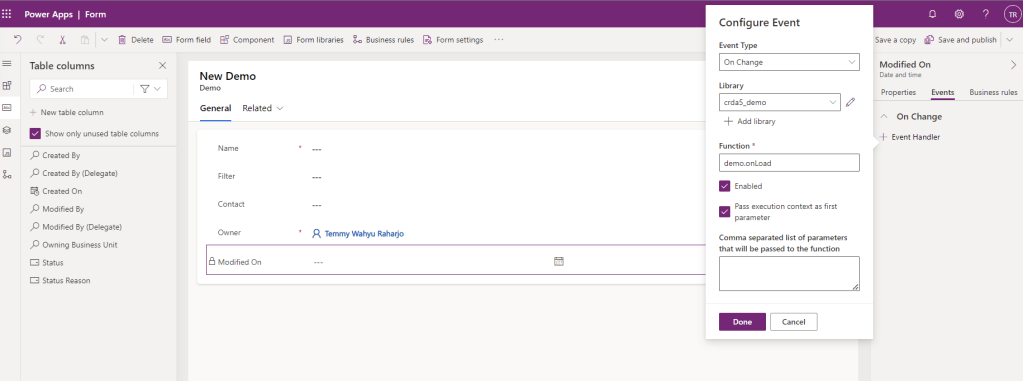
You also can hide this attribute if necessary. Then, the next step is to add a new event to call "demo.onLoad" when there are changes. The explanation for this is, once the backend is successfully saved, it will automatically change the value from the backend to the UI and call the event that we added just now.
Until this point, we can test the changes:
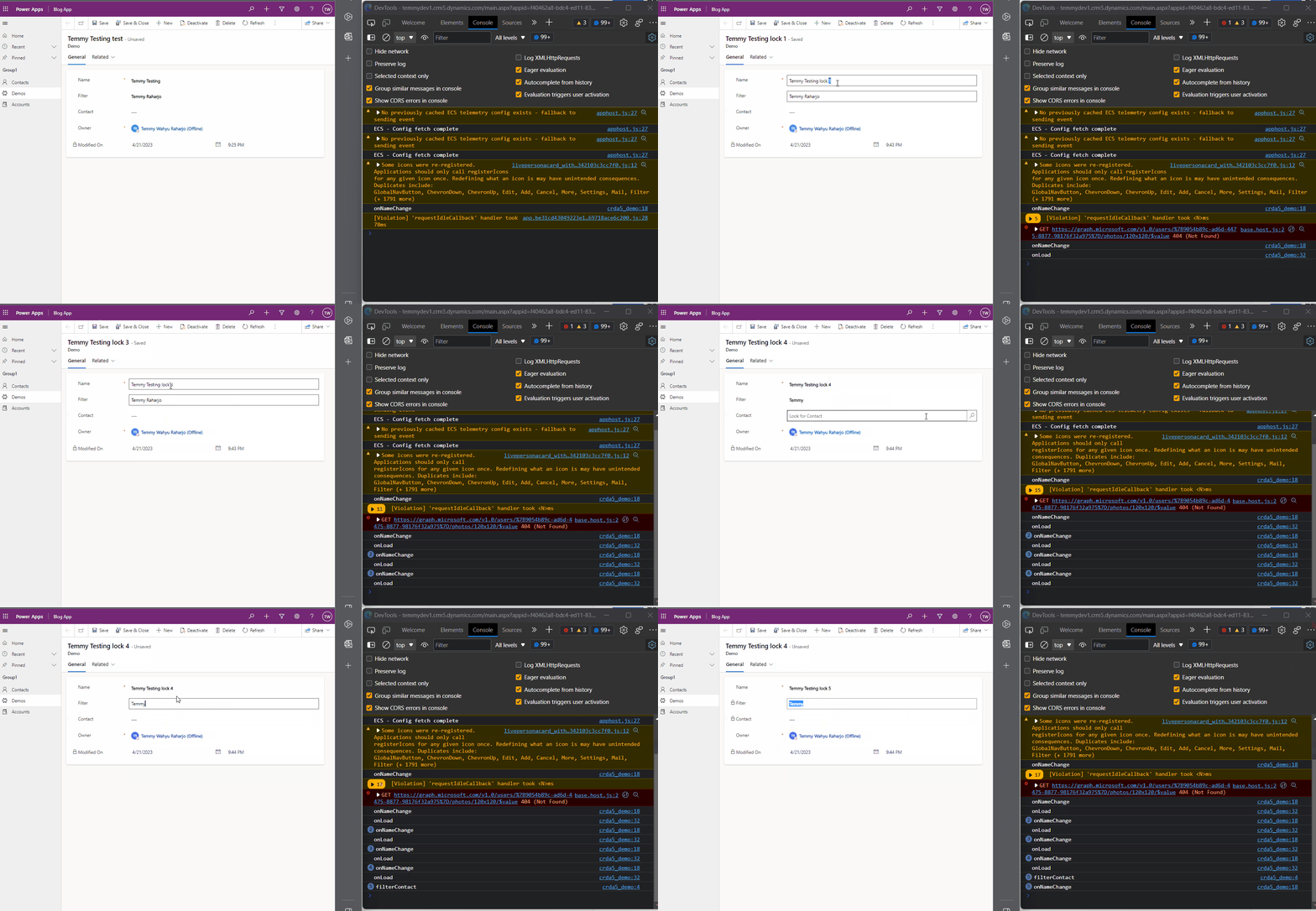
As you can see from the demo above, the event is called more than once (depending on how many times the demo.formOnLoad is called). That is why if you are using addOnChange, addPreSearch, or any other method that basically adds a function from the script. You must be careful with that. So for fixing the issue, you need to change your JavaScript like the below:
var demo = demo || {};
(function () {
    this.filterContact = function (executionContext) {
        console.log('filterContact');
        var formContext = executionContext.getFormContext();
        var filterText = formContext.getAttribute('tmy_filter').getValue();
        if (!filterText) return;
        var filter =
            `<filter type='or'>
                    <condition attribute='name' entityname='a_8ec46c45a4b643bbbbaeadd21efc6046' operator='like' value='%${filterText}%' />
                    <condition attribute='fullname' entityname='a_173992f383634b5bb00a53fb33d16e2c' operator='like' value='%${filterText}%' />
                </filter>`;
        formContext.getControl('tmy_contact').addCustomFilter(filter);
    };
    this.onNameChange = function (executionContext) {
        console.log('onNameChange');
        var formContext = executionContext.getFormContext();
        var value = formContext.getAttribute('tmy_name').getValue();
        if (!value) return;
        var disabled = value.indexOf('lock') > -1;
        formContext.getControl('tmy_filter').setDisabled(disabled);
        formContext.getControl('tmy_contact').setDisabled(disabled);
    };
    var load = false;
    this.onLoad = function (executionContext) {
        var formContext = executionContext.getFormContext();
        if (!load) {
            // Ensure only register 1 time
            formContext.getControl('tmy_contact').addPreSearch(demo.filterContact);
            formContext.getAttribute('tmy_name').addOnChange(demo.onNameChange);
            load = true;
        }
        console.log('onLoad');
        // Display purposes can run anytime
        formContext.getControl('tmy_filter').setDisabled(false);
        formContext.getControl('tmy_contact').setDisabled(false);
    };
}).apply(demo);
Once you save and published the changes. Here is the demo:
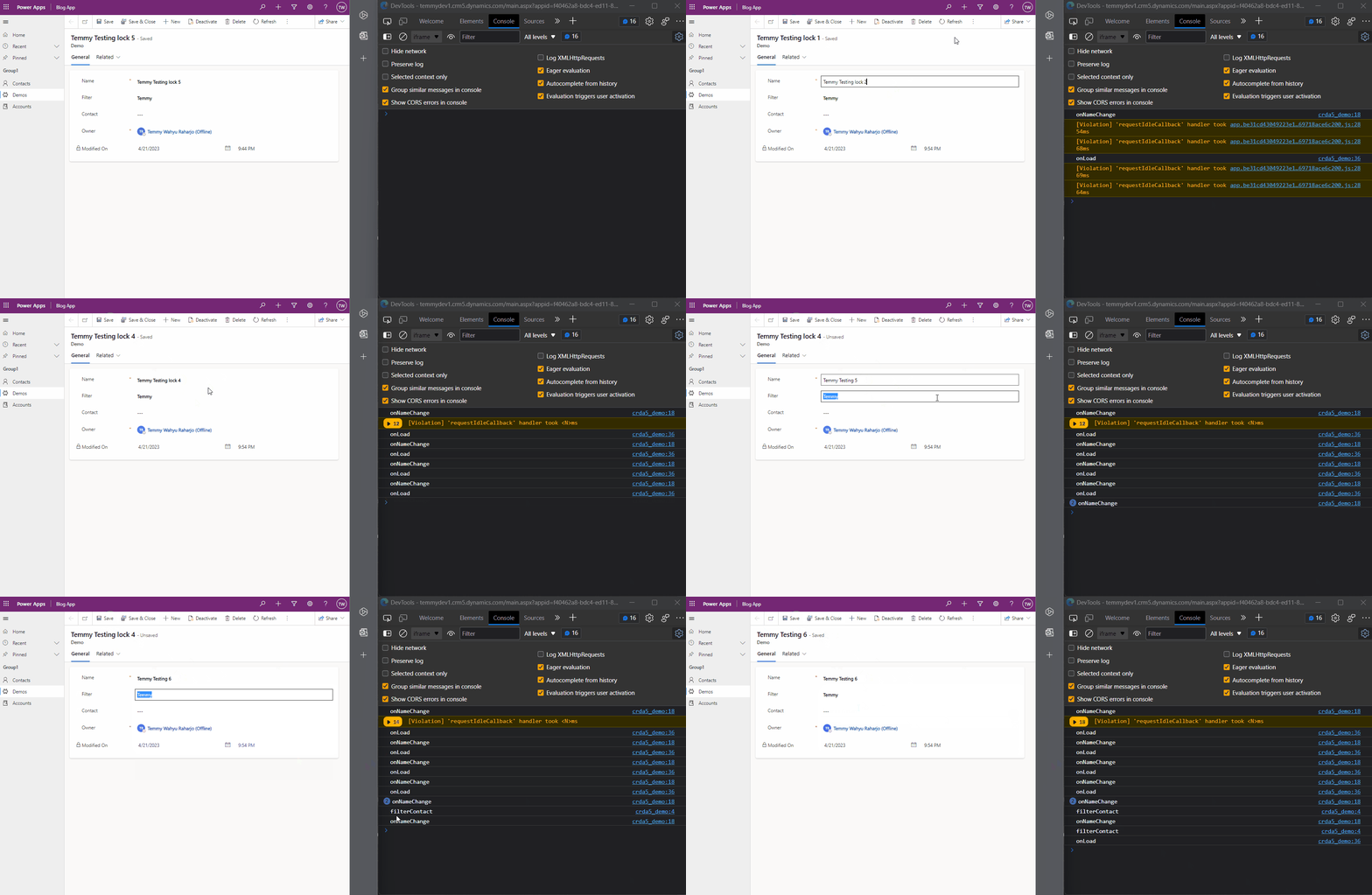
If you don't want to add the "Modified On" field to the form. We also can use the [addOnPostSave](https://learn.microsoft.com/en-us/power-apps/developer/model-driven-apps/clientapi/reference/formcontext-data-entity/addonpostsave?WT.mc_id=DX-MVP-5004571)method and it will work the same:
var demo = demo || {};
(function () {
    this.filterContact = function (executionContext) {
        console.log('filterContact');
        var formContext = executionContext.getFormContext();
        var filterText = formContext.getAttribute('tmy_filter').getValue();
        if (!filterText) return;
        var filter =
            `<filter type='or'>
                    <condition attribute='name' entityname='a_8ec46c45a4b643bbbbaeadd21efc6046' operator='like' value='%${filterText}%' />
                    <condition attribute='fullname' entityname='a_173992f383634b5bb00a53fb33d16e2c' operator='like' value='%${filterText}%' />
                </filter>`;
        formContext.getControl('tmy_contact').addCustomFilter(filter);
    };
    this.onNameChange = function (executionContext) {
        console.log('onNameChange');
        var formContext = executionContext.getFormContext();
        var value = formContext.getAttribute('tmy_name').getValue();
        if (!value) return;
        var disabled = value.indexOf('lock') > -1;
        formContext.getControl('tmy_filter').setDisabled(disabled);
        formContext.getControl('tmy_contact').setDisabled(disabled);
    };
    var load = false;
    this.onLoad = function (executionContext) {
        var formContext = executionContext.getFormContext();
        if (!load) {
            // Ensure only register 1 time
            formContext.getControl('tmy_contact').addPreSearch(demo.filterContact);
            formContext.getAttribute('tmy_name').addOnChange(demo.onNameChange);
            load = true;
            formContext.data.entity.addOnPostSave(demo.onLoad);
        }
        console.log('onLoad');
        // Display purposes can run anytime
        formContext.getControl('tmy_filter').setDisabled(false);
        formContext.getControl('tmy_contact').setDisabled(false);
    };
}).apply(demo);
Don't forget you need to disable the "Modified On" change event.
Summary
- You can call the onLoad event easily after data is successfully saved by assigning the event to "Modified On" Change.
- If you are using any method like addOnChange, addPreSearch, or any other method that accepts a function. You need to be careful and make sure only registered once.
- You also can use the addOnPostSavemethod as the alternative for #1. But you also still need to consider #2.
Happy CRM-ing!
Leave a comment
Your comment is sent privately to the author and isn't published on the site.