MDA: Testing JS changes without deploying
Our routine as Developers, if we get a new task/bug, is "change the code", "deploy", and "validate". For the front scripting, if we don't have the tool to help us update the necessary file easily, we need to open the JS component > update > deploy and publish > then go to the page that we want to test > reload the page and test the changes. There's nothing wrong with those steps. But we can easily verify our changes using the current browser feature.
For instance, I have below original code in one of my forms:
var demo = demo || {};
(function () {
    this.filterContact = function (executionContext) {
        console.log('filterContact');
        var formContext = executionContext.getFormContext();
        var filterText = formContext.getAttribute('tmy_filter').getValue();
        if (!filterText) return;
        var filter =
            `<filter type='or'>
                    <condition attribute='name' entityname='a_8ec46c45a4b643bbbbaeadd21efc6046' operator='like' value='%${filterText}%' />
                    <condition attribute='fullname' entityname='a_173992f383634b5bb00a53fb33d16e2c' operator='like' value='%${filterText}%' />
                </filter>`;
        formContext.getControl('tmy_contact').addCustomFilter(filter);
    };
    this.onNameChange = function (executionContext) {
        console.log('onNameChange');
        var formContext = executionContext.getFormContext();
        var value = formContext.getAttribute('tmy_name').getValue();
        if (!value) return;
        var disabled = value.indexOf('lock') > -1;
        formContext.getControl('tmy_filter').setDisabled(disabled);
        formContext.getControl('tmy_contact').setDisabled(disabled);
    };
    const InitialLoad = 1;
    this.onLoad = function (executionContext) {
        var isInitialLoad = executionContext.getEventArgs().getDataLoadState &&
            executionContext.getEventArgs().getDataLoadState() === InitialLoad;
        var formContext = executionContext.getFormContext();
        if (isInitialLoad) {
            // Ensure only register 1 time
            formContext.getControl('tmy_contact').addPreSearch(demo.filterContact);
            formContext.getAttribute('tmy_name').addOnChange(demo.onNameChange);
            formContext.data.entity.addOnPostSave(demo.onLoad);
        }
        console.log('onLoad');
        // Display purposes can run anytime
        formContext.getControl('tmy_filter').setDisabled(false);
        formContext.getControl('tmy_contact').setDisabled(false);
    };
}).apply(demo);
Let's say I want to add an additional feature on the preSearch function to exclude the filter if the "Name" got a "test" word. Here we can validate our changes, and deploy when everything is okay:
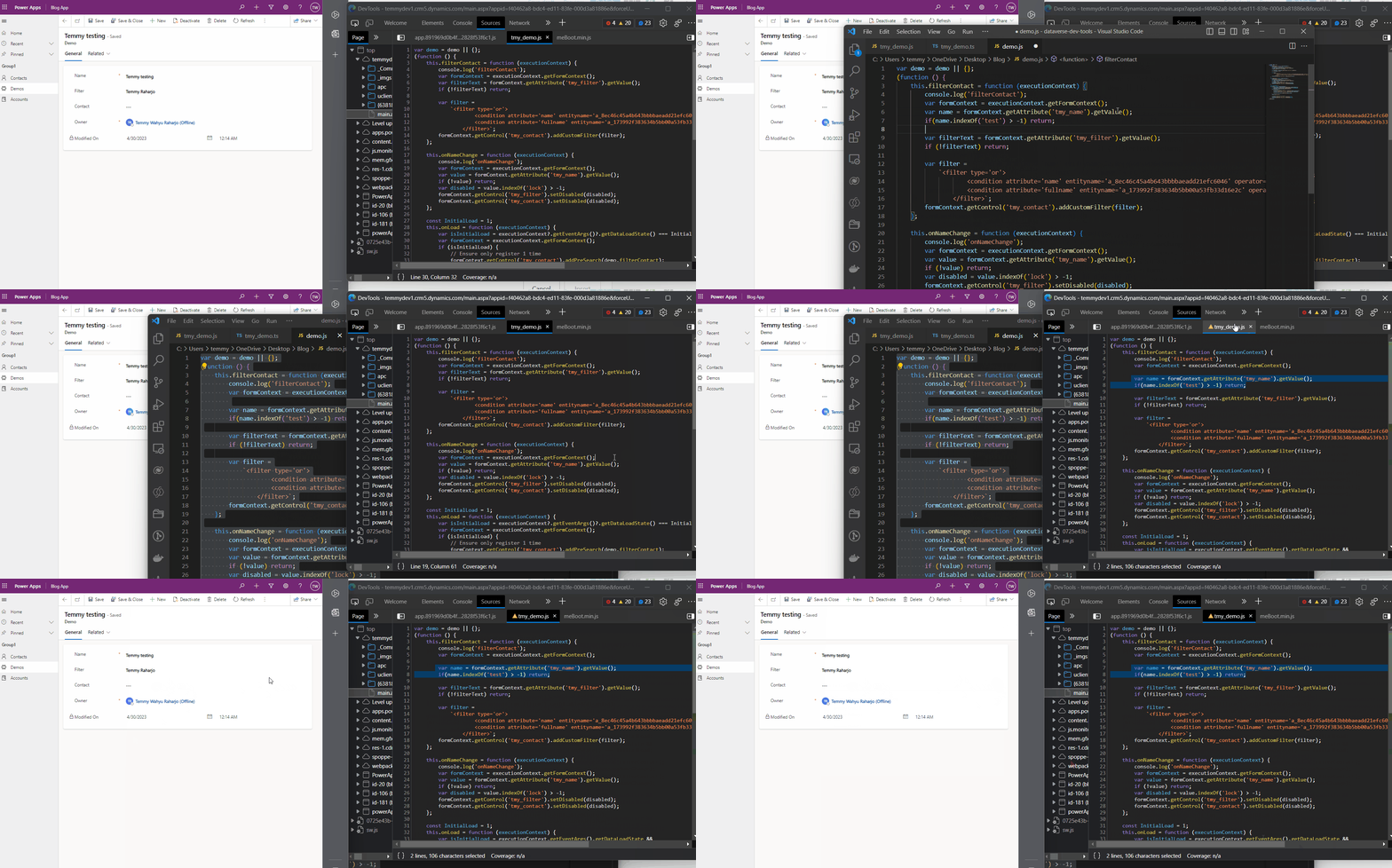
As you can see from the demo above. I did the changes from the VS Code > copy all the code > open the Developer Tools and find the JS that you want to update > ctrl + a and ctrl + v to replace the code > click ctrl + s to save the changes. The browser will lag for a bit until the changes can be tested.
But, if you want to test the onLoad event. We can't do it using our existing code as we need to refresh the page (once the page is refreshed, the JS will be restored to the server version). So for this scenario, we need to modify our JS:
var demo = demo || {};
var context;
(function () {
    this.filterContact = function (executionContext) {
        console.log('filterContact');
        var formContext = executionContext.getFormContext();
        var name = formContext.getAttribute('tmy_name').getValue();
        if(name.indexOf('test') > -1) return;
        var filterText = formContext.getAttribute('tmy_filter').getValue();
        if (!filterText) return;
        var filter =
            `<filter type='or'>
                    <condition attribute='name' entityname='a_8ec46c45a4b643bbbbaeadd21efc6046' operator='like' value='%${filterText}%' />
                    <condition attribute='fullname' entityname='a_173992f383634b5bb00a53fb33d16e2c' operator='like' value='%${filterText}%' />
                </filter>`;
        formContext.getControl('tmy_contact').addCustomFilter(filter);
    };
    this.onNameChange = function (executionContext) {
        console.log('onNameChange');
        var formContext = executionContext.getFormContext();
        var value = formContext.getAttribute('tmy_name').getValue();
        if (!value) return;
        var disabled = value.indexOf('lock') > -1;
        formContext.getControl('tmy_filter').setDisabled(disabled);
        formContext.getControl('tmy_contact').setDisabled(disabled);
    };
    const InitialLoad = 1;
    this.onLoad = function (executionContext) {
        context = executionContext;

        var isInitialLoad = executionContext.getEventArgs().getDataLoadState &&
            executionContext.getEventArgs().getDataLoadState() === InitialLoad;
        var formContext = executionContext.getFormContext();
        if (isInitialLoad) {
            // Ensure only register 1 time
            formContext.getControl('tmy_contact').addPreSearch(demo.filterContact);
            formContext.getAttribute('tmy_name').addOnChange(demo.onNameChange);
            formContext.data.entity.addOnPostSave(demo.onLoad);
        }
        console.log('onLoad');
        // Display purposes can run anytime
        formContext.getControl('tmy_filter').setDisabled(false);
        formContext.getControl('tmy_contact').setDisabled(false);
    };
}).apply(demo);
First, you need to deploy the above changes first (to make sure the "context" variable on line 35 will not be empty after the onLoad):
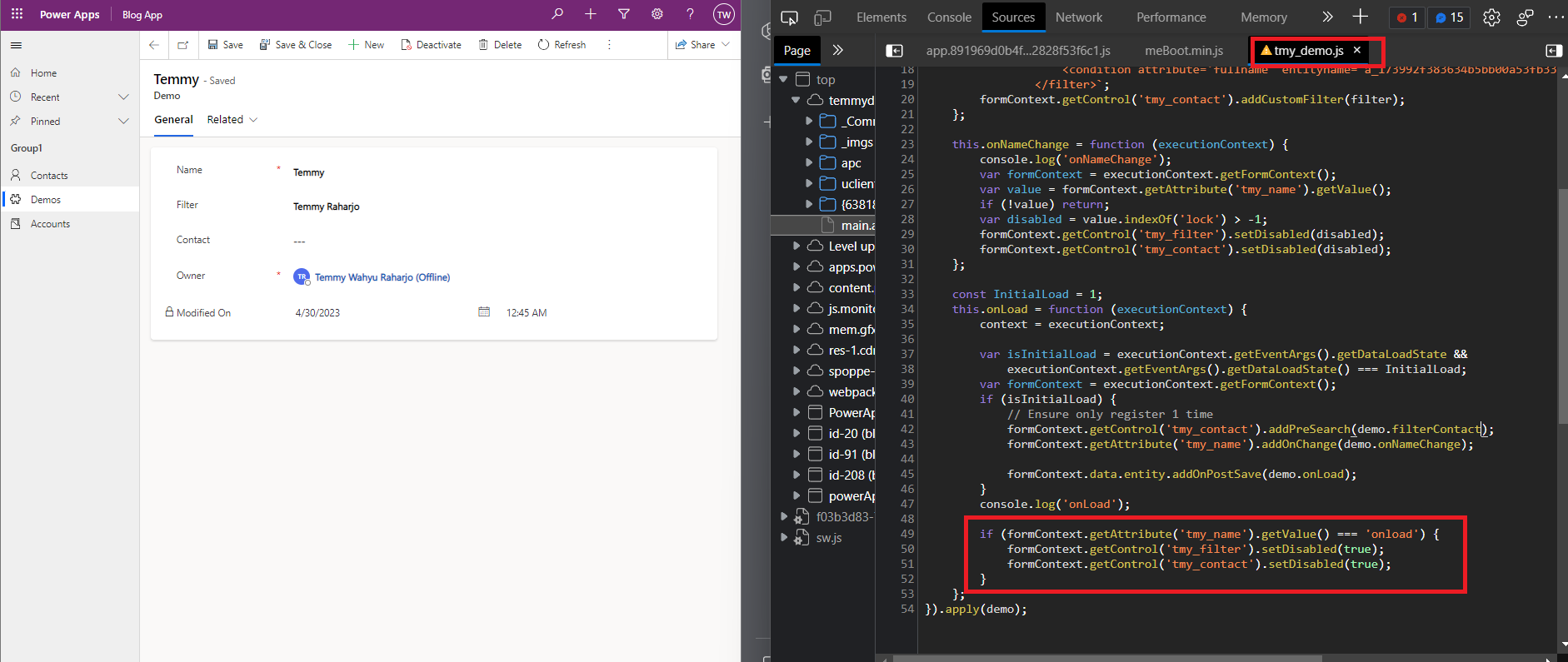
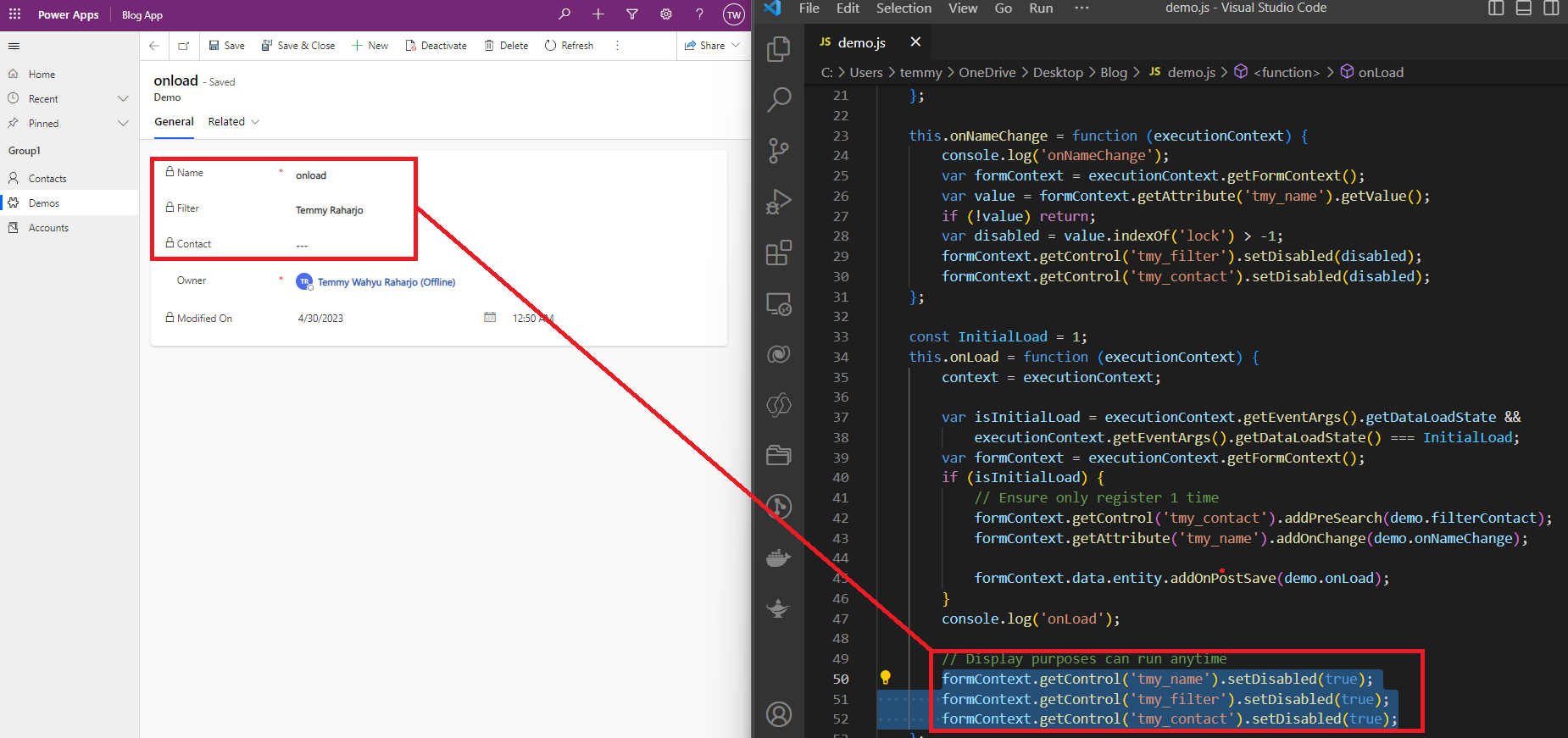
For example, I add new logic to the onLoad function if the "Name" = "onload", then I disabled those 2 attributes. So here is how we verify the changes:
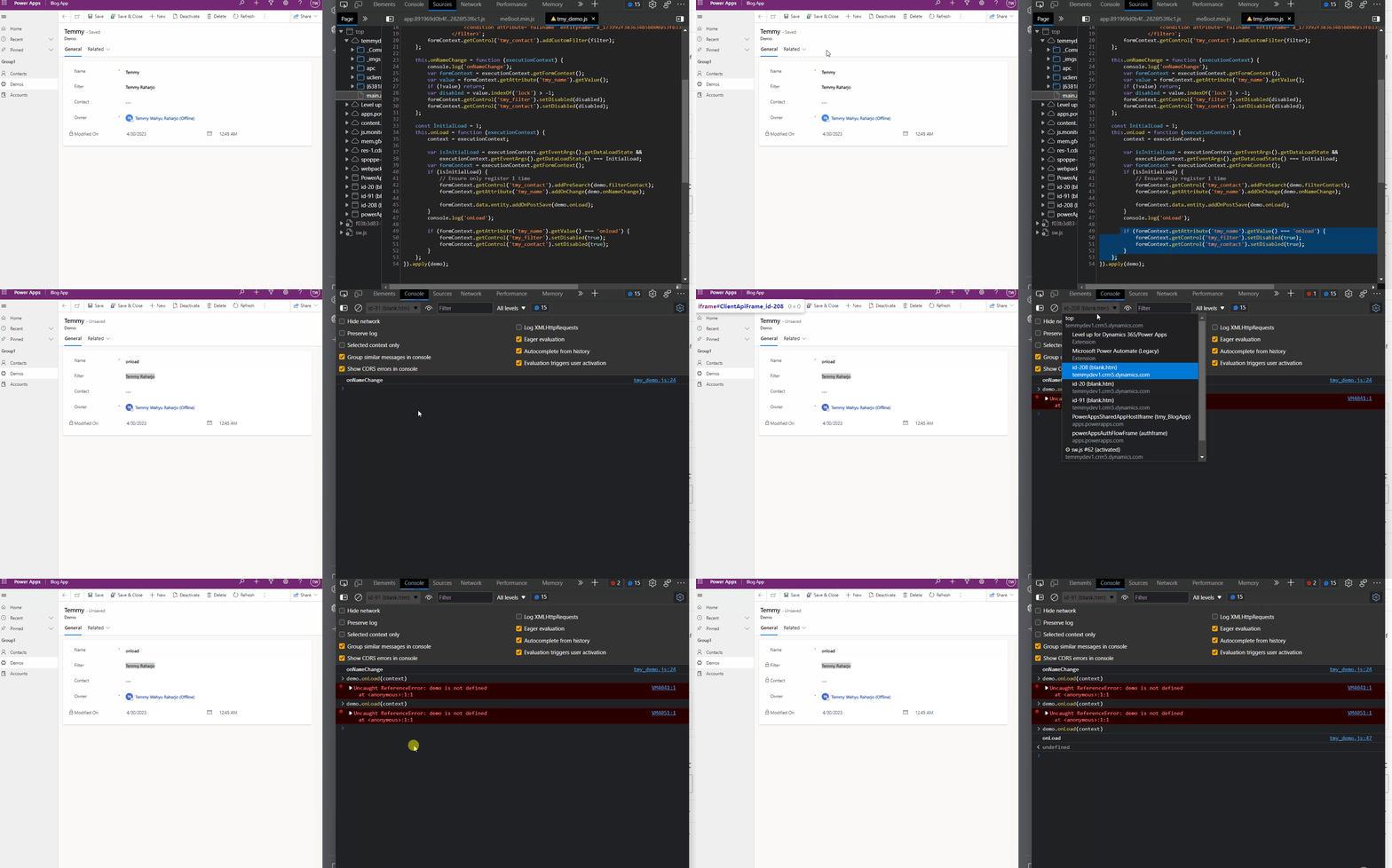
As you can see in the above demonstration, I need to change the frame one by one (Frame which starts with idxx) and execute the onLoad function.
In this way, hopefully, you can test the changes faster. And if you are already happy with the changes "locally", you can deploy the changes!
UPDATE 1 May 2023
After the seniors showed up and giving information in my LinkedIn post, I tried the tutorial from Benedikt Bergmann - Use Fiddler to serve a local version of Webresources. Originally, the idea that I want to implement is based on Microsoft documentation titled "Script web resource development using Fiddler AutoResponder" which I tried but not working.
Here is the rule that I added (replace if there's JS with URL path contains "/webresources/tmy_demo.js" to the local file that I have "..Desktop\Blog\demo.js":
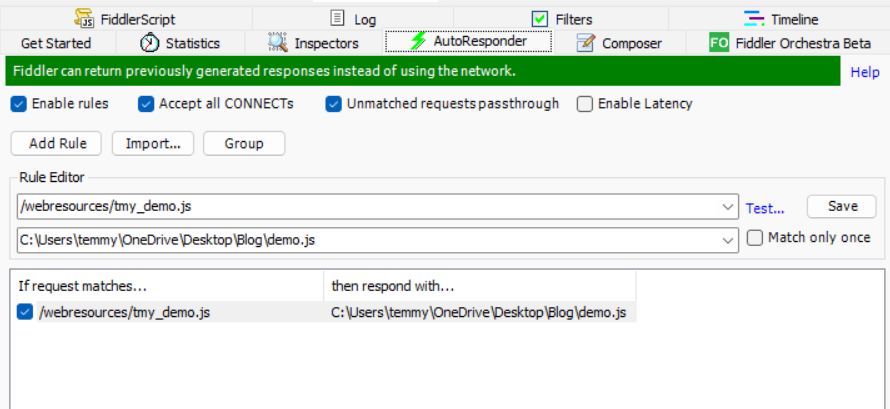
After reading Benedikt's blog post, I noticed that we can apply the filter to find:
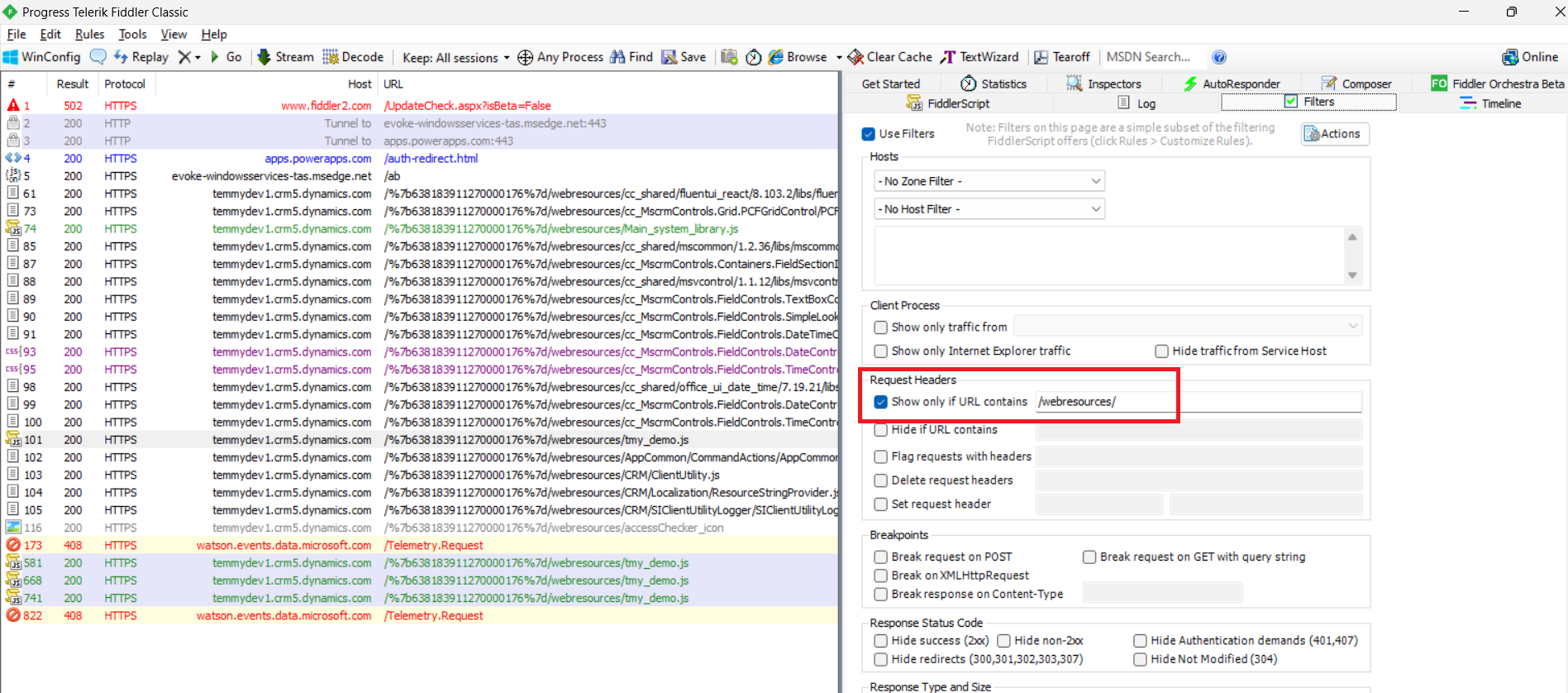
Once we added the Filter and set up the rule, the most important step that probably I missed is to RESTART THE FIDDLER!
Once we restart the Fiddler, reload the page and you can see the file replaced with your local version:
Happy CRM-ing!
Leave a comment
Your comment is sent privately to the author and isn't published on the site.