Dataverse: Retrieve data using TDS Endpoint in Plugin
We always love SQL4CDS by Mark Carrington. One of its features is using the TDS (Tabular Data Stream) Endpoint for reading data. On one of the cron jobs, I have a logic to aggregate the sum of the data. Although I was using SQL4CDS Engine to retrieve the data, I observed the query using RetrieveMultiple, the function ran for almost 1 hour for 1 million records met the conditions (after data being aggregated, it is only under 20 data). While, if I enabled the UseTDSEndpoint, it is done in under 10 seconds. By learning this, I was encouraged to implement this function in the plugin which opens lots of opportunities to cut down time to do complex queries. However, using SQL4CDS Engine was not possible as the NuGet packages were quite big (also has a dependency on Microsoft.CrmSdk.XrmTooling.CoreAssembly) and to be honest, I just need the TDS Endpoint part. So, here is how I implement the feature!
The Plugin
For the demo, I created a Dataverse Custom API where we will retrieve Contact by its ID using Service Principal credentials:
using Microsoft.Xrm.Sdk.Extensions;
using System;
using System.Collections.Generic;
using System.Data.SqlClient;
using System.Data;
using System.Net.Http;
using System.Text.Json;
using System.Reflection;
using System.Linq;

namespace BlogPackage
{
    public class SampleConnectTdsEndpointViaDataverse : PluginBase
    {
        public class Model
        {
            public string firstname { get; set; }
            public string lastname { get; set; }
        }

        public SampleConnectTdsEndpointViaDataverse(string unsecureConfiguration, string secureConfiguration)
            : base(typeof(SampleConnectTdsEndpointViaDataverse))
        {
        }

        protected override void ExecuteDataversePlugin(ILocalPluginContext localPluginContext)
        {
            if (localPluginContext == null)
            {
                throw new ArgumentNullException(nameof(localPluginContext));
            }

            var context = localPluginContext.PluginExecutionContext;

            var id = context.InputParameterOrDefault<string>("Id");

            var result = ToModels<Model>(GetData(id)).FirstOrDefault() ?? new Model();
            localPluginContext.PluginExecutionContext.OutputParameters["Result"] = JsonSerializer.Serialize(result);

        }

        private DataTable GetData(string id)
        {
            var sqlConn = "Server=your-crm-url.crm.dynamics.com;Database=your-crm-db;Encrypt=True;TrustServerCertificate=False;Persist Security Info=False";
            var token = GetAccessToken();
            using (var conn = new SqlConnection(sqlConn))
            {
                conn.AccessToken = token;
                conn.Open();

                var cmd = conn.CreateCommand();
                cmd.CommandText = $"SELECT * FROM contact WHERE contactId='{id}'";
                var reader = cmd.ExecuteReader();
                var dataTable = new DataTable();
                dataTable.Load(reader);
                conn.Close();

                return dataTable;
            }
        }

        public string GetAccessToken()
        {
            var client = new HttpClient();
            var request = new HttpRequestMessage(HttpMethod.Post, "https://login.microsoftonline.com/your-tenant-id/oauth2/token");
            var collection = new Dictionary<string, string>
            {
                ["grant_type"] = "client_credentials",
                ["client_id"] = "client-id",
                ["client_secret"] = "client-secret",
                ["resource"] = "https://your-crm-url.crm.dynamics.com"
            };
            var content = new FormUrlEncodedContent(collection);
            request.Content = content;
            var response = client.SendAsync(request).Result;
            response.EnsureSuccessStatusCode();
            var result = response.Content.ReadAsStringAsync().Result;

            return ExtractAccessToken(result);
        }

        public static IEnumerable<T> ToModels<T>(DataTable table) where T : new()
        {
            foreach (DataRow row in table.Rows)
            {
                T item = new T();
                foreach (DataColumn column in table.Columns)
                {
                    PropertyInfo prop = typeof(T).GetProperty(column.ColumnName);
                    if (prop != null && row[column] != DBNull.Value)
                    {
                        prop.SetValue(item, row[column]);
                    }
                }
                yield return item;
            }
        }

        public string ExtractAccessToken(string input)
        {
            var jsonDoc = JsonDocument.Parse(input);
            if (jsonDoc.RootElement.TryGetProperty("access_token", out JsonElement accessTokenElement))
            {
                return accessTokenElement.GetString();
            }
            else
            {
                throw new ArgumentException("Access token not found in the input string.");
            }
        }
    }
}
To use the TDS endpoint, we need to get the access token of the service principal user. Unfortunately, as we don't have access to the token, we need to get the access token by calling https://login.microsoftonline.com/ and passing the client_id, and client_secret (lines 62-80). Then, once we get the access_token, we can use this token for the next step.
Next, we need to create SqlConnectionby passing the sqlConn mentioned in line 45. Then, by using the access token we retrieved before, we can set the conn.AccessToken (line 48) and querying the db (lines 51-58). Once the data is retrieved, we have several options to use the data. In this sample code, I'm using DataTable and converting it into a custom class using the ToModels method (lines 82 - 97).
And, at last, just set the OutputParameters and we're done. After building it, you just need to update the plugin in the PRT! 😎
Create Custom API
Next, we need to create the Custom API (again, again, and again, I'm using Custom API Manager by David Rivard):
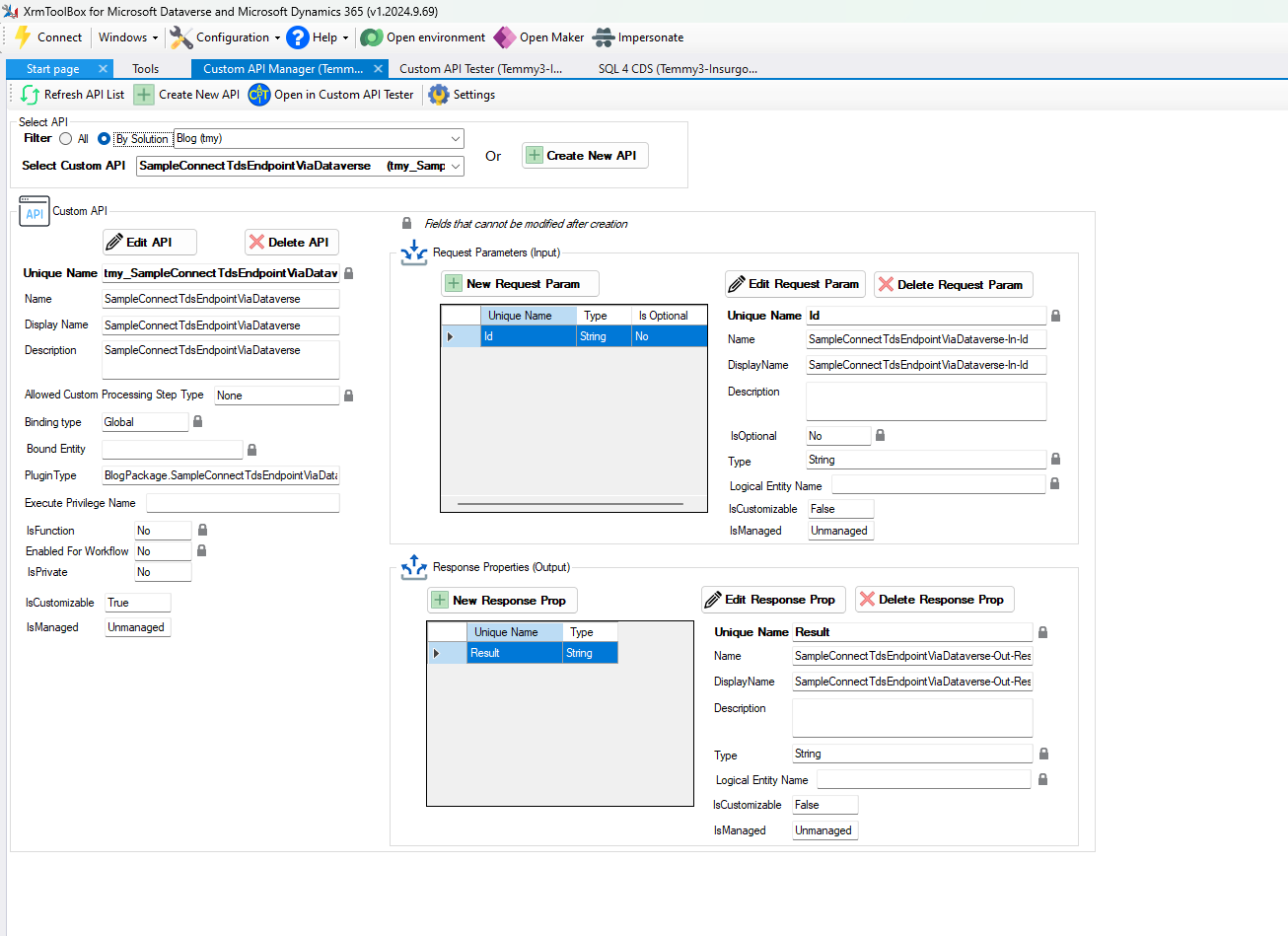
Register the Custom API
Demo Time
Once you have done all the above, you can use Custom API Tester by Jonas Rapp to test your API:
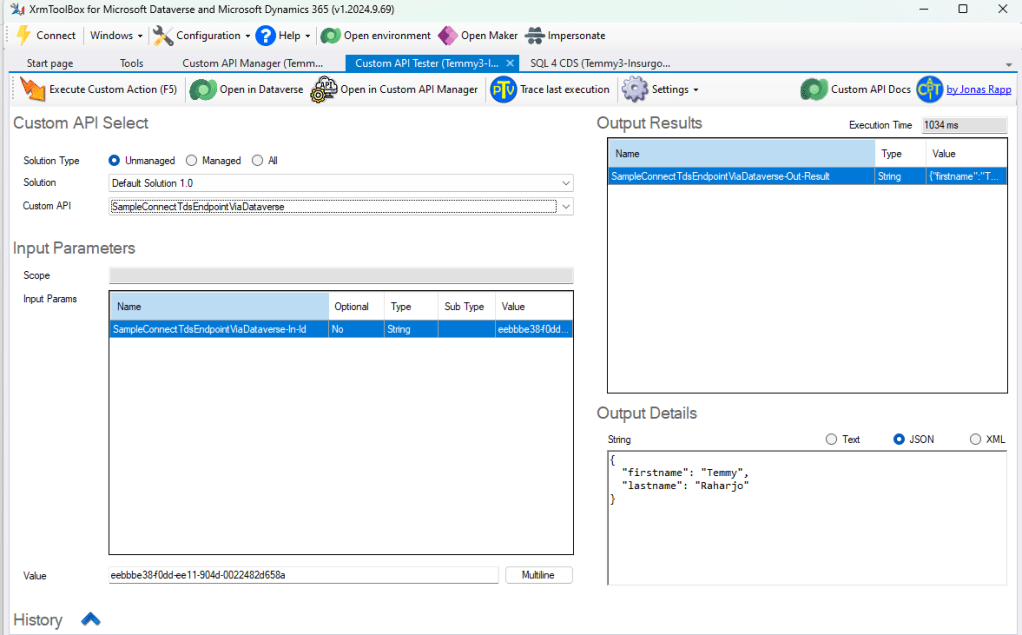
Result
Happy CRM-ing! 😎
Leave a comment
Your comment is sent privately to the author and isn't published on the site.