Dataverse: Get Azure Key Vault Secret from Plugin
I have an interesting question about how to get the Azure Key Vault Secret from the plugin. The official documentation about the RetrieveEnvironmentVariableSecretValueaction states that it can only be triggered from Power Automate Flow. The problem with this step is that it needs an extra license and is also quite slow. Today we will learn how to implement it (and PSST, we also need to go back to the old days - to learn how to merge assemblies as we have dependencies we Microsoft Azure-related NuGet Packages).
Azure Key Vault and Secret Setup
By the way, I don't have an account where I can set the Managed Identities (valid subscription for both Dataverse and Azure). For this demo, I created the Azure Key Vaults in another subscription.
In the below screenshot, this is my basic setup:
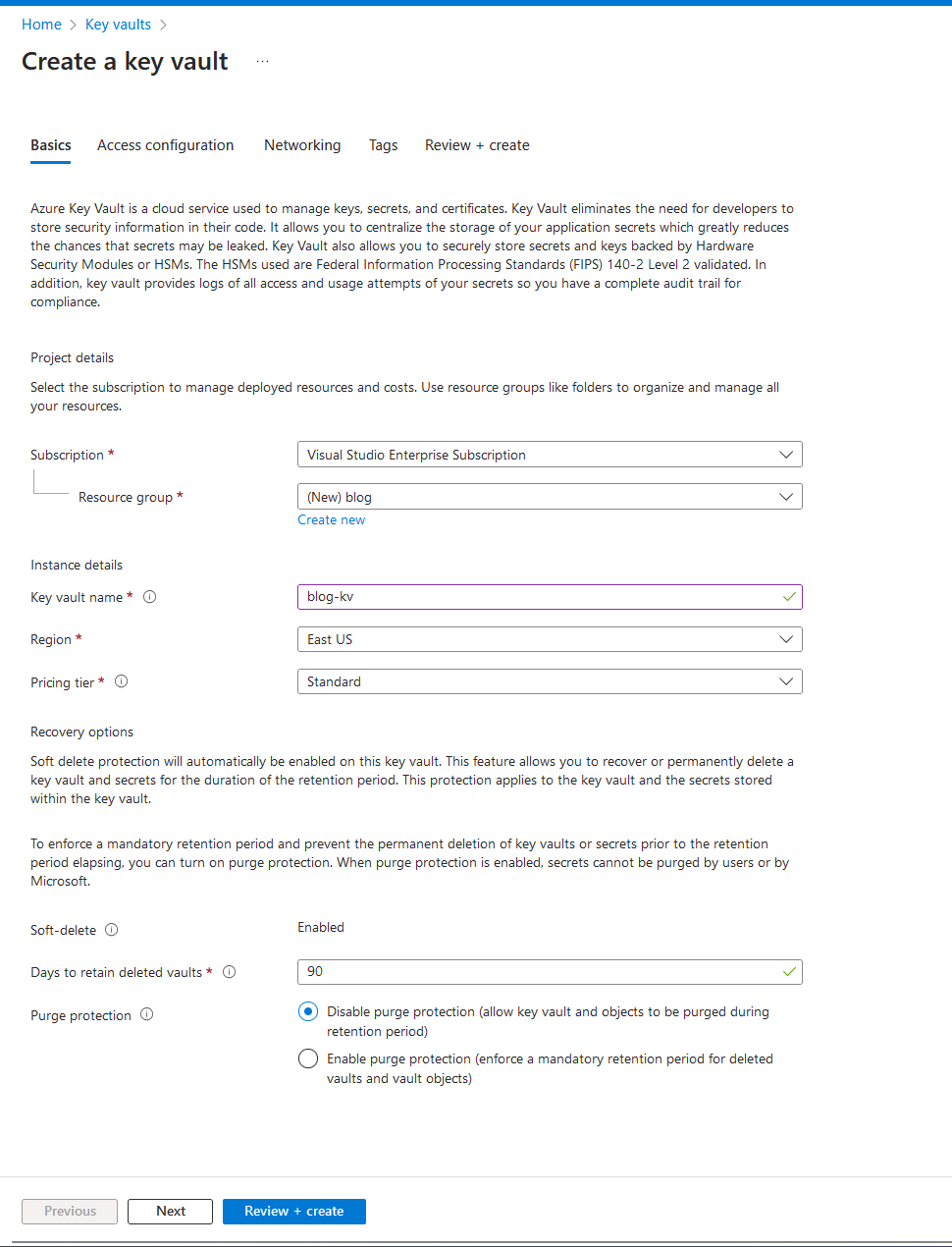
Created the Azure Key Vaults
Next, I set the Access configuration > use the template "Key & Secret Management":
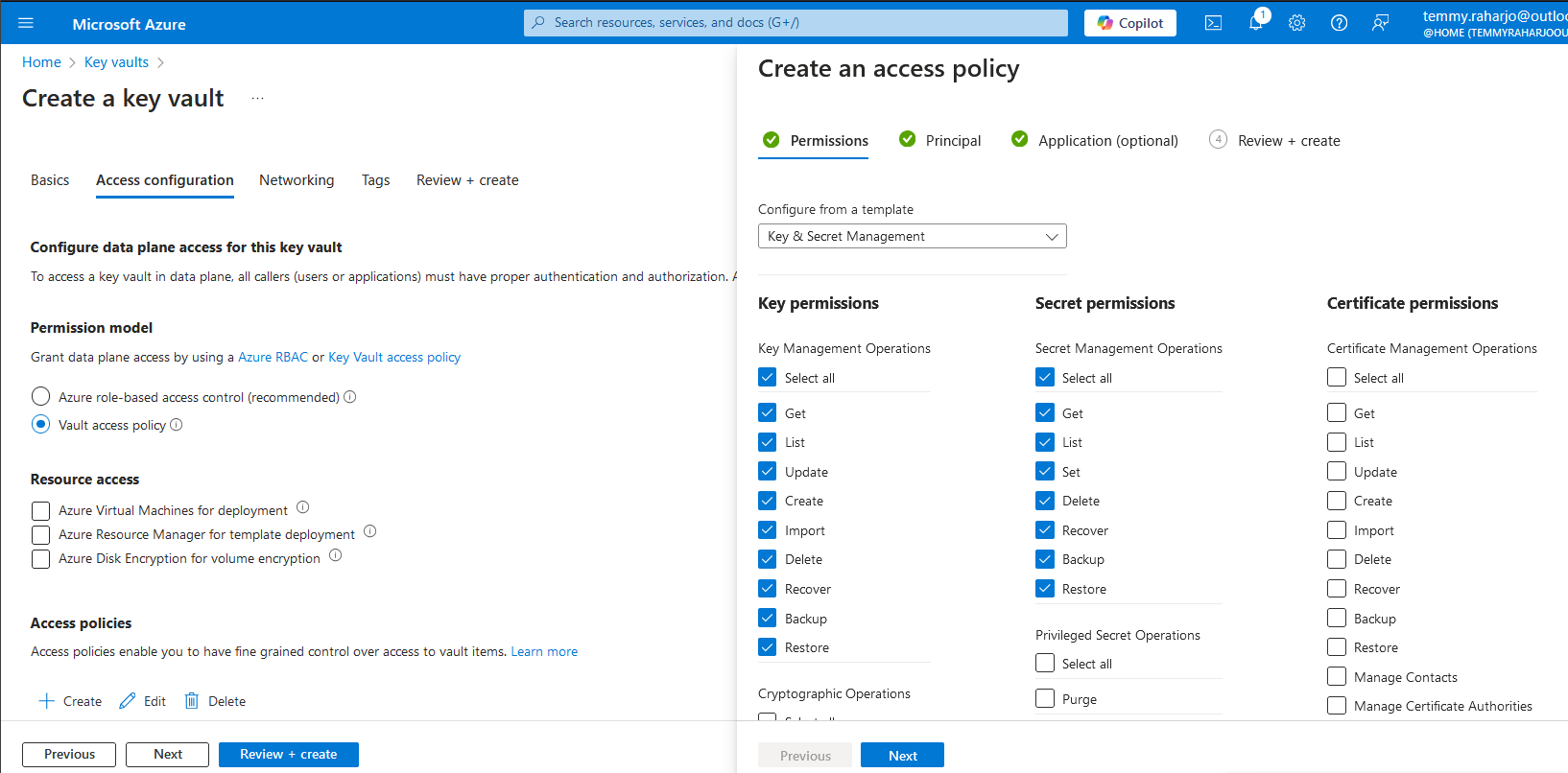
Create an access policy
Next, I select the App registration (Service Principal Blog App - if you are willing to use the same way with me, you need to take note of the Application ID, Tenant ID, and also Client Secret for a later step) to be able to access the Key Vault:
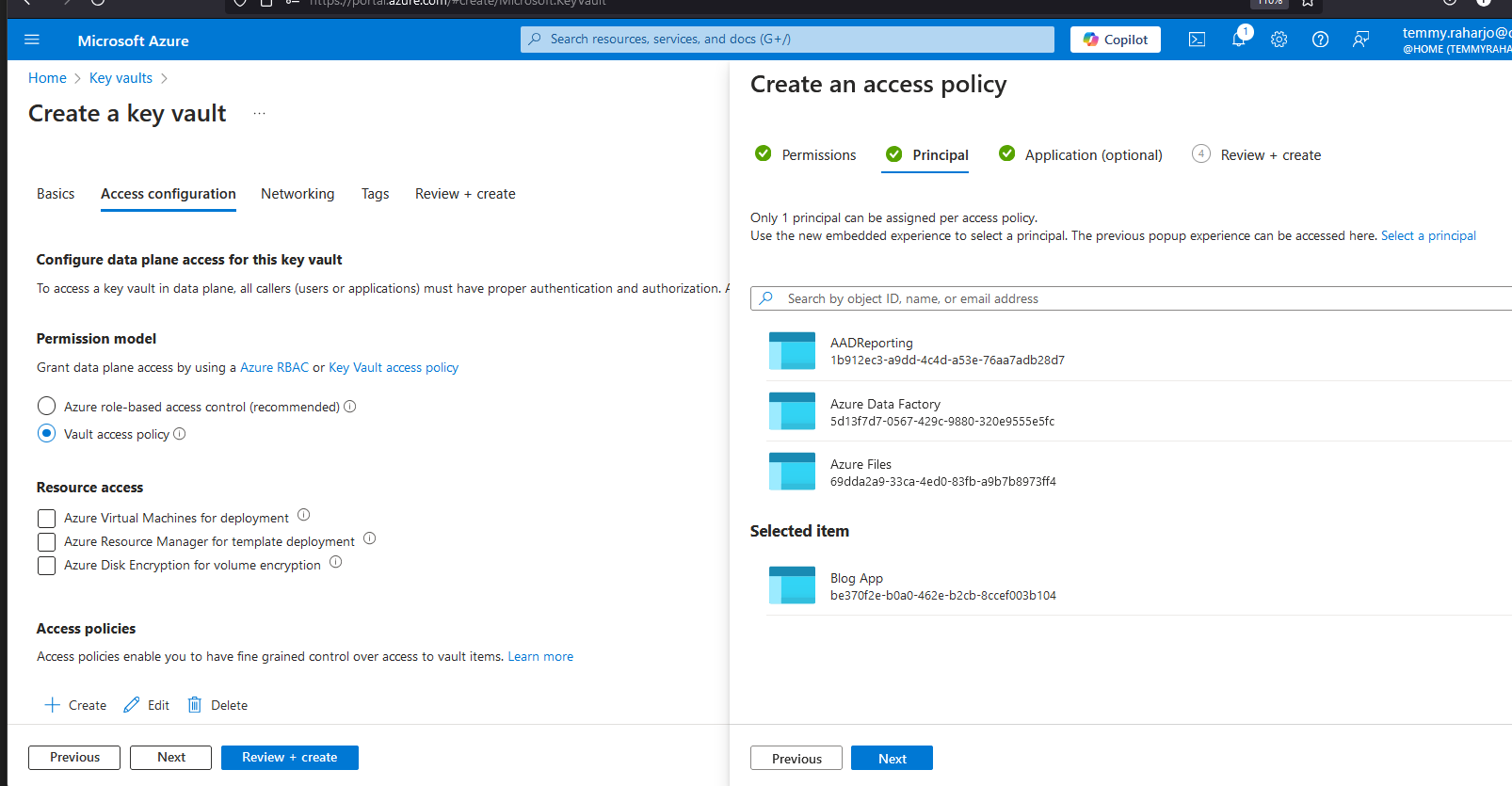
Select "Blog App" to be able to access the key vault
Once the resource is created > go to Overview > copy the Vault URI > this will be used in the code. Next, you can go to Secrets > Generate/Import > put the Name and the secret that you need:
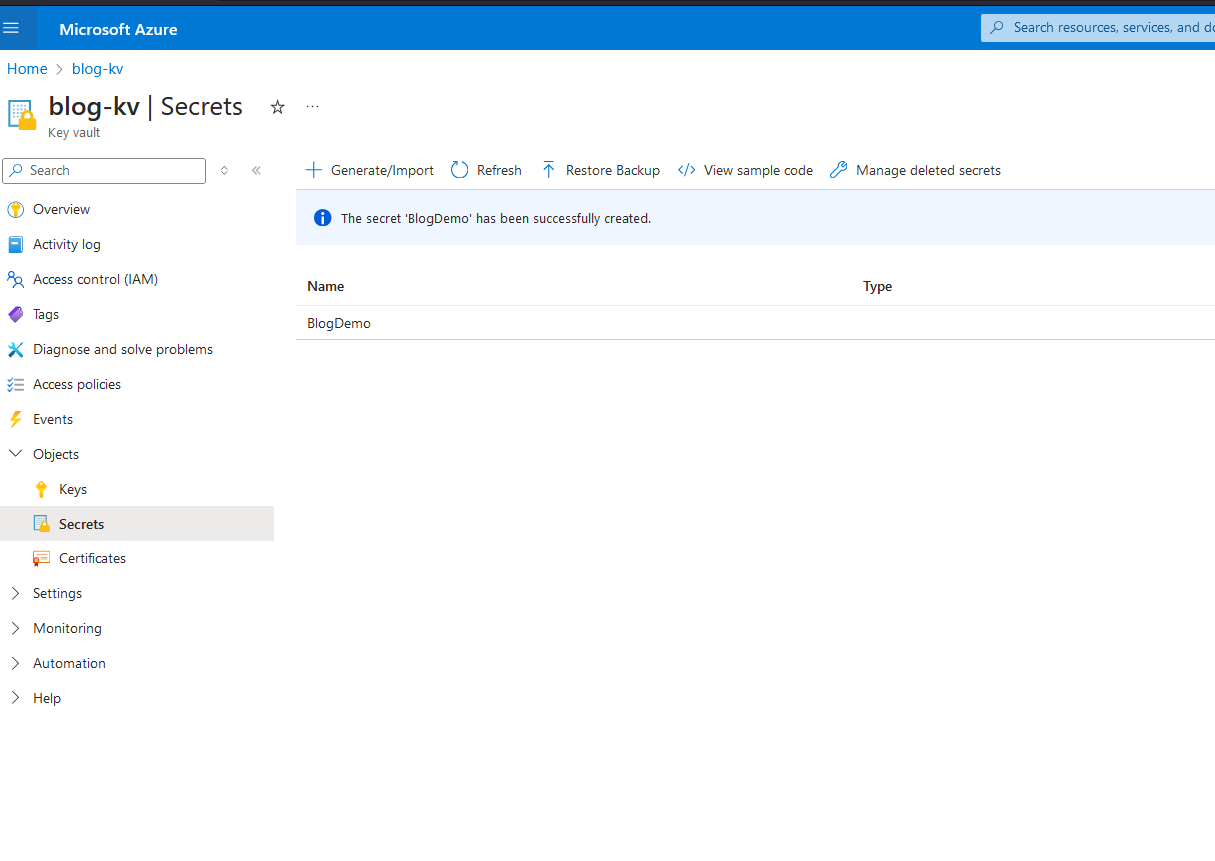
Generate Secret
Create the Plugin
As mentioned before, I need to create the plugin from scratch. So, I open the Visual Studio > Create new Project > Class Library (.NET Framework) > select .NET Framework 4.6.2 (don't forget to sign the plugin also 🤣). Then, we need to install all the below NuGet packages:
Microsoft.CrmSdk.CoreAssemblies
Azure.Identity
Azure.Security.KeyVault.Secrets
ILRepack
Next, we will create a Dataverse Custom API to get the Azure Key Vault Secret by the name. Here is the code:
using Azure.Security.KeyVault.Secrets;
using Microsoft.Xrm.Sdk.Extensions;
using System;
using System.Diagnostics;

namespace DataverseMergePlugins
{
    public class GetAzureKeyVault : PluginBase
    {
        public GetAzureKeyVault() : base(typeof(GetAzureKeyVault))
        {
        }

        override protected void ExecuteDataversePlugin(ILocalPluginContext localPluginContext)
        {
            var stopWatch = new Stopwatch();
            stopWatch.Start();
            var secretName = localPluginContext.PluginExecutionContext.InputParameterOrDefault<string>("SecretName");
            if (string.IsNullOrEmpty(secretName)) throw new ArgumentNullException("SecretName");

            // I believe this is the way to use Managed Identity. 😁
            // var tokenCredential = new Azure.Identity.ManagedIdentityCredential();

            // This will login using Service Principal
            var tokenCredential = new Azure.Identity.ClientSecretCredential("tenant-id",
                "client-id", "client-secret");

            var client = new SecretClient(new Uri("https://your-uri.vault.azure.net/"), tokenCredential);

            var secret = client.GetSecret(secretName);

            stopWatch.Stop();

            localPluginContext.PluginExecutionContext.OutputParameters["SecretValue"] = $"Get Secret: {secret.Value.Value}. Total Milliseconds: {stopWatch.ElapsedMilliseconds}";

        }
    }
}
The logic is easy to understand: we need to log in to the Key Vault with the user > and get the secret.
The hardest part is to merge the assemblies. You need to open your *.csproj and set the below-highlighted lines to merge the assemblies (you can inspect the version and also the necessary DLLs):
<?xml version="1.0" encoding="utf-8"?>
<Project ToolsVersion="15.0" xmlns="http://schemas.microsoft.com/developer/msbuild/2003">
  <Import Project="..\packages\ILRepack.2.0.35\build\ILRepack.props" Condition="Exists('..\packages\ILRepack.2.0.35\build\ILRepack.props')" />
  <Import Project="$(MSBuildExtensionsPath)\$(MSBuildToolsVersion)\Microsoft.Common.props" Condition="Exists('$(MSBuildExtensionsPath)\$(MSBuildToolsVersion)\Microsoft.Common.props')" />
  <PropertyGroup>
    <Configuration Condition=" '$(Configuration)' == '' ">Debug</Configuration>
    <Platform Condition=" '$(Platform)' == '' ">AnyCPU</Platform>
    <ProjectGuid>{17E06344-35FD-4411-8B46-CE78F37D7F01}</ProjectGuid>
    <OutputType>Library</OutputType>
    <AppDesignerFolder>Properties</AppDesignerFolder>
    <RootNamespace>DataverseMergePlugins</RootNamespace>
    <AssemblyName>DataverseMergePlugins</AssemblyName>
    <TargetFrameworkVersion>v4.6.2</TargetFrameworkVersion>
    <FileAlignment>512</FileAlignment>
    <Deterministic>true</Deterministic>
    <NuGetPackageImportStamp>
    </NuGetPackageImportStamp>
  </PropertyGroup>
  <PropertyGroup Condition=" '$(Configuration)|$(Platform)' == 'Debug|AnyCPU' ">
    <DebugSymbols>true</DebugSymbols>
    <DebugType>full</DebugType>
    <Optimize>false</Optimize>
    <OutputPath>bin\Debug\</OutputPath>
    <DefineConstants>DEBUG;TRACE</DefineConstants>
    <ErrorReport>prompt</ErrorReport>
    <WarningLevel>4</WarningLevel>
  </PropertyGroup>
  <PropertyGroup Condition=" '$(Configuration)|$(Platform)' == 'Release|AnyCPU' ">
    <DebugType>pdbonly</DebugType>
    <Optimize>true</Optimize>
    <OutputPath>bin\Release\</OutputPath>
    <DefineConstants>TRACE</DefineConstants>
    <ErrorReport>prompt</ErrorReport>
    <WarningLevel>4</WarningLevel>
  </PropertyGroup>
  <PropertyGroup>
    <SignAssembly>true</SignAssembly>
  </PropertyGroup>
  <PropertyGroup>
    <AssemblyOriginatorKeyFile>key.snk</AssemblyOriginatorKeyFile>
  </PropertyGroup>
  <ItemGroup>
    <Reference Include="Azure.Core, Version=1.44.1.0, Culture=neutral, PublicKeyToken=92742159e12e44c8, processorArchitecture=MSIL">
      <HintPath>..\packages\Azure.Core.1.44.1\lib\net461\Azure.Core.dll</HintPath>
    </Reference>
    <Reference Include="Azure.Identity, Version=1.13.0.0, Culture=neutral, PublicKeyToken=92742159e12e44c8, processorArchitecture=MSIL">
      <HintPath>..\packages\Azure.Identity.1.13.0\lib\netstandard2.0\Azure.Identity.dll</HintPath>
    </Reference>
    <Reference Include="Azure.Security.KeyVault.Secrets, Version=4.7.0.0, Culture=neutral, PublicKeyToken=92742159e12e44c8, processorArchitecture=MSIL">
      <HintPath>..\packages\Azure.Security.KeyVault.Secrets.4.7.0\lib\netstandard2.0\Azure.Security.KeyVault.Secrets.dll</HintPath>
    </Reference>
    <Reference Include="Microsoft.Bcl.AsyncInterfaces, Version=8.0.0.0, Culture=neutral, PublicKeyToken=cc7b13ffcd2ddd51, processorArchitecture=MSIL">
      <HintPath>..\packages\Microsoft.Bcl.AsyncInterfaces.8.0.0\lib\net462\Microsoft.Bcl.AsyncInterfaces.dll</HintPath>
    </Reference>
    <Reference Include="Microsoft.Crm.Sdk.Proxy, Version=9.0.0.0, Culture=neutral, PublicKeyToken=31bf3856ad364e35, processorArchitecture=MSIL">
      <HintPath>..\packages\Microsoft.CrmSdk.CoreAssemblies.9.0.2.56\lib\net462\Microsoft.Crm.Sdk.Proxy.dll</HintPath>
    </Reference>
    <Reference Include="Microsoft.Identity.Client, Version=4.65.0.0, Culture=neutral, PublicKeyToken=0a613f4dd989e8ae, processorArchitecture=MSIL">
      <HintPath>..\packages\Microsoft.Identity.Client.4.65.0\lib\net462\Microsoft.Identity.Client.dll</HintPath>
    </Reference>
    <Reference Include="Microsoft.Identity.Client.Extensions.Msal, Version=4.65.0.0, Culture=neutral, PublicKeyToken=0a613f4dd989e8ae, processorArchitecture=MSIL">
      <HintPath>..\packages\Microsoft.Identity.Client.Extensions.Msal.4.65.0\lib\netstandard2.0\Microsoft.Identity.Client.Extensions.Msal.dll</HintPath>
    </Reference>
    <Reference Include="Microsoft.IdentityModel.Abstractions, Version=6.35.0.0, Culture=neutral, PublicKeyToken=31bf3856ad364e35, processorArchitecture=MSIL">
      <HintPath>..\packages\Microsoft.IdentityModel.Abstractions.6.35.0\lib\net462\Microsoft.IdentityModel.Abstractions.dll</HintPath>
    </Reference>
    <Reference Include="Microsoft.Xrm.Sdk, Version=9.0.0.0, Culture=neutral, PublicKeyToken=31bf3856ad364e35, processorArchitecture=MSIL">
      <HintPath>..\packages\Microsoft.CrmSdk.CoreAssemblies.9.0.2.56\lib\net462\Microsoft.Xrm.Sdk.dll</HintPath>
    </Reference>
    <Reference Include="System" />
    <Reference Include="System.Buffers, Version=4.0.3.0, Culture=neutral, PublicKeyToken=cc7b13ffcd2ddd51, processorArchitecture=MSIL">
      <HintPath>..\packages\System.Buffers.4.5.1\lib\net461\System.Buffers.dll</HintPath>
    </Reference>
    <Reference Include="System.ClientModel, Version=1.1.0.0, Culture=neutral, PublicKeyToken=92742159e12e44c8, processorArchitecture=MSIL">
      <HintPath>..\packages\System.ClientModel.1.1.0\lib\netstandard2.0\System.ClientModel.dll</HintPath>
    </Reference>
    <Reference Include="System.Core" />
    <Reference Include="System.Diagnostics.DiagnosticSource, Version=6.0.0.1, Culture=neutral, PublicKeyToken=cc7b13ffcd2ddd51, processorArchitecture=MSIL">
      <HintPath>..\packages\System.Diagnostics.DiagnosticSource.6.0.1\lib\net461\System.Diagnostics.DiagnosticSource.dll</HintPath>
    </Reference>
    <Reference Include="System.DirectoryServices" />
    <Reference Include="System.DirectoryServices.AccountManagement" />
    <Reference Include="System.Drawing" />
    <Reference Include="System.IdentityModel" />
    <Reference Include="System.IO.FileSystem.AccessControl, Version=5.0.0.0, Culture=neutral, PublicKeyToken=b03f5f7f11d50a3a, processorArchitecture=MSIL">
      <HintPath>..\packages\System.IO.FileSystem.AccessControl.5.0.0\lib\net461\System.IO.FileSystem.AccessControl.dll</HintPath>
    </Reference>
    <Reference Include="System.Memory, Version=4.0.1.2, Culture=neutral, PublicKeyToken=cc7b13ffcd2ddd51, processorArchitecture=MSIL">
      <HintPath>..\packages\System.Memory.4.5.5\lib\net461\System.Memory.dll</HintPath>
    </Reference>
    <Reference Include="System.Memory.Data, Version=6.0.0.0, Culture=neutral, PublicKeyToken=cc7b13ffcd2ddd51, processorArchitecture=MSIL">
      <HintPath>..\packages\System.Memory.Data.6.0.0\lib\net461\System.Memory.Data.dll</HintPath>
    </Reference>
    <Reference Include="System.Net.Http, Version=4.1.1.3, Culture=neutral, PublicKeyToken=b03f5f7f11d50a3a, processorArchitecture=MSIL">
      <HintPath>..\packages\System.Net.Http.4.3.4\lib\net46\System.Net.Http.dll</HintPath>
    </Reference>
    <Reference Include="System.Numerics" />
    <Reference Include="System.Numerics.Vectors, Version=4.1.4.0, Culture=neutral, PublicKeyToken=b03f5f7f11d50a3a, processorArchitecture=MSIL">
      <HintPath>..\packages\System.Numerics.Vectors.4.5.0\lib\net46\System.Numerics.Vectors.dll</HintPath>
    </Reference>
    <Reference Include="System.Runtime.CompilerServices.Unsafe, Version=6.0.0.0, Culture=neutral, PublicKeyToken=b03f5f7f11d50a3a, processorArchitecture=MSIL">
      <HintPath>..\packages\System.Runtime.CompilerServices.Unsafe.6.0.0\lib\net461\System.Runtime.CompilerServices.Unsafe.dll</HintPath>
    </Reference>
    <Reference Include="System.Runtime.InteropServices.RuntimeInformation, Version=4.0.1.0, Culture=neutral, PublicKeyToken=b03f5f7f11d50a3a, processorArchitecture=MSIL">
      <HintPath>..\packages\System.Runtime.InteropServices.RuntimeInformation.4.3.0\lib\net45\System.Runtime.InteropServices.RuntimeInformation.dll</HintPath>
    </Reference>
    <Reference Include="System.Runtime.Serialization" />
    <Reference Include="System.Security" />
    <Reference Include="System.Security.AccessControl, Version=5.0.0.0, Culture=neutral, PublicKeyToken=b03f5f7f11d50a3a, processorArchitecture=MSIL">
      <HintPath>..\packages\System.Security.AccessControl.5.0.0\lib\net461\System.Security.AccessControl.dll</HintPath>
    </Reference>
    <Reference Include="System.Security.Cryptography.Algorithms, Version=4.1.0.0, Culture=neutral, PublicKeyToken=b03f5f7f11d50a3a, processorArchitecture=MSIL">
      <HintPath>..\packages\System.Security.Cryptography.Algorithms.4.3.0\lib\net461\System.Security.Cryptography.Algorithms.dll</HintPath>
    </Reference>
    <Reference Include="System.Security.Cryptography.Encoding, Version=4.0.1.0, Culture=neutral, PublicKeyToken=b03f5f7f11d50a3a, processorArchitecture=MSIL">
      <HintPath>..\packages\System.Security.Cryptography.Encoding.4.3.0\lib\net46\System.Security.Cryptography.Encoding.dll</HintPath>
    </Reference>
    <Reference Include="System.Security.Cryptography.Primitives, Version=4.0.1.0, Culture=neutral, PublicKeyToken=b03f5f7f11d50a3a, processorArchitecture=MSIL">
      <HintPath>..\packages\System.Security.Cryptography.Primitives.4.3.0\lib\net46\System.Security.Cryptography.Primitives.dll</HintPath>
    </Reference>
    <Reference Include="System.Security.Cryptography.ProtectedData, Version=4.0.3.0, Culture=neutral, PublicKeyToken=b03f5f7f11d50a3a, processorArchitecture=MSIL">
      <HintPath>..\packages\System.Security.Cryptography.ProtectedData.4.5.0\lib\net461\System.Security.Cryptography.ProtectedData.dll</HintPath>
    </Reference>
    <Reference Include="System.Security.Cryptography.X509Certificates, Version=4.1.1.0, Culture=neutral, PublicKeyToken=b03f5f7f11d50a3a, processorArchitecture=MSIL">
      <HintPath>..\packages\System.Security.Cryptography.X509Certificates.4.3.0\lib\net461\System.Security.Cryptography.X509Certificates.dll</HintPath>
    </Reference>
    <Reference Include="System.Security.Principal.Windows, Version=5.0.0.0, Culture=neutral, PublicKeyToken=b03f5f7f11d50a3a, processorArchitecture=MSIL">
      <HintPath>..\packages\System.Security.Principal.Windows.5.0.0\lib\net461\System.Security.Principal.Windows.dll</HintPath>
    </Reference>
    <Reference Include="System.ServiceModel" />
    <Reference Include="System.ServiceModel.Http, Version=4.10.3.0, Culture=neutral, PublicKeyToken=b03f5f7f11d50a3a, processorArchitecture=MSIL">
      <HintPath>..\packages\System.ServiceModel.Http.4.10.3\lib\net461\System.ServiceModel.Http.dll</HintPath>
    </Reference>
    <Reference Include="System.ServiceModel.Primitives, Version=4.10.3.0, Culture=neutral, PublicKeyToken=b03f5f7f11d50a3a, processorArchitecture=MSIL">
      <HintPath>..\packages\System.ServiceModel.Primitives.4.10.3\lib\net461\System.ServiceModel.Primitives.dll</HintPath>
    </Reference>
    <Reference Include="System.ServiceModel.Web" />
    <Reference Include="System.Text.Encodings.Web, Version=8.0.0.0, Culture=neutral, PublicKeyToken=cc7b13ffcd2ddd51, processorArchitecture=MSIL">
      <HintPath>..\packages\System.Text.Encodings.Web.8.0.0\lib\net462\System.Text.Encodings.Web.dll</HintPath>
    </Reference>
    <Reference Include="System.Text.Json, Version=8.0.0.5, Culture=neutral, PublicKeyToken=cc7b13ffcd2ddd51, processorArchitecture=MSIL">
      <HintPath>..\packages\System.Text.Json.8.0.5\lib\net462\System.Text.Json.dll</HintPath>
    </Reference>
    <Reference Include="System.Threading.Tasks.Extensions, Version=4.2.0.1, Culture=neutral, PublicKeyToken=cc7b13ffcd2ddd51, processorArchitecture=MSIL">
      <HintPath>..\packages\System.Threading.Tasks.Extensions.4.5.4\lib\net461\System.Threading.Tasks.Extensions.dll</HintPath>
    </Reference>
    <Reference Include="System.ValueTuple, Version=4.0.3.0, Culture=neutral, PublicKeyToken=cc7b13ffcd2ddd51, processorArchitecture=MSIL">
      <HintPath>..\packages\System.ValueTuple.4.5.0\lib\net461\System.ValueTuple.dll</HintPath>
    </Reference>
    <Reference Include="System.Web" />
    <Reference Include="System.Windows.Forms" />
    <Reference Include="System.Xml.Linq" />
    <Reference Include="System.Data.DataSetExtensions" />
    <Reference Include="Microsoft.CSharp" />
    <Reference Include="System.Data" />
    <Reference Include="System.Xml" />
  </ItemGroup>
  <ItemGroup>
    <Compile Include="GetAzureKeyVault.cs" />
    <Compile Include="PluginBase.cs" />
    <Compile Include="Properties\AssemblyInfo.cs" />
  </ItemGroup>
  <ItemGroup>
    <None Include="key.snk" />
    <None Include="packages.config" />
  </ItemGroup>
  <Import Project="$(MSBuildToolsPath)\Microsoft.CSharp.targets" />
  <Target Name="EnsureNuGetPackageBuildImports" BeforeTargets="PrepareForBuild">
    <PropertyGroup>
      <ErrorText>This project references NuGet package(s) that are missing on this computer. Use NuGet Package Restore to download them.  For more information, see http://go.microsoft.com/fwlink/?LinkID=322105. The missing file is {0}.</ErrorText>
    </PropertyGroup>
    <Error Condition="!Exists('..\packages\ILRepack.2.0.35\build\ILRepack.props')" Text="$([System.String]::Format('$(ErrorText)', '..\packages\ILRepack.2.0.35\build\ILRepack.props'))" />
  </Target>
  <Target Name="AfterBuild" AfterTargets="Build">
    <ItemGroup>
      <InputAssemblies Include="$(TargetPath)" />
      <InputAssemblies Include="$(TargetDir)System.Memory.Data.dll" />
      <InputAssemblies Include="$(TargetDir)Azure.Identity.dll" />
      <InputAssemblies Include="$(TargetDir)Azure.Security.KeyVault.Secrets.dll" />
      <InputAssemblies Include="$(TargetDir)Microsoft.Identity.Client.dll" />
      <InputAssemblies Include="$(TargetDir)Azure.Core.dll" />
      <InputAssemblies Include="$(TargetDir)Microsoft.Identity.Client.Extensions.Msal.dll" />
      <InputAssemblies Include="$(TargetDir)System.ClientModel.dll" />
    </ItemGroup>
    <ItemGroup>
      <KeyFile Include="$(ProjectDir)key.snk" />
    </ItemGroup>
    <Exec Command="$(ILRepack) /keyfile:@(KeyFile) /parallel /out:$(TargetPath) /lib:$(TargetDir) @(InputAssemblies -> '%(Identity)', ' ')" />
  </Target>
</Project>
Then, you also need to add an additional one-line code in your AssemblyInfo.cs:
using System.Reflection;
using System.Runtime.CompilerServices;
using System.Runtime.InteropServices;

// General Information about an assembly is controlled through the following
// set of attributes. Change these attribute values to modify the information
// associated with an assembly.
[assembly: AssemblyTitle("DataverseMergePlugins")]
[assembly: AssemblyDescription("")]
[assembly: AssemblyConfiguration("")]
[assembly: AssemblyCompany("HP")]
[assembly: AssemblyProduct("DataverseMergePlugins")]
[assembly: AssemblyCopyright("Copyright © HP 2024")]
[assembly: AssemblyTrademark("")]
[assembly: AssemblyCulture("")]

// Setting ComVisible to false makes the types in this assembly not visible
// to COM components.  If you need to access a type in this assembly from
// COM, set the ComVisible attribute to true on that type.
[assembly: ComVisible(false)]

// The following GUID is for the ID of the typelib if this project is exposed to COM
[assembly: Guid("17e06344-35fd-4411-8b46-ce78f37d7f01")]

// Version information for an assembly consists of the following four values:
//
//      Major Version
//      Minor Version
//      Build Number
//      Revision
//
// You can specify all the values or you can default the Build and Revision Numbers
// by using the '*' as shown below:
// [assembly: AssemblyVersion("1.0.*")]
[assembly: AssemblyVersion("1.0.0.0")]
[assembly: AssemblyFileVersion("1.0.0.0")]
[assembly: AssemblyInformationalVersion("1.0.0.0")]
Once this is done, you can try to rebuild the plugin project and you should get this Output:
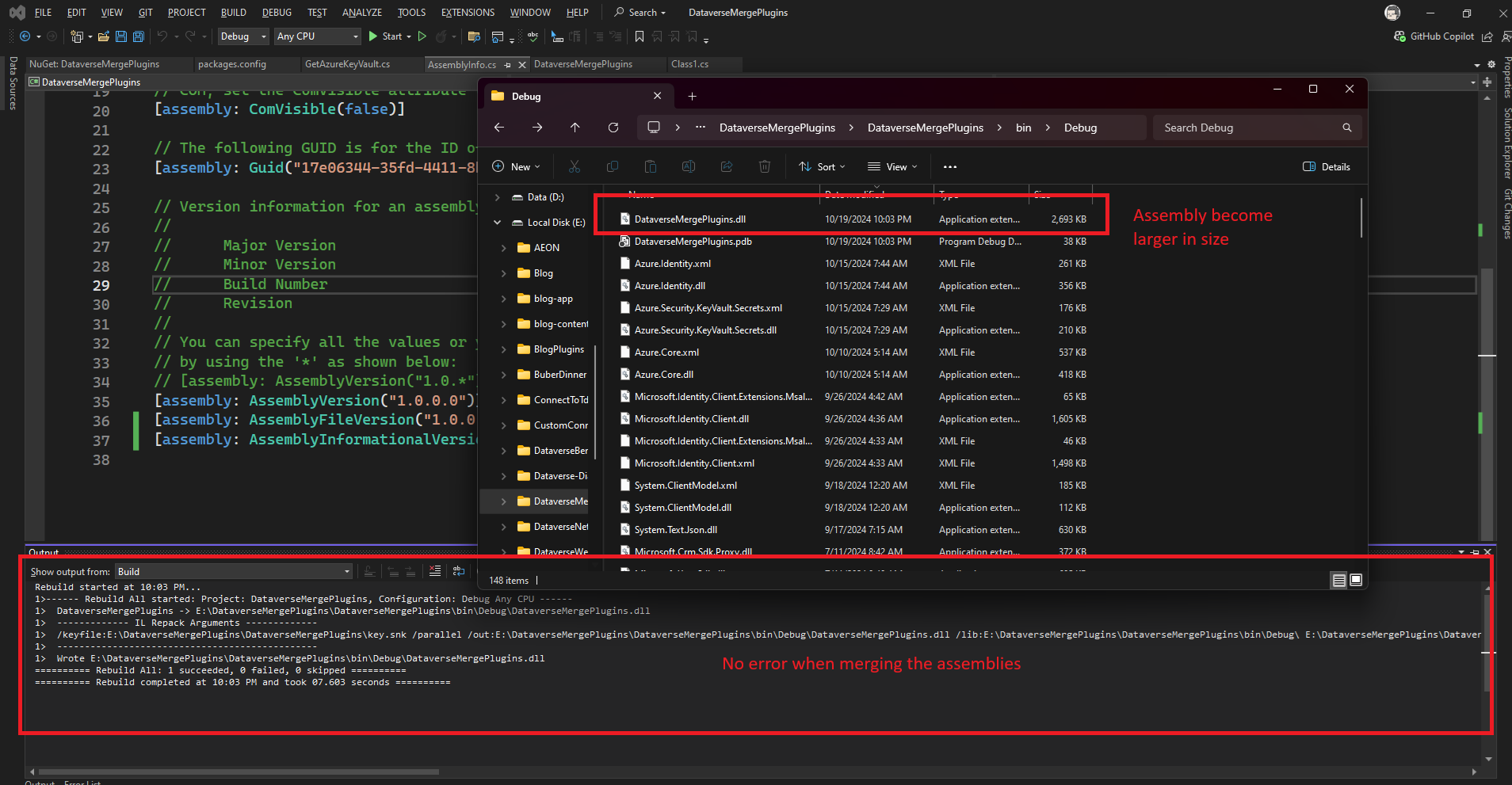
Merging result
You can deploy the plugin via the Plugin Registration Tools and create the Custom API (Custom API Manager by David Rivard):
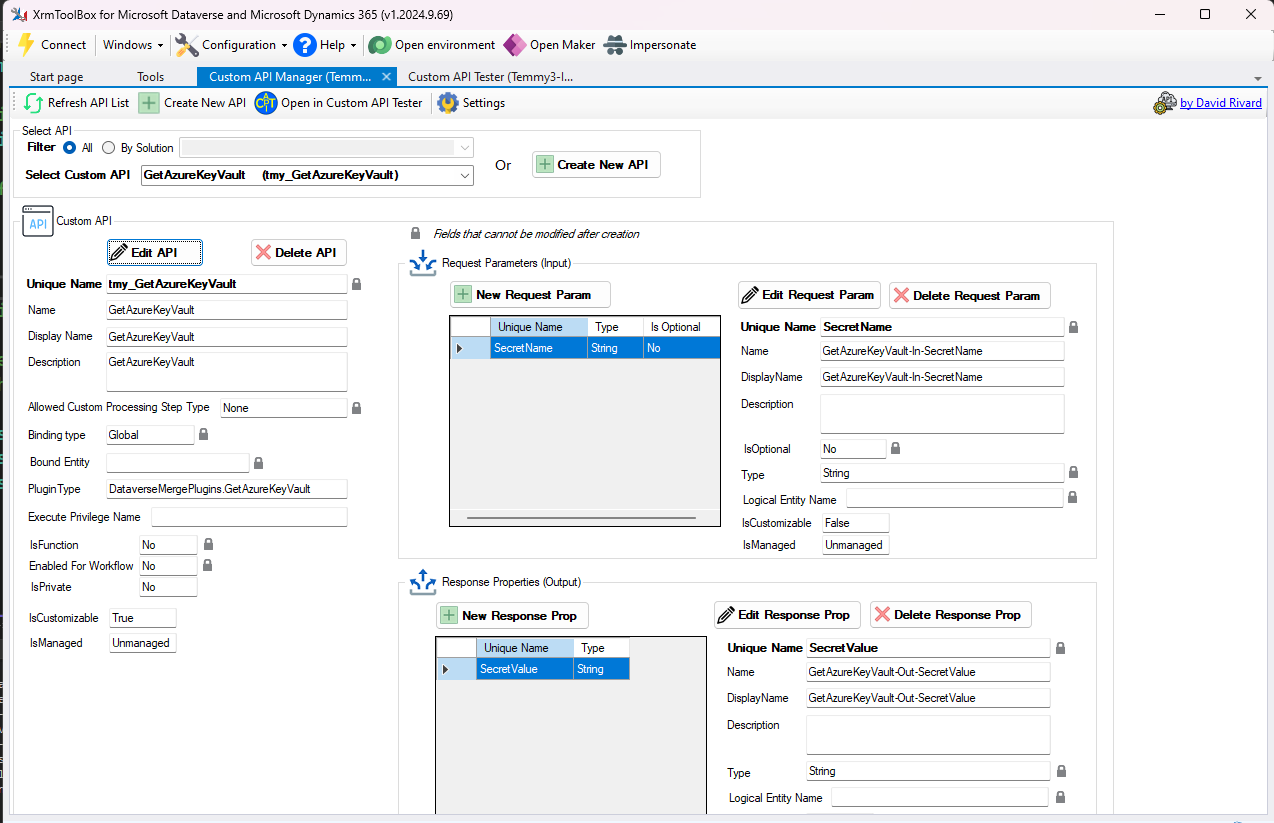
Create the Custom API - Input Param and Output Param
Demo Time
Once the API is created, you can test the Custom API using Custom API Tester by Jonas Rapp:
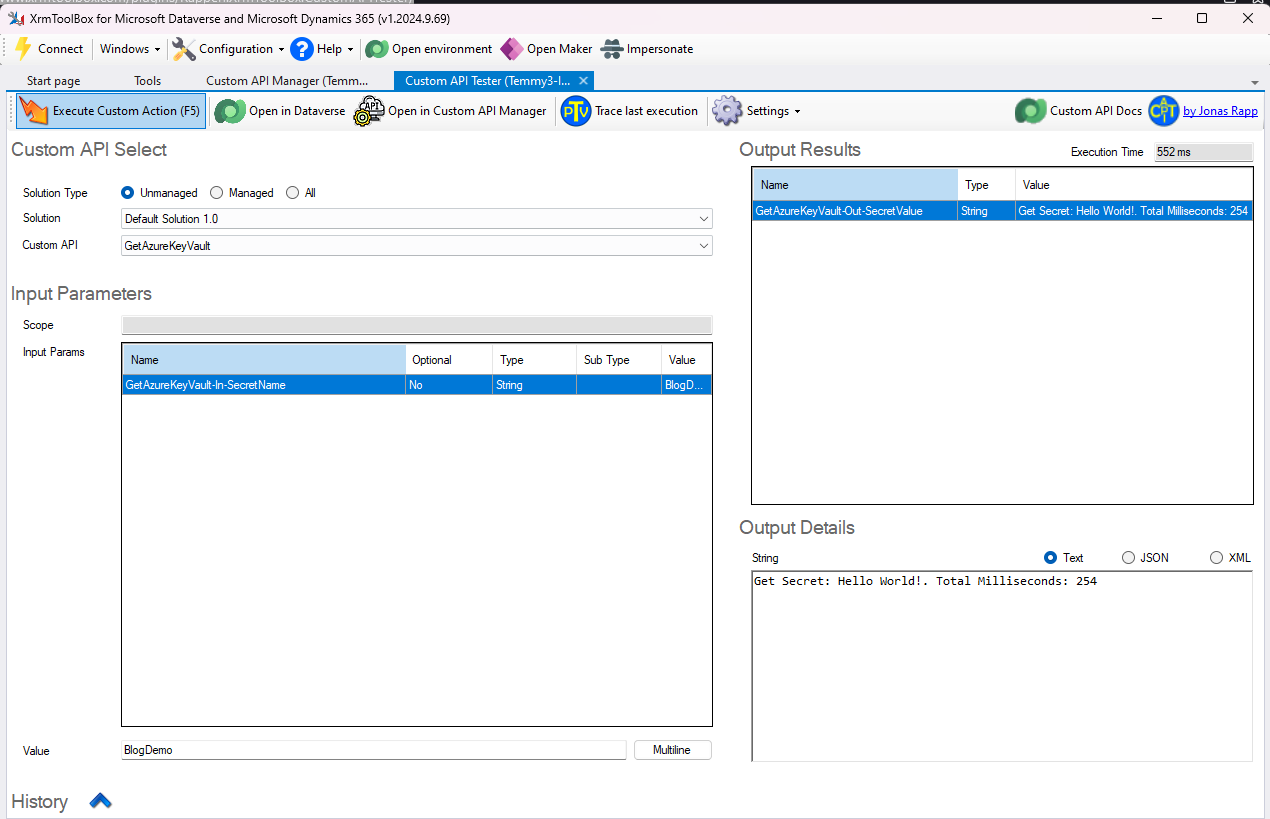
Demo time!
Hope you learn something! Happy CRM-ing! 🚀
Leave a comment
Your comment is sent privately to the author and isn't published on the site.