Dataverse: When to choose between ExecuteMultipleRequest vs Bulk Operation Messages
Last week, we learned that bulk operation messages offer higher performance than ExecuteMultipleRequest. Today, we dig deeper with the sample of scenarios that I prepared so you can understand when you need to use ExecuteMultipleRequest vs bulk operation messages. Enjoy!
ExecuteMultipleRequest
When we talk about ExecuteMultipleRequest, we have several combinations that we can apply by passing the ExecuteMultipleSettings class. The two settings are ContinueOnError (bool) and ReturnResponses (bool). If we set the ContinueOnError to false, meaning if there is an error raised, it will stop the operations (will not continue to the next requests). While, if we set it to true, it will continue the operations. For ReturnResponses, if you set it as true, it will return the response message that you send (remember, you can mix and match the ExecuteMultipleRequest with any of the messages that you want CreateRequest, UpdateRequest, DeleteRequest, and so on).
For our testing, below is the snippet code that I created to make you understand this message:
var listContact = new List<Entity>();

var errorContact = new Entity("contact")
{
    ["firstname"] = "Error",
    ["lastname"] = "Temmy"
};
listContact.Add(errorContact);
for (int i = 0; i < 9; i++)
{
    var entity = new Entity("contact")
    {
        ["firstname"] = $"Temmy",
        ["lastname"] = i.ToString()
    };
    listContact.Add(entity);
}

var executeMultipleRequest = new ExecuteMultipleRequest
{
    Requests = [],
    Settings = new ExecuteMultipleSettings
    {
        ContinueOnError = true,
        ReturnResponses = true
    }
};
executeMultipleRequest.Requests.AddRange(listContact.Select(e => new CreateRequest { Target = e }));

var executeMultipleResponse = (ExecuteMultipleResponse)service.Execute(executeMultipleRequest);
Console.WriteLine($"Created: {executeMultipleResponse.Responses.Count}");
foreach (var response in executeMultipleResponse.Responses)
{
    if (response.Fault != null)
    {
        Console.WriteLine($"Index: {response.RequestIndex}. Fault: {response.Fault.Message}");
    }
    else
    {
        var createResponse = response.Response as CreateResponse;
        Console.WriteLine($"Index: {response.RequestIndex}. Created ID: {createResponse!.id}");
    }
}
FYI, I also created a Plugin to trigger an error if we send an "Error" string in the First Name of the Contact for Create/Update. Then, in lines 19 - 27, you can see that I set the ContinueOnError to true and ReturnResponses to true. With these settings, you can see lines 32 - 43, I can create code to process the response from ExecuteMultipleResponse. The result can provide me with the Fault and CreateResponseinformation.
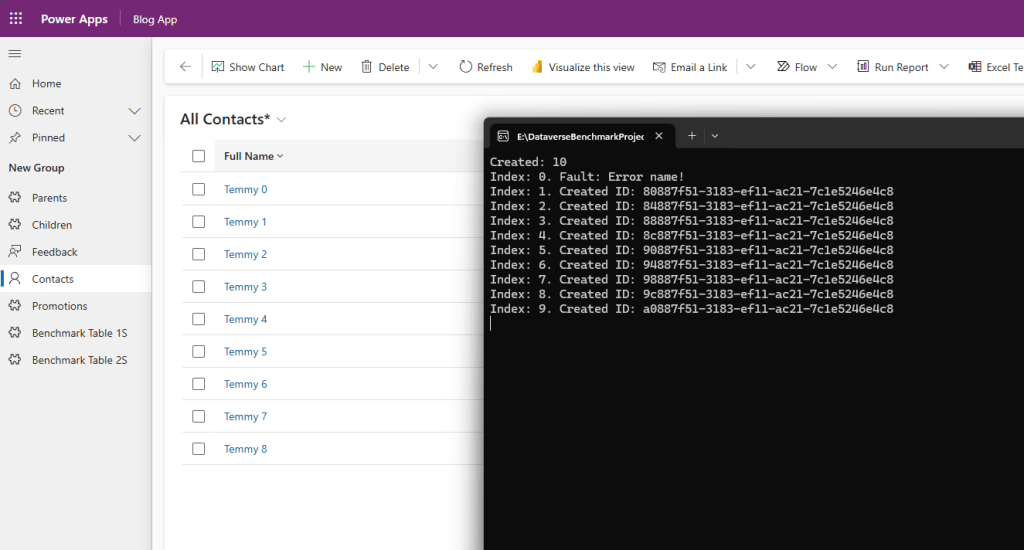
ExecuteMultipleRequest's result
The most important information for this message is, the ExecuteMultipleRequest is not being executed IN TRANSACTION. If you need to ensure transaction (aka do multiple operations in a single database operation - for rollback purposes if any error), use other messages like ExecuteTransactionRequest or the bulk operation messages.
Bulk operation messages
Currently, we have below messages on the bulk operation messages:
As mentioned in the names, each message can support specific operations only. Meaning, if you need to do a bulk create operation, you can use CreateMultiple. If you need to do bulk update operations, you can use UpdateMultiple. So on.
Let's change a bit the code that we saw earlier with the below:
var listContact = new List<Entity>();

for (int i = 0; i < 9; i++)
{
    var entity = new Entity("contact")
    {
        ["firstname"] = $"Temmy",
        ["lastname"] = i.ToString()
    };
    listContact.Add(entity);
}
var errorContact = new Entity("contact")
{
    ["firstname"] = "Error",
    ["lastname"] = "Temmy"
};
listContact.Add(errorContact);

var createMultiple = new CreateMultipleRequest { Targets = new EntityCollection(listContact) { EntityName = "contact" } };
var result = (CreateMultipleResponse)service.Execute(createMultiple);
Console.WriteLine($"Created: {result.Ids.Count()}");
foreach (var createdId in result.Ids)
{
    Console.WriteLine($"Created ID: {createdId}");
}
When we run the code, we will get the "Error name" from the plugin:
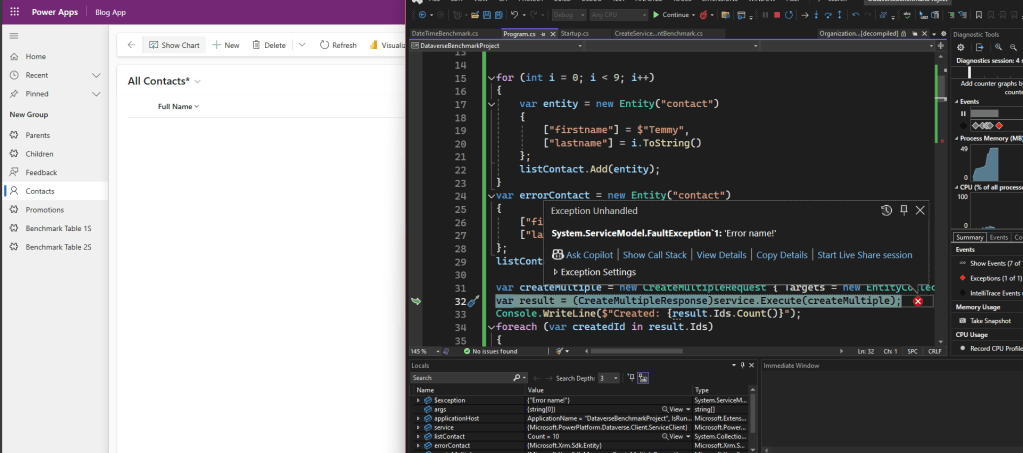
Error during execution
In the above result, you can see that no Contact was created as for Standard Table, Dataverse will invoke it in a single transaction. If you read this MS Learn article, there are differences between how the Standard Table vs Elastic Table behave (which seems to imply that Microsoft can't force the same standardization on how the concurrency works on Elastic Table as in the documentation, it stated "With elastic tables, a bulk operation may partially succeed. You can use the error details to identify which records failed.").
Also, because we execute this bulk operation in a transaction, if there is an error, the System will be doing the rollback. Hence, instead of getting the performance that you dream of, the system will work twice as hard to execute the operation + roll back the transaction. That is why the official documentation stated to use these messages only if the possibility of success is bigger than the error. Also, in the sample of these bulk operation messages, it uses "BypassCustomPluginExecution":
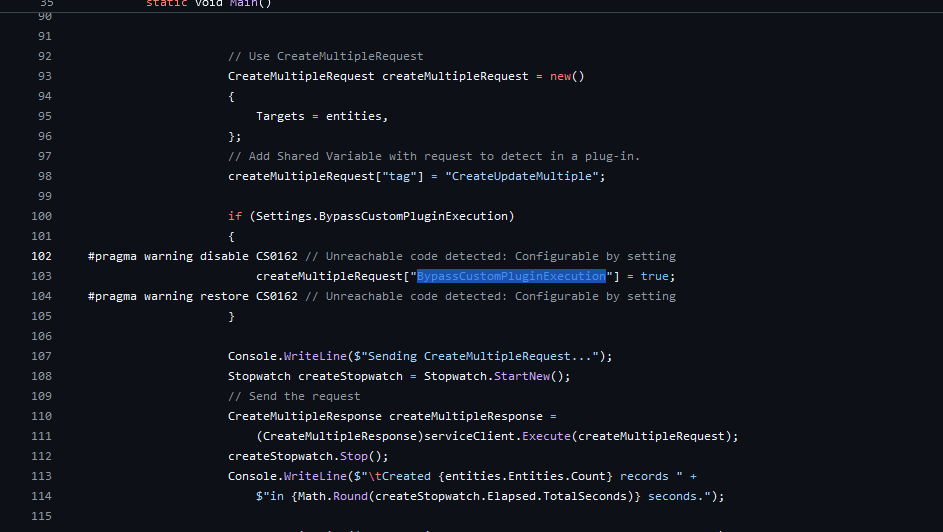
BypassCustomPluginExecution to trigger plugins
Summary
In short, I summarized when to use ExecuteMultipleRequest vs bulk operation messages:
| Factor | ExecuteMultipleRequest | Bulk operation messages |
|---|---|---|
| Performance | - | Faster (if no error is raised during execution) |
| DB Transaction (roll back if there is an error) | No | Yes |
| Entity supports | All | For now, you need to check if the Table supports the operation |
| Mixing operations (Create, Update, Delete, etc..) | Yes | No |
| Triggering Plugins Recommendation | Depends on your scenario | Better to set it as "BypassCustomPluginExecution" as triggering plugins raising the possibility of the error |
| Best Scenario | As long the scenario does not require a Db transaction (rollback mechanism) | Data Migration or scenario where you need to Create/Update/Delete records without triggering plugins (no effects needed) |
Happy CRM-ing! 🚀
Leave a comment
Your comment is sent privately to the author and isn't published on the site.