Dataverse: Learn How to Implement Azure Durable Functions - Payment Scenario
Azure Durable Functions is an extension of Azure Functions that offers specialized capabilities, including statefulness, orchestration, handling retries, and support for running long-running operations. The orchestration functionscan help us group multiple processes and bundle them into one operation, ensuring consistency across the system (handling errors and retrying) and making it durable, as the name suggests. Because of this nature, this component is fitted to critical scenarios such as handling the payment process as which we will learn today.
Here is the step-by-step for today's demonstration:
- The user created an Invoice in Dataverse. Dataverse Webhook will call the Azure Durable Function - HTTP Trigger:
- HTTP Trigger will call the orchestration function. It will trigger the timer function to send a notification through the Activity Function if the Invoice. Status has not changed yet.
- The last step will update the Invoice.Status is set to canceled (through the Activity Function) if the Invoice is canceled. Status has not changed after xx minutes.
- The user has successfully updated the Invoice.Status to Partial/Completed, Dataverse Webhook will call the Azure Durable Function - HTTP Trigger:
- HTTP Trigger will call the orchestration function. It will call Entity Trigger, which, for this demo, will call the external Payment Service.
- Set the Dataverse Invoice.PaymentServiceStatus (if the Payment Service is successful, set to "Success"; Else set to "Error").
Create Azure Durable Functions
First, we need to create a new Project. From your Visual Studio, create a new project and find Azure Functions > Set the directory where you want to put the code > choose the Functions worker and set it to ".NET 8.0 Isolated (Long Term Support)".
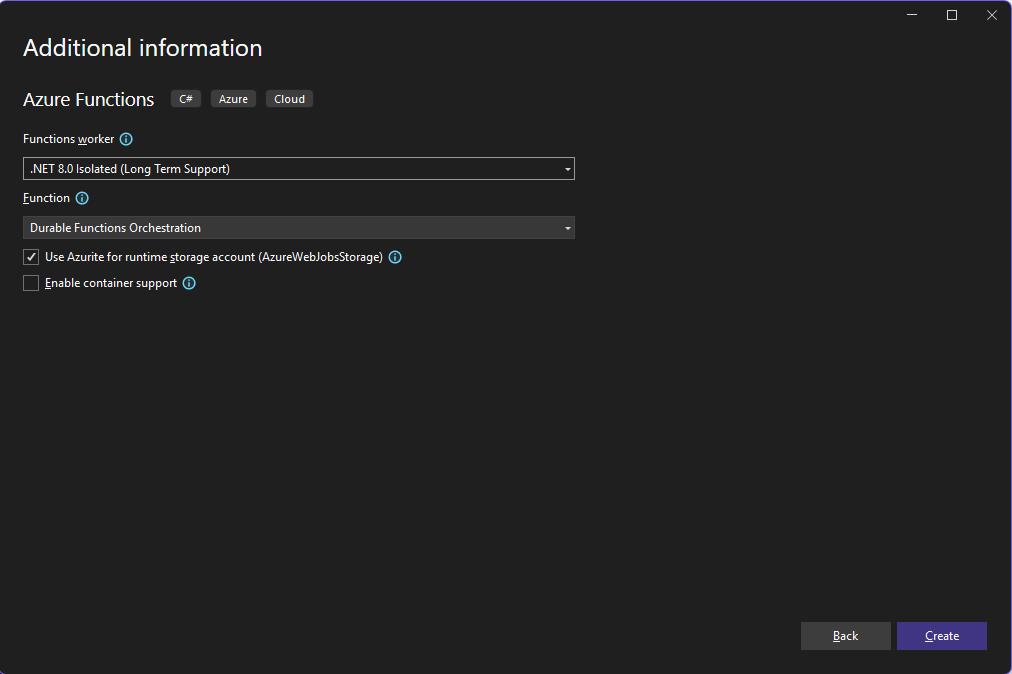
Create an Azure Durable Function project.
In the next dialog, you can choose the template for "Durable Functions Orchestration".
I'll not go into too detail on how to set up the project, and I will only show the important parts (if you need help, feel free to ping me). First, here is the Durable Functions code:
using Blog.Model;
using DataverseTools.Connections;
using Microsoft.Azure.Functions.Worker;
using Microsoft.Azure.Functions.Worker.Http;
using Microsoft.DurableTask;
using Microsoft.DurableTask.Client;
using Microsoft.DurableTask.Entities;
using Microsoft.Extensions.Configuration;
using Microsoft.Extensions.DependencyInjection;
using Microsoft.Extensions.Logging;
using Microsoft.Xrm.Sdk;
using Microsoft.Xrm.Sdk.Query;
using System.Runtime.Serialization.Json;
using System.Text.Json;

namespace AzDurableFunctions;

public static class PaymentProcessingFunction
{
    private static readonly invoice_statuscode[] _paidInvoiceStatuses =
            [invoice_statuscode.Complete, invoice_statuscode.Partial];

    [Function(nameof(PaymentProcessingFunction))]
    public static async Task RunOrchestrator(
        [OrchestrationTrigger] TaskOrchestrationContext context)
    {
        ILogger logger = context.CreateReplaySafeLogger(nameof(PaymentProcessingFunction));

        OrchestrationInput? input = context.GetInput<OrchestrationInput>();

        if (input!.Status == invoice_statuscode.New)
        {
            int intervalMinutes = 2;
            int maxDurationMinutes = 10;
            int maxIterations = maxDurationMinutes / intervalMinutes;

            for (int i = 0; i < maxIterations; i++)
            {
                logger.LogInformation("Waiting for {Interval} minutes before checking payment status again.", intervalMinutes);
                await context.CreateTimer(context.CurrentUtcDateTime.AddMinutes(intervalMinutes), CancellationToken.None);

                await context.CallActivityAsync(nameof(CreateDataverseNotification), input);
            }

            logger.LogInformation("Waiting for {Interval} minutes before cancel the invoice if the payment is not done.", intervalMinutes);
            await context.CreateTimer(context.CurrentUtcDateTime.AddMinutes(intervalMinutes), CancellationToken.None);

            await context.CallActivityAsync(nameof(CancelDataverseInvoice), input);
        }
        else if (_paidInvoiceStatuses.Contains(input!.Status))
        {
            logger.LogInformation("Calling InvoiceEntity function.");
            var entityId = new EntityInstanceId(nameof(InvoiceEntity), input.Id.ToString());
            await context.Entities.SignalEntityAsync(entityId, ((int)input.Status).ToString(), input);
        }
    }

    [Function(nameof(CancelDataverseInvoice))]
    public async static Task CancelDataverseInvoice([ActivityTrigger] OrchestrationInput input, FunctionContext executionContext)
    {
        var service = executionContext.InstanceServices.GetService<XrmConnection>()!.GetServiceClient();

        if (service == null) return;

        var invoice = (await service.RetrieveAsync(input.LogicalName, input.Id, new ColumnSet(true))).ToEntity<Invoice>();

        if (_paidInvoiceStatuses.Contains(invoice.StatusCode.GetValueOrDefault())) return;

        var updateInvoice = new Invoice
        {
            Id = input.Id,
            StateCode = invoice_statecode.Canceled,
            StatusCode = invoice_statuscode.Canceled
        };

        await service.UpdateAsync(updateInvoice);
    }

    [Function(nameof(CreateDataverseNotification))]
    public async static Task CreateDataverseNotification([ActivityTrigger] OrchestrationInput input, FunctionContext executionContext)
    {
        var service = executionContext.InstanceServices.GetService<XrmConnection>()!.GetServiceClient();

        if (service == null) return;

        if (input.CreatedById == Guid.Empty) return;

        var invoice = (await service.RetrieveAsync(input.LogicalName, input.Id, new ColumnSet(true))).ToEntity<Invoice>();

        if (_paidInvoiceStatuses.Contains(invoice.StatusCode.GetValueOrDefault())) return;

        var notif = new SendAppNotificationRequest
        {
            Title = $"Reminder invoice {invoice.InvoiceNumber}",
            Body = $"Invoice number: {invoice.InvoiceNumber}. Total Amount: {invoice.TotalAmount.Value:C}. Please complete the payment as soon as possible.",
            IconType = new OptionSetValue(100000003), // Warning icon
            ToastType = new OptionSetValue(200000001), // Hidden toast
            Recipient = new EntityReference("systemuser", input.CreatedById), // Replace with actual recipient
        };

        await service.ExecuteAsync(notif);
    }

    [Function(nameof(InvoiceEntity))]
    public static Task InvoiceEntity([EntityTrigger] TaskEntityDispatcher dispatcher)
    {
        return dispatcher.DispatchAsync(static async operation =>
        {
            if (operation.State.GetState(typeof(int)) is null)
            {
                operation.State.SetState((int)invoice_statuscode.New);
            }

            var input = operation.GetInput<OrchestrationInput>();

            if (int.TryParse(operation.Name, out int statusCodeValue))
            {
                var operationEnum = (invoice_statuscode)int.Parse(operation.Name);
                switch (operationEnum)
                {
                    case invoice_statuscode.Partial:
                    case invoice_statuscode.Complete:
                        using (var client = new HttpClient())
                        {
                            // Just another mockup service for demonstration purposes.
                            var request = new HttpRequestMessage(HttpMethod.Post, "https://mockfast.io/backend/apitemplate/post/938160498186326/payment");
                            request.Headers.Add("Authorization", "Bearer mck_jaj57w3imnvc08xklb2");
                            var contextBody = new
                            {
                                invoiceNumber = input.InvoiceNumber,
                                totalAmount = input.TotalAmount,
                                status = operationEnum.ToString()
                            };
                            var content = new StringContent(JsonSerializer.Serialize(contextBody), System.Text.Encoding.UTF8, "text/plain");
                            request.Content = content;
                            var response = await client.SendAsync(request);

                            if (response.IsSuccessStatusCode)
                            {
                                operation.State.SetState((int)operationEnum);
                            }

                            var ochestrationId = $"PaymentService_{input.LogicalName}_{input.Id}";
                            operation.Context.ScheduleNewOrchestration(nameof(ProcessStateChangeOrchestration),
                                new PaymentServiceInput { Id = input.Id, IsSuccess = response.IsSuccessStatusCode, LogicalName = input.LogicalName },
                                new StartOrchestrationOptions { InstanceId = ochestrationId });
                        }
                        break;
                    default:
                        operation.State.SetState((int)operationEnum);
                        break;
                }
            }

            return default;
        });
    }

    [Function("ProcessStateChangeOrchestration")]
    public static async Task ProcessStateChangeOrchestration(
    [OrchestrationTrigger] TaskOrchestrationContext context)
    {

        var input = context.GetInput<PaymentServiceInput>();
        if (input == null) return;

        ILogger logger = context.CreateReplaySafeLogger(nameof(ProcessStateChangeOrchestration));
        logger.LogInformation("Processing state change for invoice {Id} with status {IsSuccess}", input.Id, input.IsSuccess);

        await context.CallActivityAsync(nameof(UpdateDataverseInvoice), input);
    }

    [Function(nameof(UpdateDataverseInvoice))]
    public async static Task UpdateDataverseInvoice([ActivityTrigger] PaymentServiceInput input, FunctionContext executionContext)
    {
        var service = executionContext.InstanceServices.GetService<XrmConnection>()!.GetServiceClient();
        if (service == null) return;

        var update = new Invoice
        {
            Id = input.Id,
            tmy_PaymentServiceStatus = input.IsSuccess ?
                tmy_invoice_tmy_paymentservicestatus.Success :
                tmy_invoice_tmy_paymentservicestatus.Error
        };
        await service.UpdateAsync(update);
    }

    private static readonly invoice_statuscode[] _allowedStatusCodes =
        [invoice_statuscode.New, invoice_statuscode.Complete, invoice_statuscode.Partial];

    [Function("Function1_HttpStart")]
    public static async Task<HttpResponseData> HttpStart(
        [HttpTrigger(AuthorizationLevel.Anonymous, "post")] HttpRequestData req,
        [DurableClient] DurableTaskClient client,
        FunctionContext executionContext)
    {
        // Add HTTP Header security
        IConfiguration? configuration = executionContext.InstanceServices.GetService<IConfiguration>();
        string? systemInstrumentationKey = configuration?["InstrumentationKey"];

        string? instrumentationKey = req.Headers.GetValues("InstrumentationKey").FirstOrDefault();
        if (!string.IsNullOrEmpty(systemInstrumentationKey) && instrumentationKey != systemInstrumentationKey)
        {
            return req.CreateResponse(System.Net.HttpStatusCode.Unauthorized);
        }

        ILogger logger = executionContext.GetLogger("Function1_HttpStart");

        try
        {
            var serializer = new DataContractJsonSerializer(typeof(RemoteExecutionContext));
            var message = serializer.ReadObject(req.Body) as RemoteExecutionContext;

            if (message == null) return req.CreateResponse(System.Net.HttpStatusCode.NoContent);

            var target = (Entity)message.InputParameters["Target"];
            if (target.LogicalName != "invoice") return req.CreateResponse(System.Net.HttpStatusCode.NoContent);

            var entity = target.ToEntity<Invoice>();

            if (!_allowedStatusCodes.Contains(entity.StatusCode.GetValueOrDefault())) return req.CreateResponse(System.Net.HttpStatusCode.NoContent);

            // For idempotency, we use the entity's logical name and id as the orchestration instance id.
            string id = $"{entity.LogicalName}_{entity.StatusCode}_{entity.Id}";

            var input = new OrchestrationInput
            {
                LogicalName = entity.LogicalName,
                Id = entity.Id,
                Status = entity.StatusCode.GetValueOrDefault(),
                InvoiceNumber = entity.InvoiceNumber,
                TotalAmount = entity.TotalAmount?.Value ?? 0m,
                CreatedById = entity.CreatedBy?.Id ?? Guid.Empty
            };

            // Check if the orchestration instance already exists
            var existingInstance = await client.GetInstanceAsync(id);
            if (existingInstance != null)
            {
                return req.CreateResponse(System.Net.HttpStatusCode.Accepted);
            }

            // Call Orchestration function
            var options = new StartOrchestrationOptions { InstanceId = id };
            await client.ScheduleNewOrchestrationInstanceAsync(nameof(PaymentProcessingFunction), input, options);

            return await client.CreateCheckStatusResponseAsync(req, id);
        }
        catch (Exception ex)
        {
            logger.LogInformation("Error processing request: {Message}", ex.Message);
            return req.CreateResponse(System.Net.HttpStatusCode.NoContent);
        }
    }

    public class OrchestrationInput
    {
        public string LogicalName { get; set; }
        public Guid Id { get; set; }
        public invoice_statuscode Status { get; set; }
        public string InvoiceNumber { get; set; }
        public decimal TotalAmount { get; set; }
        public Guid CreatedById { get; set; }
    }

    public class PaymentServiceInput
    {
        public string LogicalName { get; set; }
        public Guid Id { get; set; }
        public bool IsSuccess { get; set; }
    }
}
To make it easier to understand the logic, you can read the diagram below and then read the code implementation above:
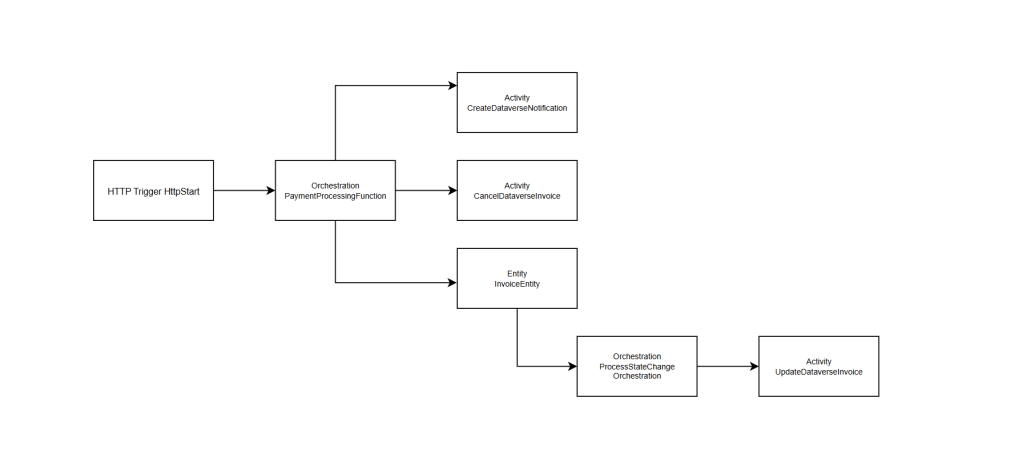
Summary: Code flow
When designing the code for Azure Durable Functions, you need to have assumption of the failure points. Then based on that points, you need to design retry/rollback mechanism (if applied).
If you learn the above code, you will learn how we can pass Input from one function to another function. Another things that I also learned when we want to call another Function from Entity Function, we only has options to call it using Orchestration Function which causing the above design.
Next, here is the code for the Program.cs:
using DataverseTools;
using Microsoft.AspNetCore.Builder;
using Microsoft.AspNetCore.Server.Kestrel.Core;
using Microsoft.Azure.Functions.Worker;
using Microsoft.Azure.Functions.Worker.Builder;
using Microsoft.Extensions.DependencyInjection;
using Microsoft.Extensions.Hosting;

internal class Program
{
    private static void Main(string[] args)
    {
        var builder = FunctionsApplication.CreateBuilder(args);

        builder.ConfigureFunctionsWebApplication();

        builder.Services.Configure<KestrelServerOptions>(options =>
        {
            options.AllowSynchronousIO = true; // Enable synchronous IO for compatibility with legacy code
        });
        builder.Services.Configure<IISServerOptions>(options =>
        {
            options.AllowSynchronousIO = true; // Enable synchronous IO for compatibility with legacy code
        });

        builder.Services
            .AddApplicationInsightsTelemetryWorkerService()
            .ConfigureFunctionsApplicationInsights()
            .AddDataverse();

        builder.Build().Run();
    }
}
As you can see, I'm adding configuration on KestrelServerOptions and IISServerOptions (lines 17 - 24) because when I tried to run an HTTP call, it would throw "Error processing request: Synchronous operations are disallowed. Call ReadAsync or set AllowSynchronousIO to true instead.".
For the AddDataverse extension method (line 29), basically, I wrapped the creation of ***ServiceClient***using the XrmConnection class (this is a custom class that wraps the logic to use multiple app users, for enabling pooling purposes and exposing it into the Dependency Injection).
Up to this point, you can deploy the code. These durable functions will need 3 Components on Azure:
- Azure App Service for hosting the Azure Durable Functions
- Azure Application Insights
- Azure Storage: The System will automatically create Tables to enable the statefulness of the Azure Durable Functions.
For development purposes, you can use the Publish method in Visual Studio, which will guide you on the components that need to be created (if you are using the latest version of Visual Studio, the experience on the publish has improved a lot):
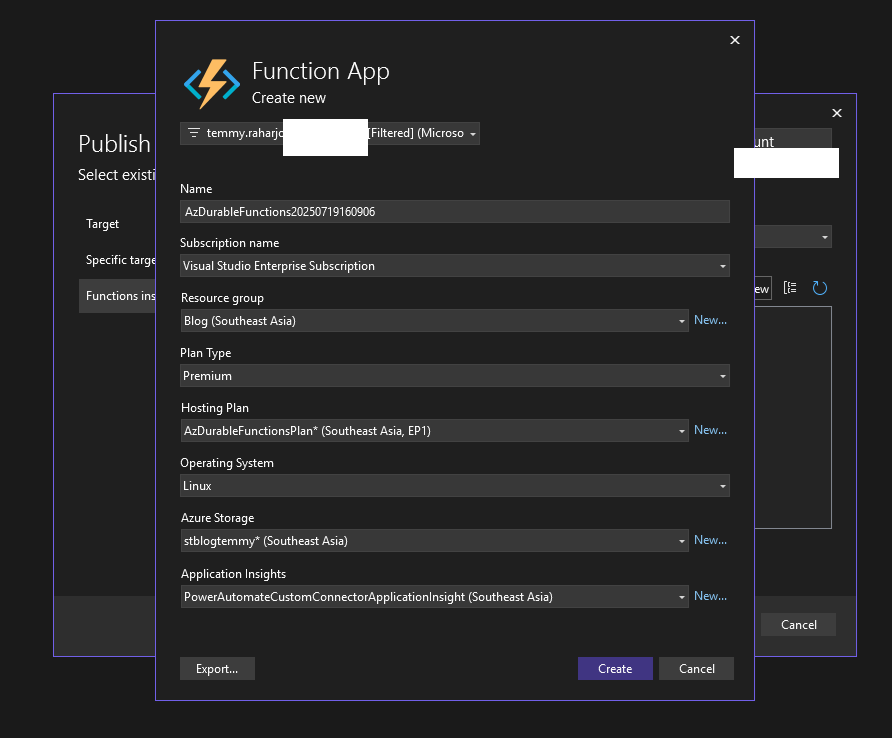
Create a Deployment Profile in Visual Studio
You need to ensure to set host.json > right click > Properties > Build action set to "Content" and set Copy to Output to Directory to "If Newer/Always" as this Durable Functions also relying on the host.json
Once it is deployed, we need to set the Environment Variables of the App Service. Some settings will be automatically set because we created the above profile. But, for some logic such as "InstrumentationKey" in the App Settings, we need to create by ourselves (custom logic):
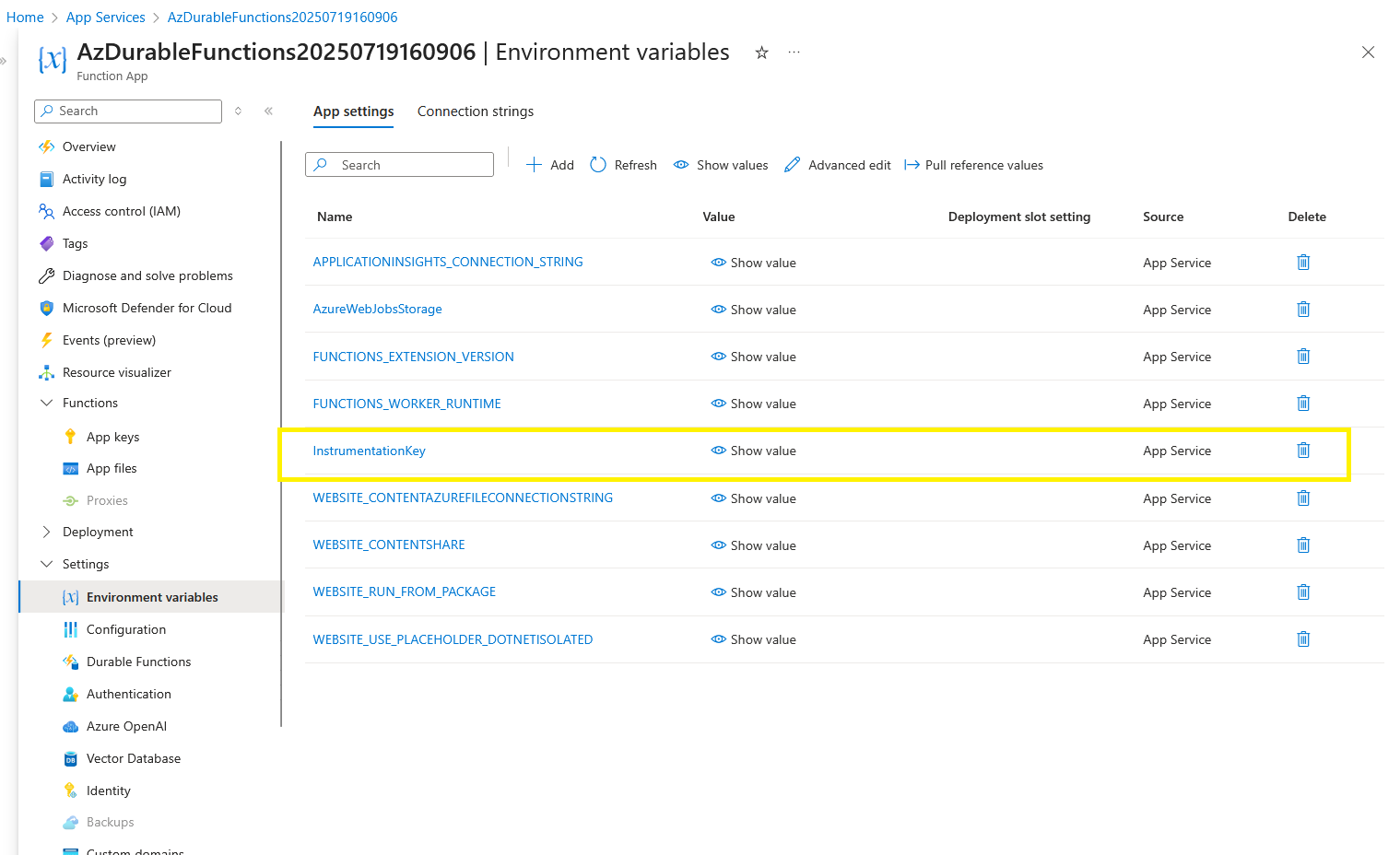
Instrumentation Key for simple authentication
Also, we need to create the Connection strings for Dataverse:
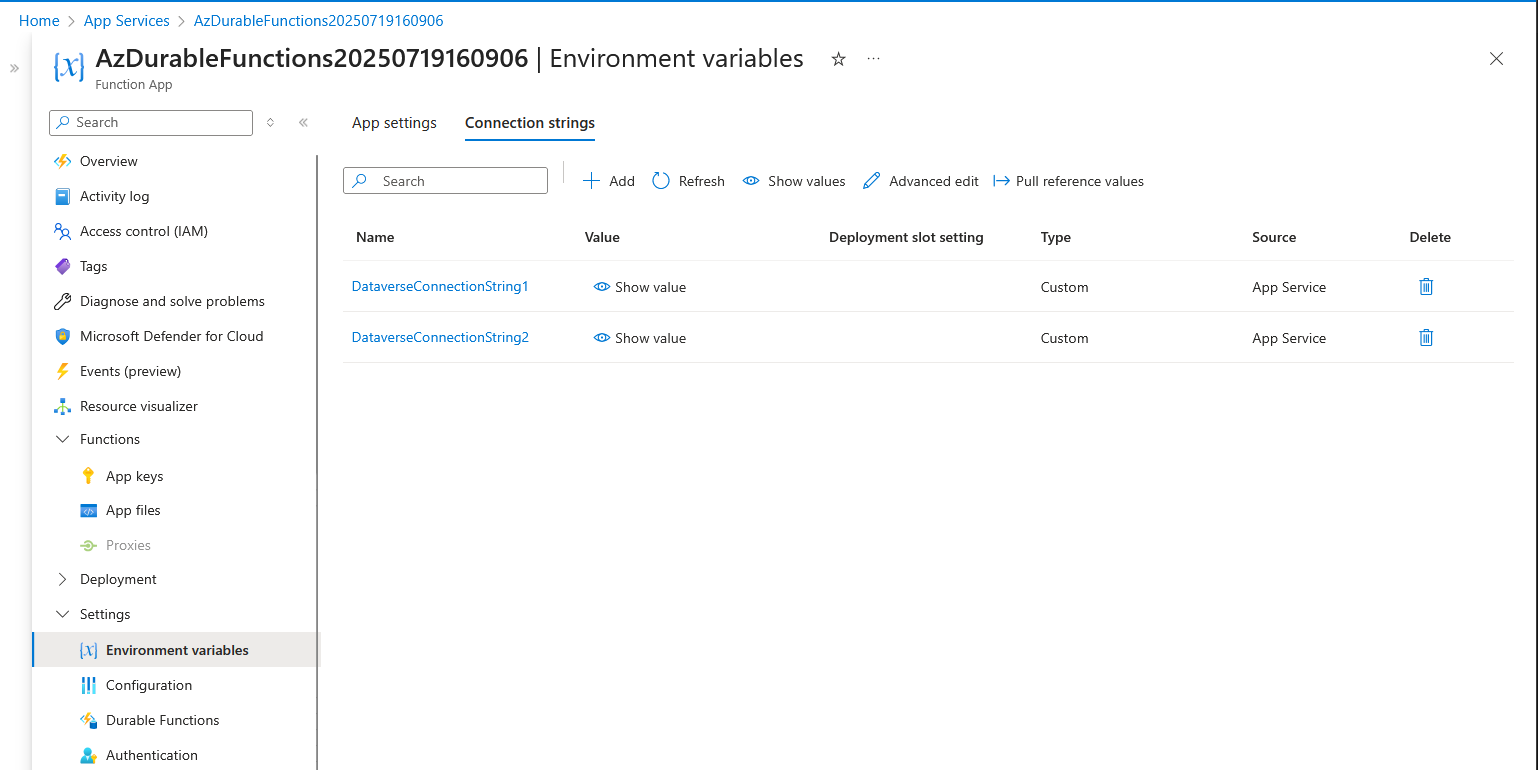
Dataverse Connection Strings
Once everything is up and running, the App Service is ready to be tested.
Register Dataverse Webhook
In the App Service, go to the Overview page. There, you will see the Functions that we created. Because we want to get the URL for Function1_HttpStart, we can click on the "Invocations and more" > go to "Code + Test" > there you will see the "Get function URL" button to get the URL > click and copy the default (Function key). This value will be used for the next step:
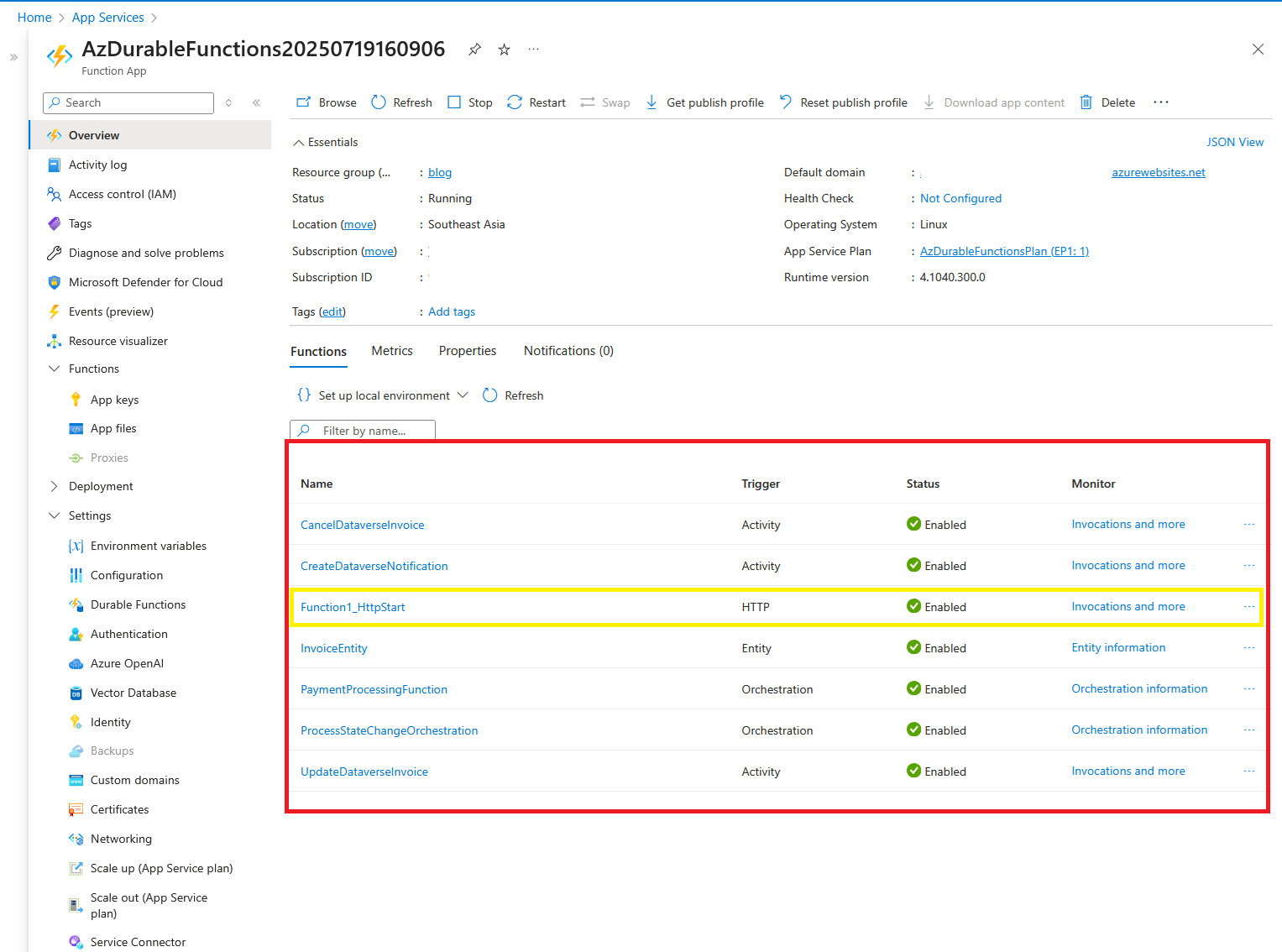
Overview of the Function App
Next, open your Plugin Registration Tool > connect to your dev environment > click Register > Register New Web Hook > put the name and paste the Endpoint URL that you got from the previous step. Then, for authentication purposes, we need to set the HTTP header and set the Keys + Values.
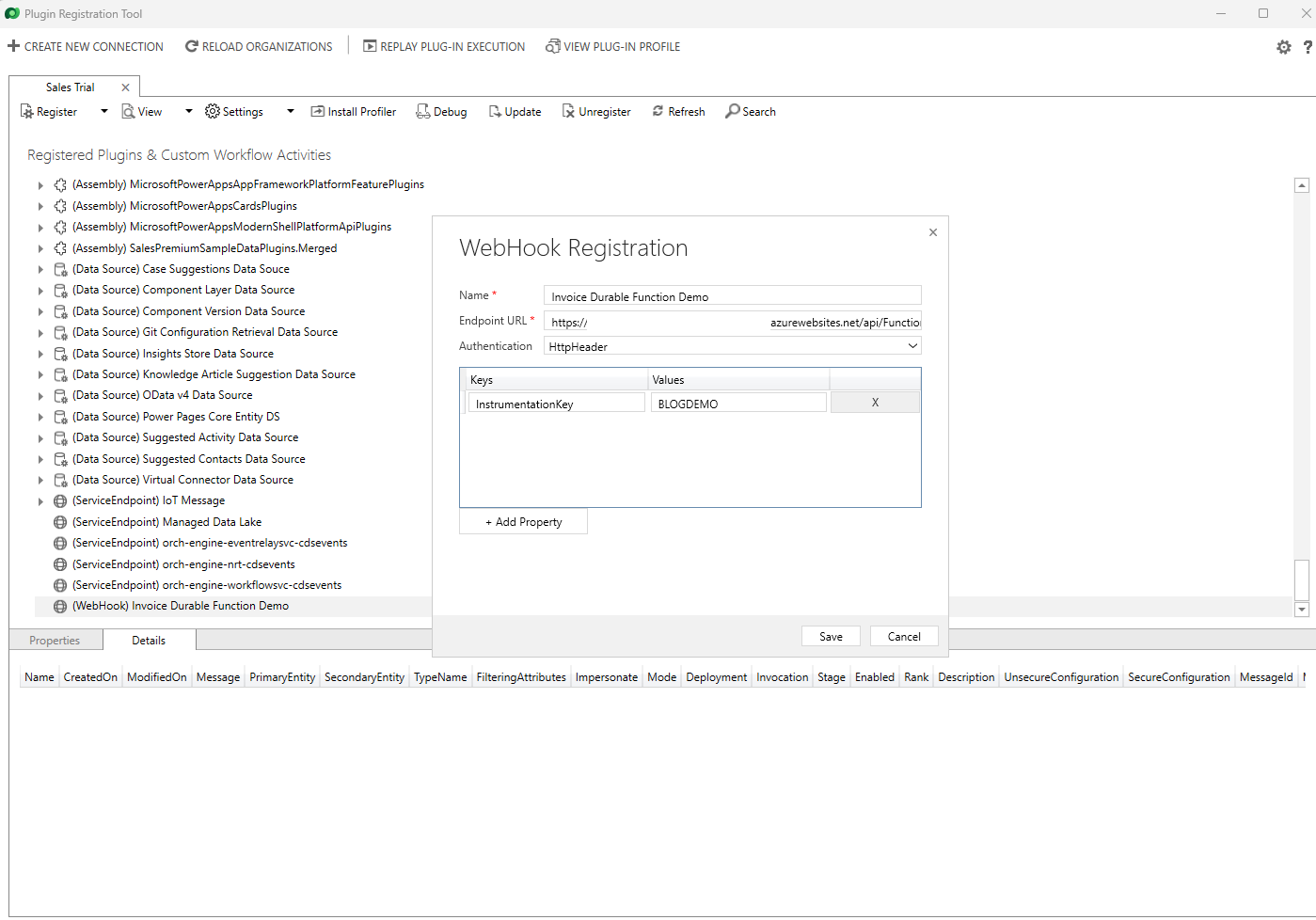
Register a new webhook.
Then, we can register a new plugin step. For **** demo purposes, I set two new plugin steps on the Create and Update of the Invoice entity. Both are using PostOperation - Async:
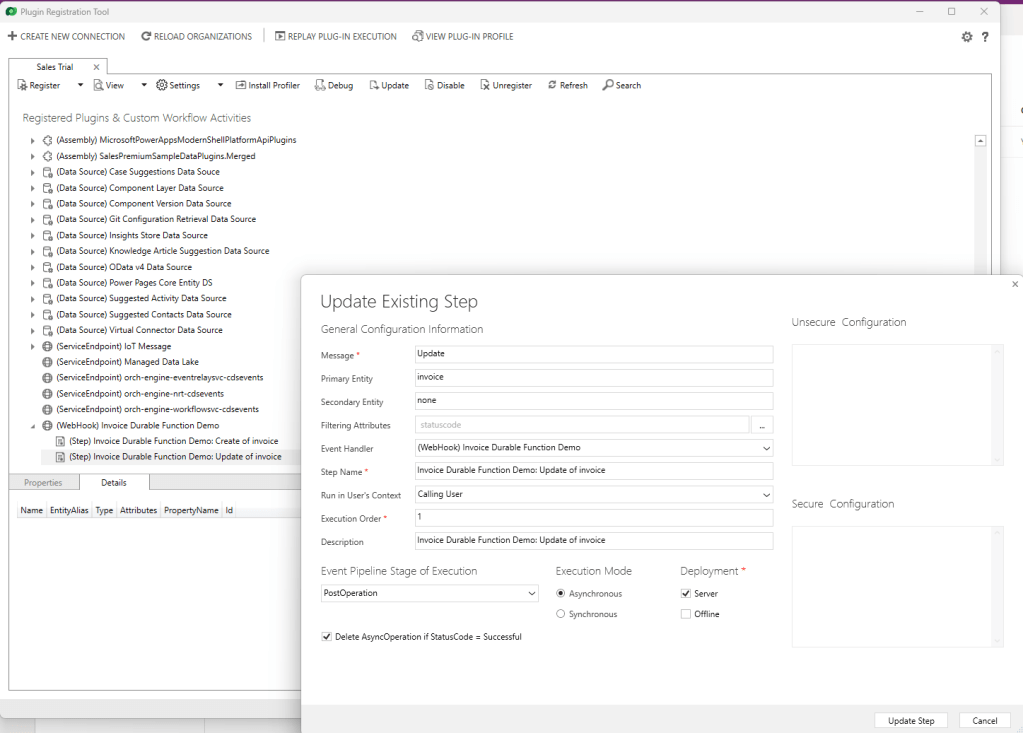
Register Plugin Steps
Summary
Once the plugin steps are registered, you can create the invoices and update the status, and wait for the Durable Functions run:
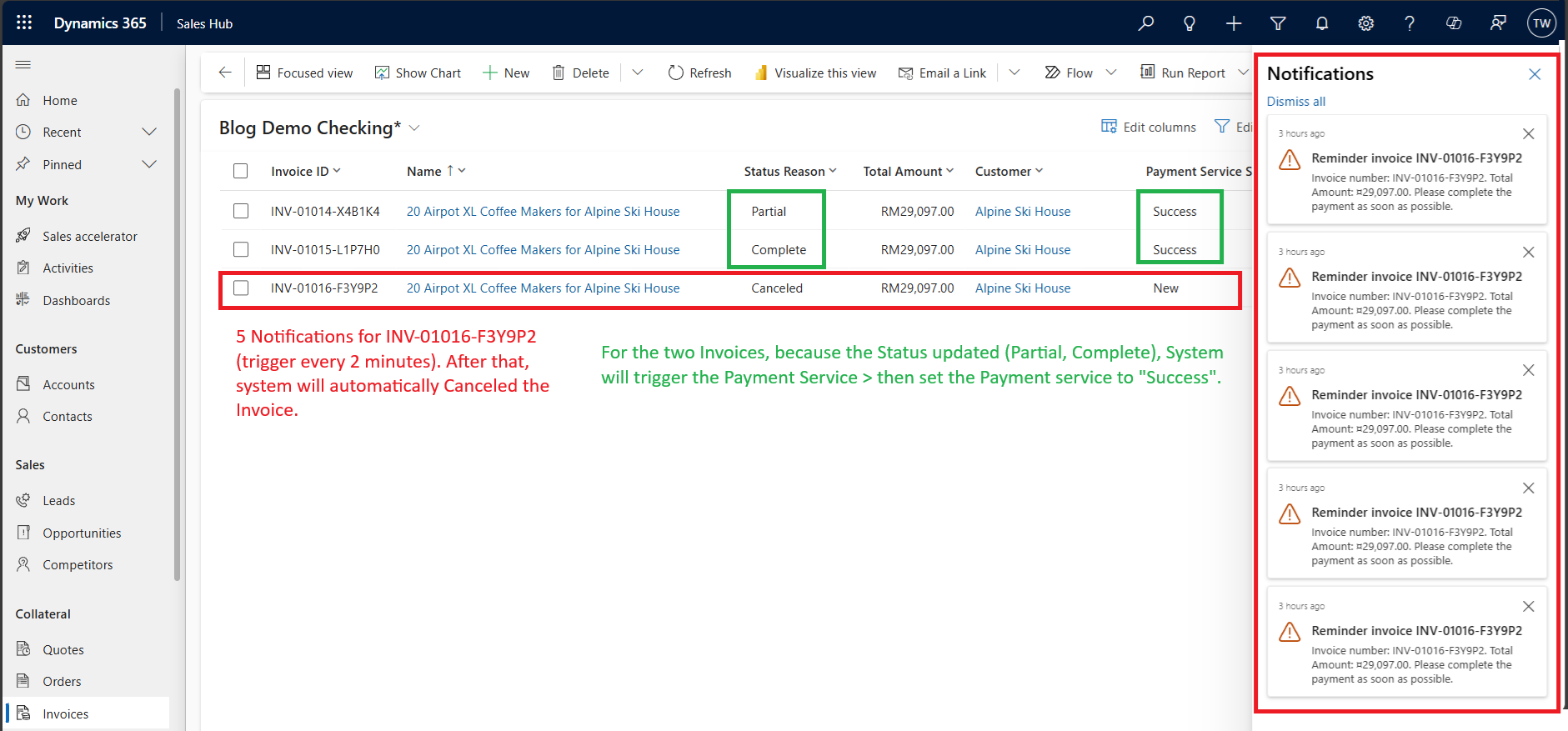
Demo result
And here is the list that I learned from this learning:
- The statefullness is accomplished because the framework, by default, will store the execution/state (if Entity) to the Azure Storage Table. You can open Microsoft Azure Storage > and check the records created (same when you are developing locally).
- Even though the code looks complex at beginning. Once the foundation is created, you will get used to it. But, be careful as the framework itself favours spaghetti code style (I believe many developers will create a fat 1 class with many functions).
- Implementing a try-catch block in every function will be a good way to force developers to think about retry/rollback scenarios.
- The developer needs to change the perspective to split the simple scenario into multiple functions and learn to apply the correct function types (Orchestration, Entity, and Activity).
That's all from today's blog post. I think I still lack of experience to implement the code correctly (as I think the Durable Functions itself is a big topic, and actually I struggle a lot to write this blog). If you have another perspective on how to implement it, please do let me know, and as usual, happy CRM-ing! 🚀
Leave a comment
Your comment is sent privately to the author and isn't published on the site.