Dataverse: C# extension to simplify how to get Custom API Input
I'm fairly certain that all of us agree that we are performing mundane code to obtain input parameters when developing custom APIs. For populating the context.PluginExecutionContext.InputParameters, we need to extract each parameter and cast the value to the correct data type, which is a tedious task. Hence, to make things easier, you can use this extension!
The below code snippet is a sample usage class and the extension method:
using Microsoft.Xrm.Sdk;
using Newtonsoft.Json;
using System;
using System.Collections.Generic;
using System.ComponentModel.DataAnnotations;
using System.Linq;
using System.Reflection;

namespace BlogPackage
{
    public class TestApi : PluginBase
    {
        public class InputModel
        {
            public bool? InputBool { get; set; }
            public DateTime? InputDateTime { get; set; }
            public decimal? InputDecimal { get; set; }
            public Entity InputEntity { get; set; }
            public EntityCollection InputEntityCollection { get; set; }
            public EntityReference InputEntityReference { get; set; }
            public double? InputFloat { get; set; }
            public int? InputInteger { get; set; }
            public Money InputMoney { get; set; }
            public OptionSetValue InputPicklist { get; set; }
            public string InputString { get; set; }
            public string[] InputStringArray { get; set; }
            public Guid? InputGuid { get; set; }
        }
        public TestApi() : base(typeof(TestApi))
        {
        }

        protected override void ExecuteDataversePlugin(ILocalPluginContext localPluginContext)
        {
            var input = localPluginContext.PluginExecutionContext.InputParameters.ConvertTo<InputModel>();
            var output = JsonConvert.SerializeObject(input, Formatting.None);

            localPluginContext.PluginExecutionContext.OutputParameters["Output"] = output;
        }
    }

    public static class ApiHelpers
    {
        public static T ConvertTo<T>(this ParameterCollection collection)
            where T : class, new()
        {
            var result = Activator.CreateInstance<T>();
            var properties = typeof(T).GetProperties().Where(e => e.CanRead | e.CanWrite);

            foreach (var property in properties)
            {
                var valid = collection.Contains(property.Name) && collection[property.Name] != null;
                if (!valid) continue;
                var value = collection[property.Name];

                // Handle type conversion if needed
                if (value.GetType() != property.PropertyType)
                {
                    value = CastToType(property.PropertyType, value);
                }

                property.SetValue(result, value);
            }

            // Validate the model using DataAnnotations
            var validationResults = new List<ValidationResult>();
            var validationContext = new ValidationContext(result);
            var isModelValid = Validator.TryValidateObject(result, validationContext, validationResults, validateAllProperties: true);

            if (!isModelValid)
            {
                // Join all validation errors into a single message
                var errorMessage = string.Join(Environment.NewLine, validationResults.Select(r => r.ErrorMessage));
                throw new InvalidPluginExecutionException($"Validation failed: {errorMessage}");
            }

            return result;
        }

        private static object CastToType(Type propertyType, object value)
        {
            if (value.GetType() != propertyType)
            {
                if (value is IConvertible)
                {
                    if (propertyType.GetGenericTypeDefinition() == typeof(Nullable<>))
                    {
                        var underlyingType = Nullable.GetUnderlyingType(propertyType);
                        return CastToType(underlyingType, value);
                    }
                    return Convert.ChangeType(value, propertyType);
                }
            }
            return value;
        }
    }
}
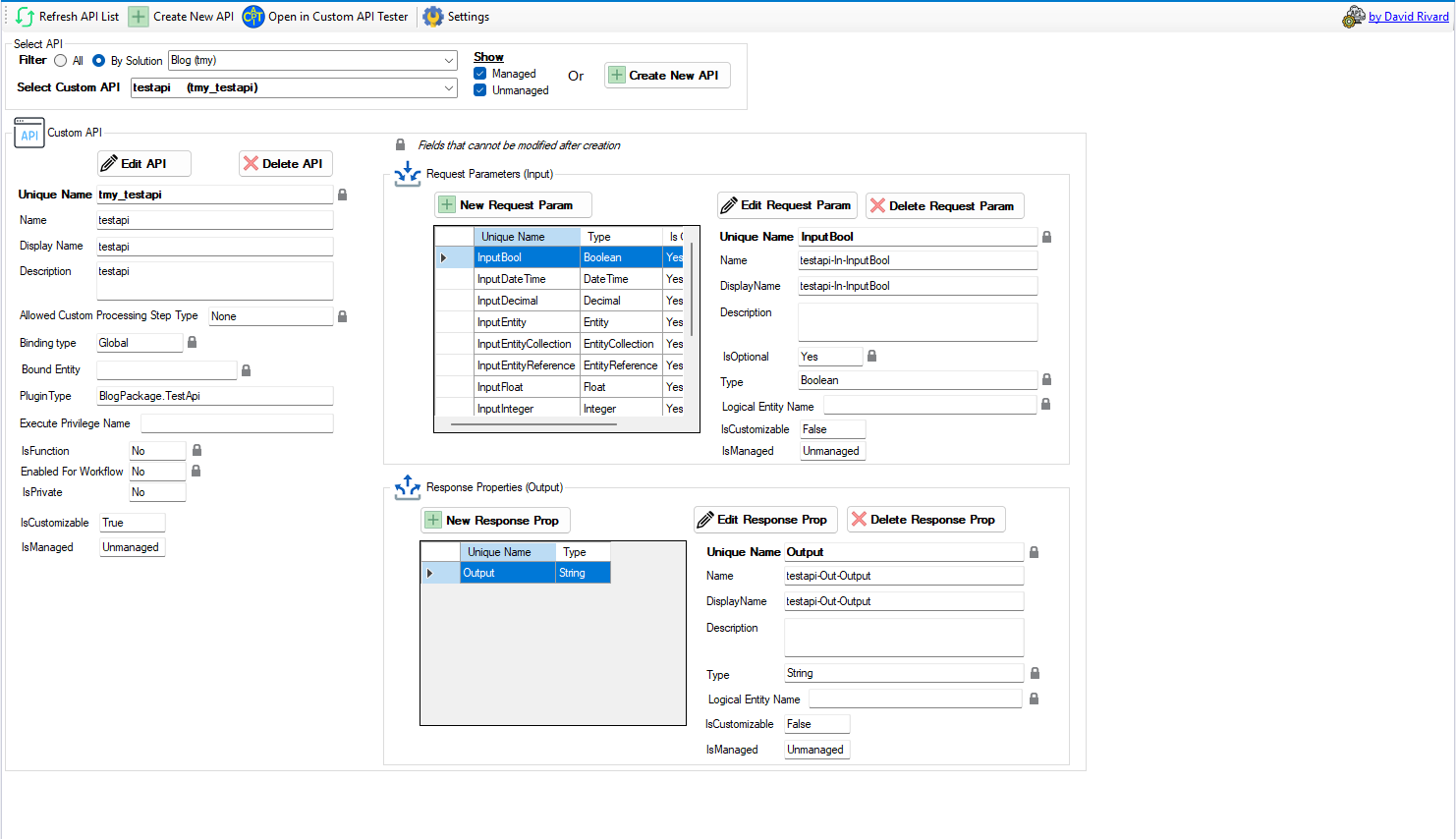
Based on the above code, I created the below Custom API using Custom API Manager by David Rivard:
And here is the result:
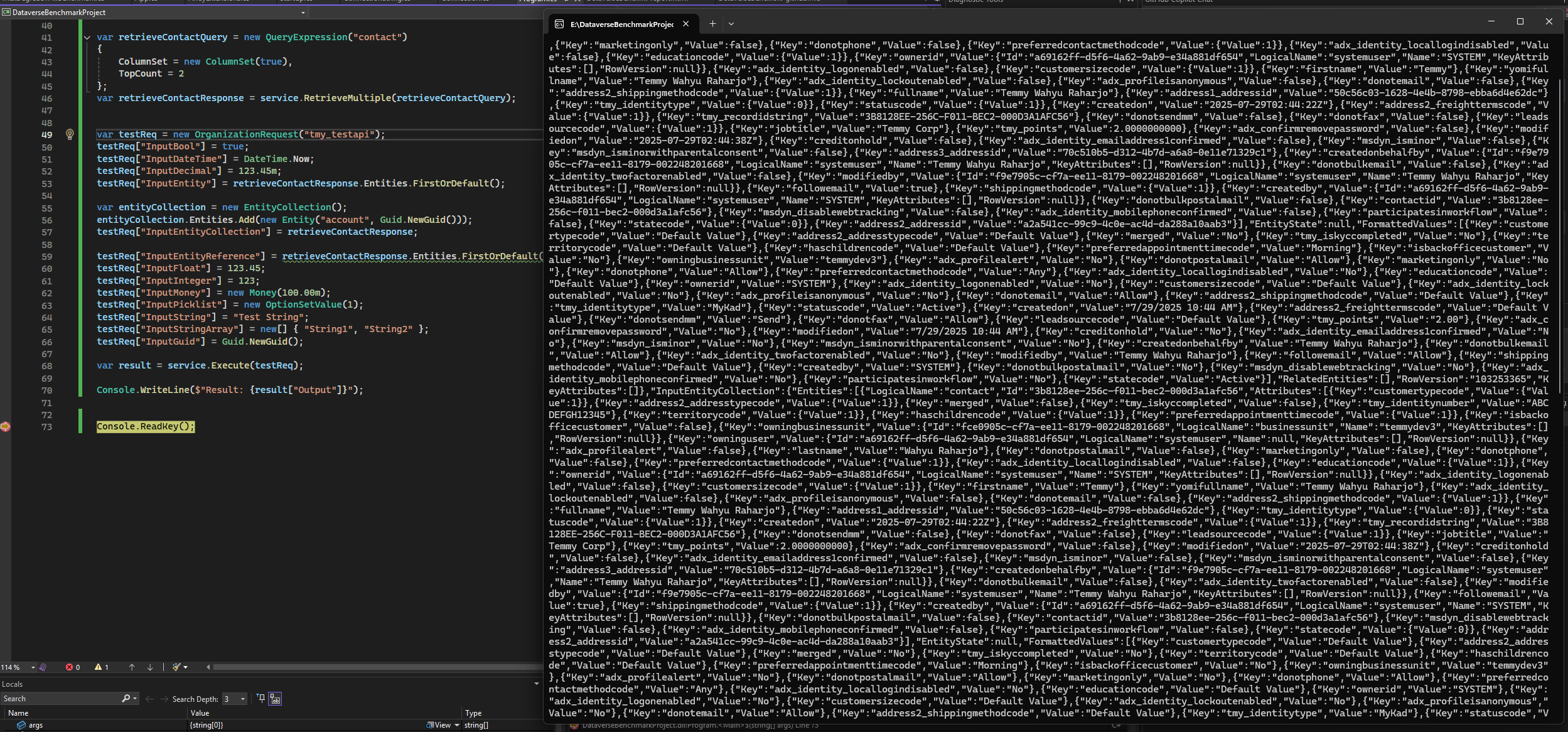
Execute through ServiceClient and verify the result manually.
The below code is the difference between the "mundane" code vs the extension method:
// The mundane code
var inputBool = localPluginContext.PluginExecutionContext.InputParameterOrDefault<bool?>("InputBool");
var inputDateTime = localPluginContext.PluginExecutionContext.InputParameterOrDefault<DateTime?>("InputDateTime");
var inputDecimal = localPluginContext.PluginExecutionContext.InputParameterOrDefault<decimal?>("InputDecimal");
var inputEntity = localPluginContext.PluginExecutionContext.InputParameterOrDefault<Entity>("InputEntity");
var inputEntityCollection = localPluginContext.PluginExecutionContext.InputParameterOrDefault<EntityCollection>("InputEntityCollection");
var inputEntityReference = localPluginContext.PluginExecutionContext.InputParameterOrDefault<EntityReference>("InputEntityReference");
var inputFloat = localPluginContext.PluginExecutionContext.InputParameterOrDefault<double?>("InputFloat");
var inputInteger = localPluginContext.PluginExecutionContext.InputParameterOrDefault<int?>("InputInteger");
var inputMoney = localPluginContext.PluginExecutionContext.InputParameterOrDefault<Money>("InputMoney");
var inputPicklist = localPluginContext.PluginExecutionContext.InputParameterOrDefault<OptionSetValue>("InputPicklist");
var inputString = localPluginContext.PluginExecutionContext.InputParameterOrDefault<string>("InputString");
var inputStringArray = localPluginContext.PluginExecutionContext.InputParameterOrDefault<string[]>("InputStringArray");
var inputGuid = localPluginContext.PluginExecutionContext.InputParameterOrDefault<Guid>("InputGuid");

// The extension method
var input = localPluginContext.PluginExecutionContext.InputParameters.ConvertTo<InputModel>();
var output = JsonConvert.SerializeObject(input, Formatting.None);
Bonus: Validating Input using System.ComponentModel.DataAnnotations
On the ConvertTo extension, there is code for validating the input as well. Then, you can apply the ***Required***attribute, and the code will validate the input automatically:
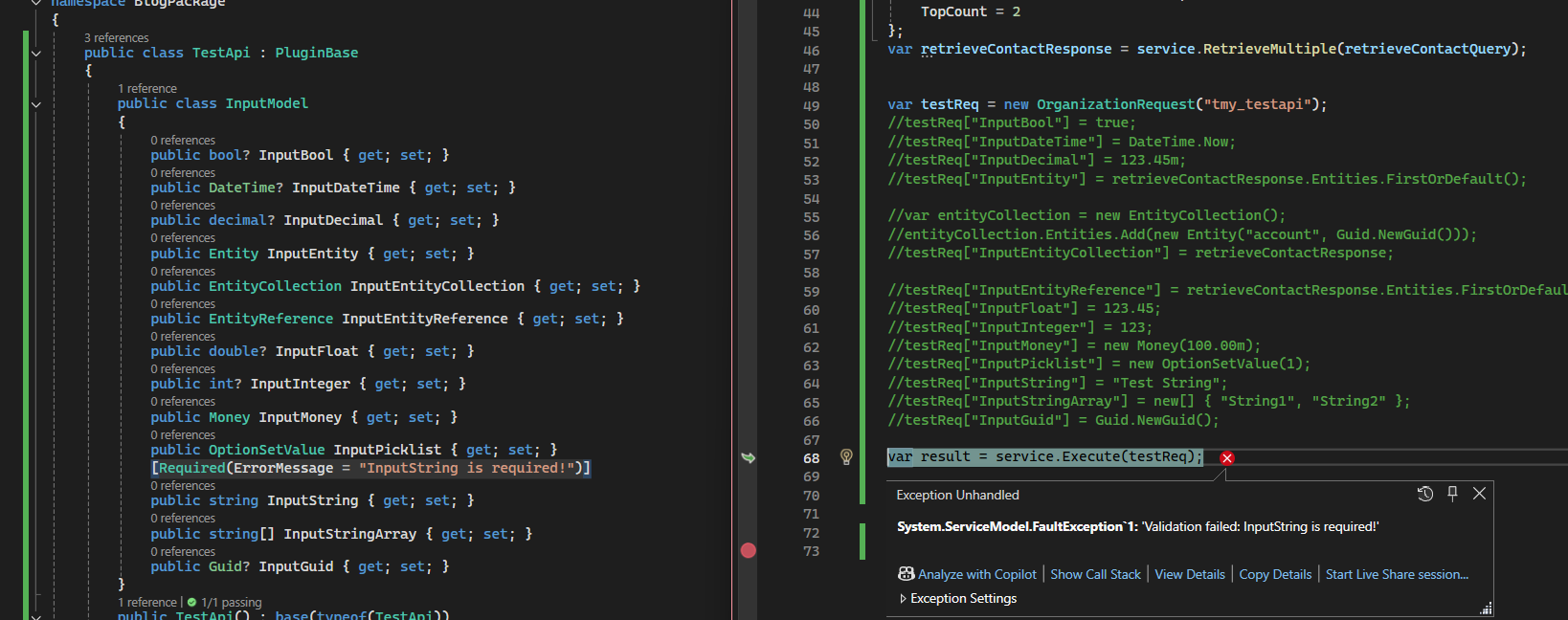
Sample add Required and the error when executed.
And, the last thing. Based on my testing, Microsoft seems to set the default values for Bool, DateTime, Decimal, Float, and Guid (Dataverse automatically sets even when not being passed when calling):

Happy CRM-ing 🚀!
Leave a comment
Your comment is sent privately to the author and isn't published on the site.