Using Azure Service Bus Queue to simplify Dataverse Concurrency
Have you ever faced a challenge where you needed to process bulk data that would update a single record? For example, you processed receipts for a single customer, and the program failed to update the correct data because the processing happened at almost the same time (concurrency issues). To simplify this process, we will learn how to add an Azure Service Bus Queue, call it from Dataverse to create a queue message, and learn how to create Azure Functions to process the messages.
Create Azure Service Bus
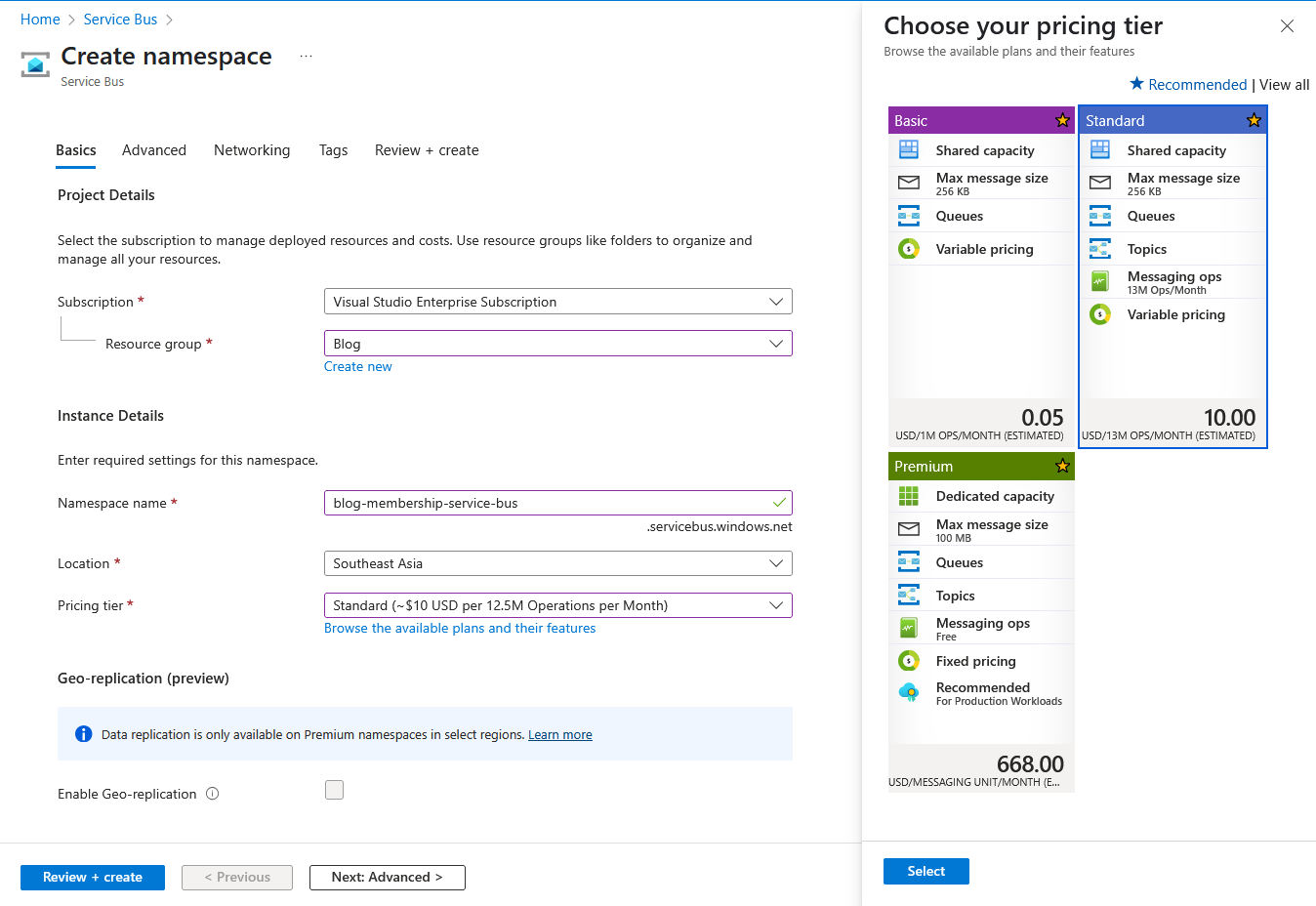
First, navigate to portal.azure.com and create a Service Bus instance. Set the Resource Group, Namespace, Location, and select the Pricing Tier. For this blog's purposes, I'm choosing the Standard:
Create Service Bus
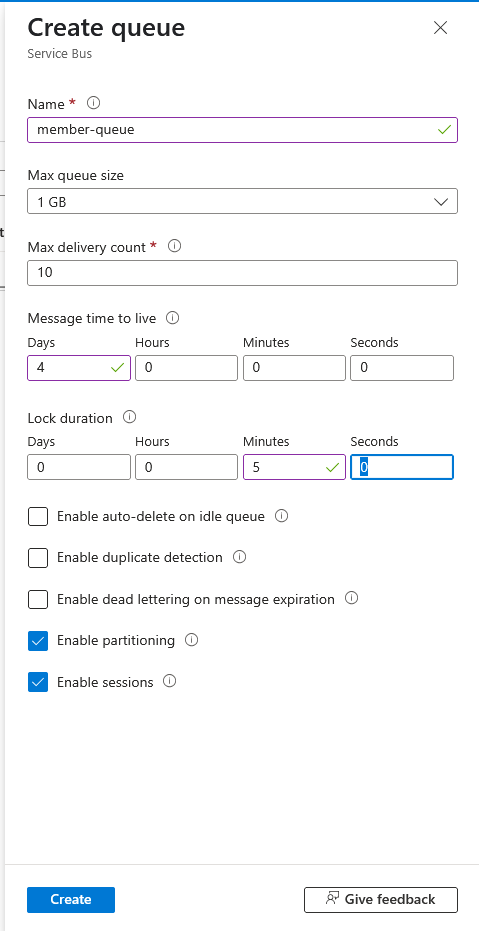
Next, once the Service Bus is created > go to the Entities > Queue > create new queue and set the Name, Max queue size, Max delivery count, Message time to live, Lock duration. To make the queue messages processed synchronously for each member, we will check the Enable sessions:
Create Queue
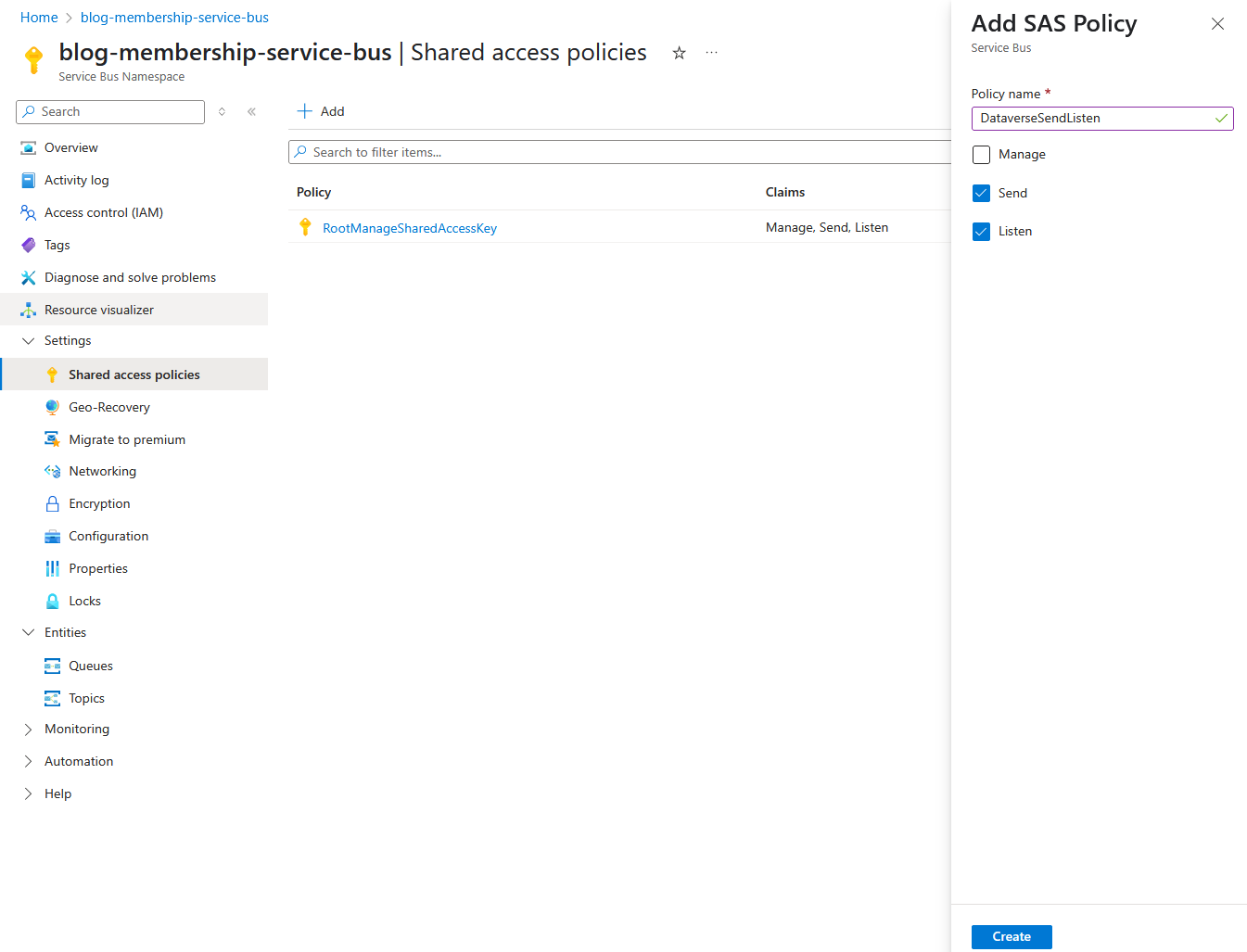
Last, for the other components able to send/listen to the Service Bus Queue, you need to go to Settings > Shared access policies > Add new SAS Policy > then you can get the connection string and keep it for later use:
Create SAS Policy
Dataverse Plugin
To simplify the process, I created a new Plugin with the following code:
using Azure.Messaging.ServiceBus;
using BlogPackage;
using Microsoft.Xrm.Sdk;
using Microsoft.Xrm.Sdk.Extensions;
using Microsoft.Xrm.Sdk.Query;
using Newtonsoft.Json;
using System;
using System.Linq;
using System.Threading.Tasks;

public class SendToServiceBusQueue : PluginBase
{
    public class SendToServiceBusQueueConfig
    {
        public string EnvironmentVariableName { get; set; }
        public string SessionIdAttributeName { get; set; } = "";
        public string ParititonKeyAttributeName { get; set; } = "";
        public string MemberIdAttributeName { get; set; }
        public string PointsAttributeName { get; set; }
    }

    public class PointsModel
    {
        public string MemberId { get; set; }
        public string Points { get; set; }
    }

    private readonly SendToServiceBusQueueConfig _config;
    public SendToServiceBusQueue(string unsecureConfig) : base(typeof(SendToServiceBusQueue))
    {
        if (string.IsNullOrEmpty(unsecureConfig)) throw new ArgumentNullException(nameof(unsecureConfig));
        _config = JsonConvert.DeserializeObject<SendToServiceBusQueueConfig>(unsecureConfig);
    }

    protected override void ExecuteDataversePlugin(ILocalPluginContext localPluginContext)
    {
        var entity = localPluginContext.PluginExecutionContext.InputParameterOrDefault<Entity>("Target");

        var sessionId = GeAttributeValue(entity, _config.SessionIdAttributeName);
        var parititonKey = GeAttributeValue(entity, _config.ParititonKeyAttributeName);

        var environmentVariable = GetEnvironmentVariableData(localPluginContext.AdminService, _config.EnvironmentVariableName);
        if (environmentVariable == null)
        {
            throw new InvalidPluginExecutionException($"Environment variable '{_config.EnvironmentVariableName}' not found.");
        }

        var configs = (environmentVariable.GetAttributeValue<string>("defaultvalue") ??
                    environmentVariable.GetAttributeValue<AliasedValue>("ev.value")?.Value?.ToString()).Split(new[] { '|' }, StringSplitOptions.RemoveEmptyEntries).ToArray();
        var connectionString = configs[0];
        var queueName = configs[1];

        var pointModel = new PointsModel
        {
            MemberId = GeAttributeValue(entity, _config.MemberIdAttributeName),
            Points = GeAttributeValue(entity, _config.PointsAttributeName)
        };
        SendMessage(connectionString, queueName, pointModel, sessionId, parititonKey).GetAwaiter().GetResult();
    }

    private string GeAttributeValue(Entity record, string attributeName)
    {
        if (record.Contains(attributeName))
        {
            var valueObj = record.GetAttributeValue<object>(attributeName);
            var objectType = valueObj.GetType();
            if (objectType == typeof(OptionSetValue))
            {
                return ((OptionSetValue)valueObj).Value.ToString();
            }
            else if (objectType == typeof(EntityReference))
            {
                return ((EntityReference)valueObj).Id.ToString();
            }

            return valueObj.ToString();
        }
        else
        {
            return string.Empty;
        }
    }

    private async Task SendMessage(string connectionString, string queueName, PointsModel entity, string sessionId, string parititonKey)
    {
        var client = new ServiceBusClient(connectionString);

        // Create a sender for the queue
        var sender = client.CreateSender(queueName);

        // Create a message
        ServiceBusMessage message = new ServiceBusMessage(JsonConvert.SerializeObject(entity))
        {
            // Optional: Set SessionId or PartitionKey
            SessionId = sessionId,
            // If sessionId is not provided - ParitionKey can't different with SessionId, use parititonKey or leave it empty
            PartitionKey = !string.IsNullOrEmpty(sessionId) ? sessionId : parititonKey
        };

        // Send the message
        await sender.SendMessageAsync(message);
        await sender.DisposeAsync();
    }

    private Entity GetEnvironmentVariableData(IOrganizationService service, string environmentVariableName)
    {
        var query = new QueryExpression("environmentvariabledefinition")
        {
            ColumnSet = new ColumnSet("defaultvalue", "schemaname"),
            TopCount = 1
        };
        query.Criteria.AddCondition("displayname", ConditionOperator.Equal, environmentVariableName);

        var childLink =
            query.AddLink("environmentvariablevalue", "environmentvariabledefinitionid", "environmentvariabledefinitionid", JoinOperator.LeftOuter);
        childLink.EntityAlias = "ev";
        childLink.Columns = new ColumnSet("value");
        childLink.Orders.Add(new OrderExpression("createdon", OrderType.Descending));

        var result = service.RetrieveMultiple(query);

        var data = result.Entities.Any()
            ? result.Entities.FirstOrDefault()
            : null;

        return data;
    }
}
In the above code, we created a generic plugin that can be registered in multiple tables with the functionality to create a Service Bus Message to represent the movement Points of the Member. The logic explanations:
- We created SendToServiceBusQueueConfig class. This class will represent the configuration of the plugin step that we registered in the system. The idea is to make the plugin as generic as possible. The developer needs to pass the Environment Variable (to get the connection to the Azure Service Bus and the queue name) and get the necessary values of the record (lines 31 - 32).
- We need to get the Target entity and get the SessionId or PartitionKey based on the configuration (lines 37 - 40).
- Get the connection string and queue name based on the configuration (lines 42 - 51).
- We define PointsModel, the representative of the object that will be read by the processor. Here, we get the necessary values to be sent as the message (lines 53 - 57).
- Send the message to Azure Service Bus Queue and set the SessionId (lines 84 - 103).
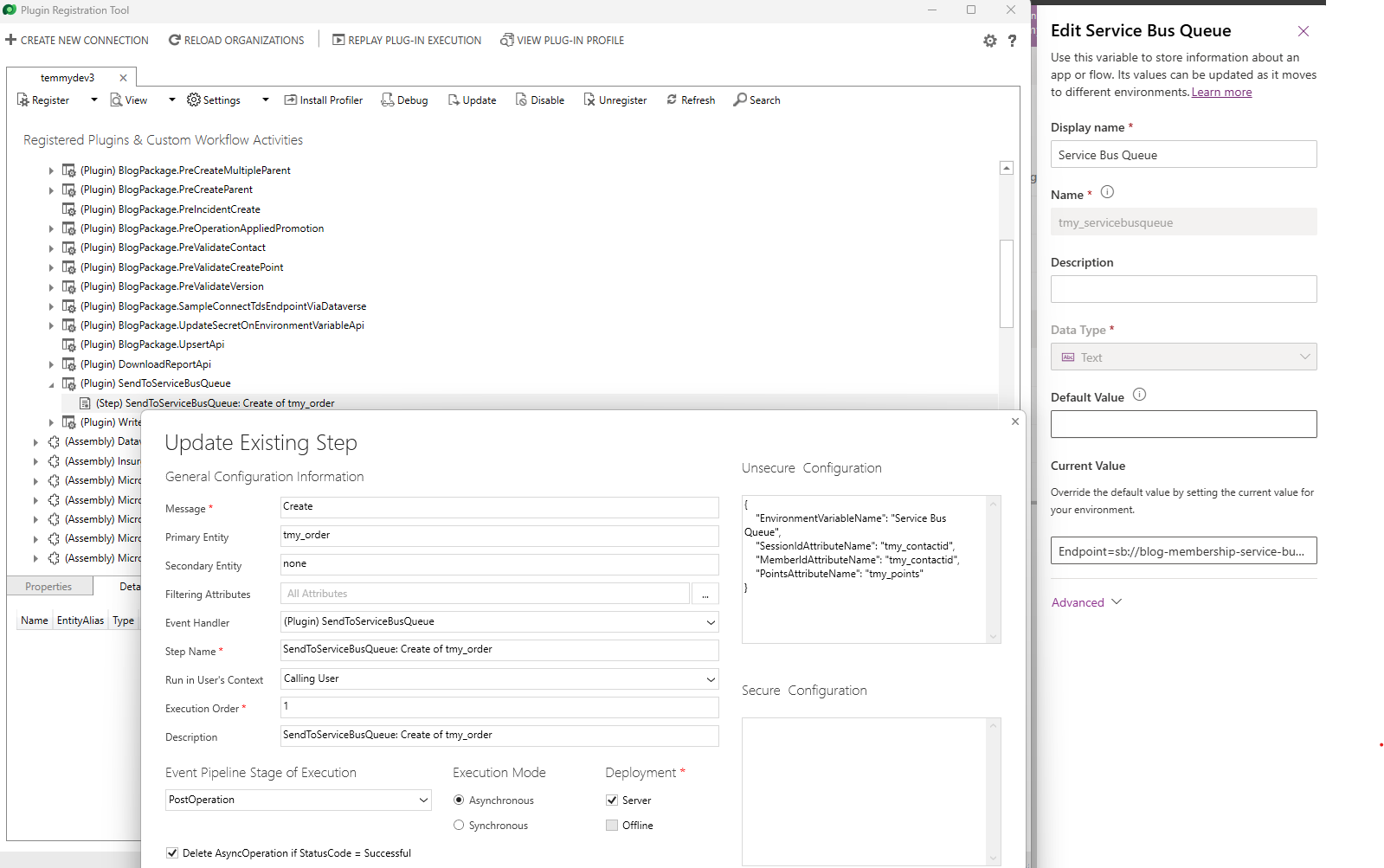
I added the below Environment Variable(format: ConnectionString|QueueName), registered the plugin step, and set the Unsecure Config needed for the testing:
Plugin step, Unsecure Config, and Environment Variable
Azure Function
Next, we need to create the Azure Function project. If you have not yet installed the Microsoft.Azure.Functions.ProjectTemplates, you need to execute the following command:
dotnet new -i Microsoft.Azure.Functions.ProjectTemplates
Then, you need to create a new project:
dotnet new func --name DotnetFuncDemo
To connect to Dataverse, you need to add a new NuGet package:
Microsoft.PowerPlatform.Dataverse.Client
For the Program.cs here is the code:
using Microsoft.Azure.Functions.Worker;
using Microsoft.Azure.Functions.Worker.Builder;
using Microsoft.Extensions.DependencyInjection;
using Microsoft.Extensions.Hosting;
using Microsoft.PowerPlatform.Dataverse.Client;

var builder = FunctionsApplication.CreateBuilder(args);

var configuration = builder.Configuration;

builder.Services.AddScoped<IOrganizationServiceAsync2>(_ => new ServiceClient(configuration["DataverseConnectionString"]));

builder.ConfigureFunctionsWebApplication();

builder.Services
    .AddApplicationInsightsTelemetryWorkerService()
    .ConfigureFunctionsApplicationInsights();

builder.Build().Run();
Then, for the main code, here is the code for the function:
using Azure.Messaging.ServiceBus;
using Microsoft.Azure.Functions.Worker;
using Microsoft.Extensions.Azure;
using Microsoft.Extensions.Logging;
using Microsoft.PowerPlatform.Dataverse.Client;
using Microsoft.Xrm.Sdk;
using Microsoft.Xrm.Sdk.Query;

namespace DotnetFuncDemo;

public class LoyaltyRequestFunction
{
    public class Request
    {
        public string MemberId { get; set; }
        public string Points { get; set; }
    }

    private readonly IOrganizationServiceAsync2 _service;
    private readonly ILogger<LoyaltyRequestFunction> _logger;

    public LoyaltyRequestFunction(IOrganizationServiceAsync2 service, ILogger<LoyaltyRequestFunction> logger)
    {
        _service = service;
        _logger = logger;
    }

    [Function(nameof(LoyaltyRequestFunction))]
    public async Task Run(
        [ServiceBusTrigger("member-queue", Connection = "ServiceBusConnectionString", IsSessionsEnabled = true, IsBatched = true)]
        ServiceBusReceivedMessage[] messages,
        ServiceBusMessageActions actions)
    {
        if (!Guid.TryParse(messages[0].SessionId, out var memberId)) return;

        _logger.LogInformation($">> Process for member ID: {memberId} - Total Messages: {messages.Length}..");

        var member = await GetContact(memberId);
        if (member == null) return;

        var currentPoints = member.GetAttributeValue<int?>("tmy_memberpoints").GetValueOrDefault();

        foreach (var message in messages)
        {
            var request = System.Text.Json.JsonSerializer.Deserialize<Request>(message.Body.ToString());
            if (request == null || !Guid.TryParse(request.MemberId, out var requestMemberId) || requestMemberId != memberId)
                continue;

            var points = int.TryParse(request.Points, out var parsedPoints) ? parsedPoints : 0;
            currentPoints += points;

            // Complete the message to remove it from the queue
            await actions.CompleteMessageAsync(message);
        }

        var update = new Entity("contact", memberId)
        {
            ["tmy_memberpoints"] = currentPoints
        };
        await _service.UpdateAsync(update);
    }

    private async Task<Entity?> GetContact(Guid memberId)
    {
        var query = new QueryExpression("contact")
        {
            ColumnSet = new ColumnSet(true),
            TopCount = 1
        };
        query.Criteria.AddCondition("contactid", ConditionOperator.Equal, memberId);

        var result = await _service.RetrieveMultipleAsync(query);

        return result.Entities.Count > 0 ? result.Entities[0] : null;
    }
}
The key in the above is to set the Azure Function IsSessionsEnabled and IsBatched to make the function able to get an array of ServiceBusReceivedMessage. Basically, the other code is just to process the message and update the Contact.MemberPoints based on the current state + with the Points retrieved from the Queue Message.
For the demo, I created the requests using ExecuteMultipleRequest:
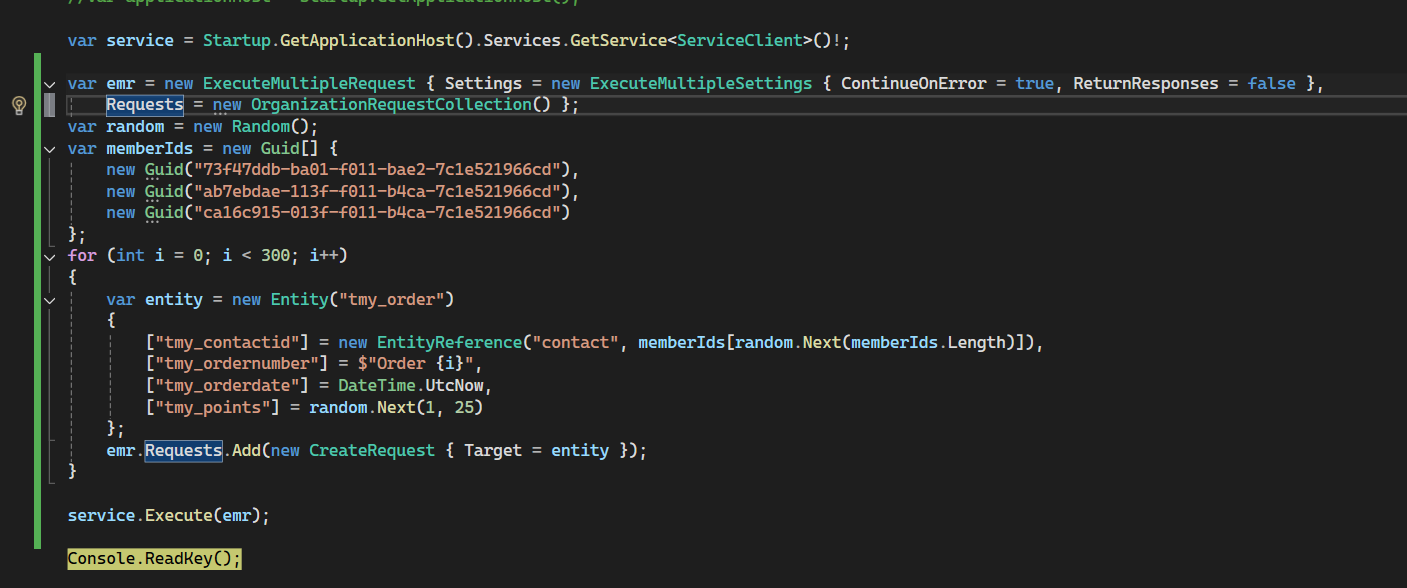
Code to simulate bulk processing via Dataverse
And here is the screenshot when Azure Function is running locally:
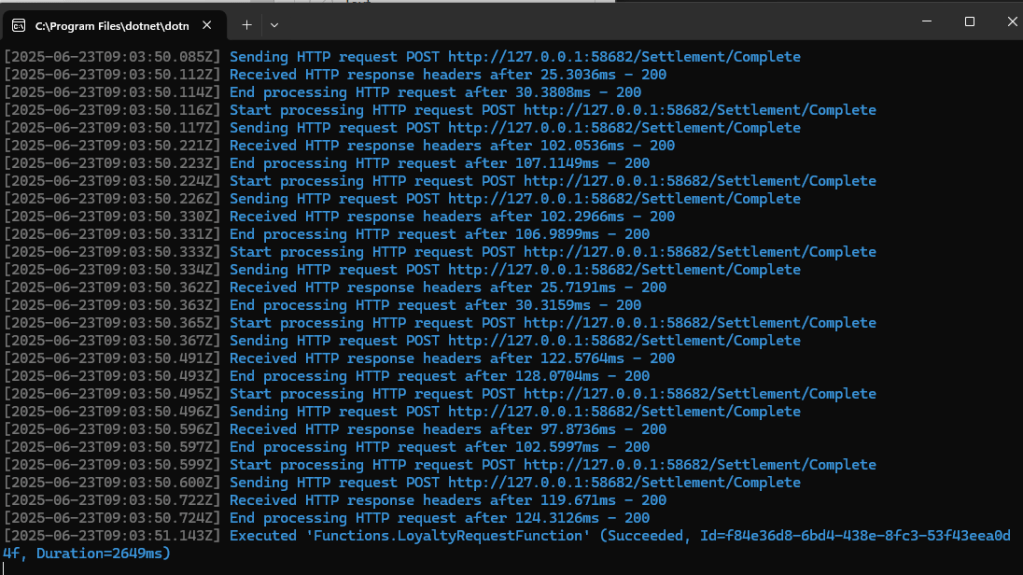
Running Azure Function processing
To check the data, here is my query in SQL 4 CDS, and all the results are reflected correctly (matched the Order vs Contact):
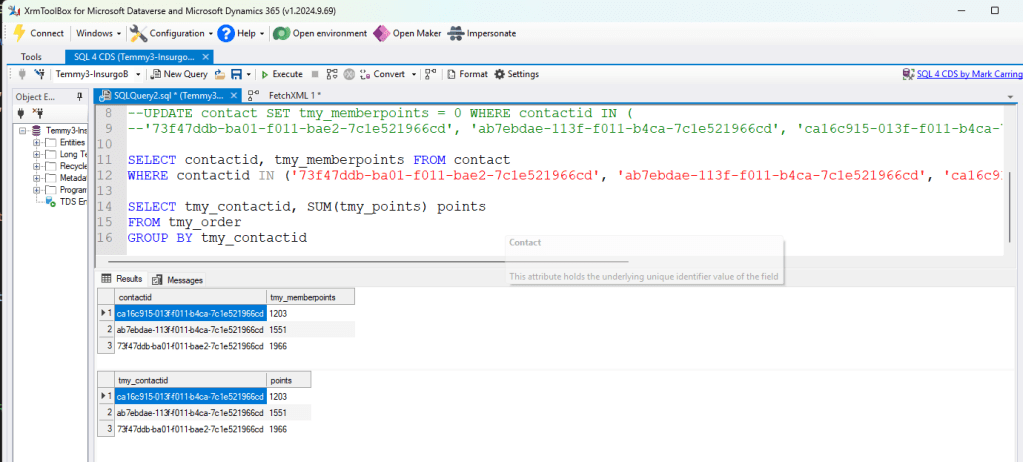
SQL 4 CDS result
Summary
- Azure Service Bus Queue helps us to process the messages synchronously based on the SessionId (sometimes the data does not come in the same group).
- The processing time can be slower compared to direct processing, as we rely on the Azure Function to process the messages.
- With this architecture, the operations are subject toService Protection API Limits. Hence, you need to think about the fallback strategy to reprocess the error (if any).
Happy CRM-ing! 🚀
Leave a comment
Your comment is sent privately to the author and isn't published on the site.