Dynamics CRM Model Driven Apps: Simple Tips for registering events in Form
I started using Dynamics CRM in version 2013. Back then, we all know if we need some retrieving function in JavaScript, we needed to create our library (HttpRequest) or use XrmSvcToolkit. Even in XrmSvcToolkit we actually can set async to true, our tendency will straight to use it as sync. And this concept is the problem that we always carry on in the current version.
The problem comes when we want to apply it in the current version. As we know, we have a WebApi project that implements promise. The concept of Promise has become a standard of Javascript development nowadays and we as CRM developers need to stop running from it. Embrace it.
Below, this is a sample of how we get data using XrmSvcToolkit(Implementation of CRM old code):
function getAccount(accountId){
    var data;
    XrmSvcToolkit.retrieve({
        entityName: "Account",
        id: accountId,
        select: ["Name", "Telephone1", "Fax", "WebSiteURL", "PrimaryContactId"],
        async: false,
        successCallback: function (result) {
          result = data;
        },
        errorCallback: function (error) {
            alert("Failed to retrieve record");
        }
    });

    return data;
}
function setByAccount() {
    var accountRef = Xrm.Page.getAttribute('new_accountid').getValue();
    if(!accountRef) return;
    var accountData = getAccount(accountRef[0].id);
    if(!accountData) return;
    Xrm.Page.getAttribute('new_description').setValue(accountData.Name);
}
From the code above, we can see getAccount function is the method that handles retrieving data. While in setByAccount method is the function that uses it and sets the result (accountData.Name) to new_description. And that's it. Clean enough!
If we refactor it to the current version of CRM, this is how the code looks like:
function error(error) {
    console.log(error);
}
function setAccount(context, account) {
    var formContext = context.getFormContext();
    context.getAttribute('new_description').setValue(account.Name);
}
function getAccount(context) {
    var accountRef = Xrm.Page.getAttribute('new_accountid').getValue();
    if (!accountRef) return;
    Xrm.WebApi.retrieveRecord('account', accountRef[0].id,
        '?$select=Name,Telephone1,Fax,WebSiteURL,PrimaryContactId')
        .then(success => setAccount(context, success),
            error => error(error));
}
Now getAccount method is being changed, from before to return the data. Now it changed to link the action (call setAccount method).
With that being said, our JavaScript changes a lot if we migrate from the old version to the new version and this is the problem that we need to face (bad design leading to regression). So how to handle it to make sure it is easier to maintain in the future? For me, the answer is when we register the function in the form. Instead of doing this:
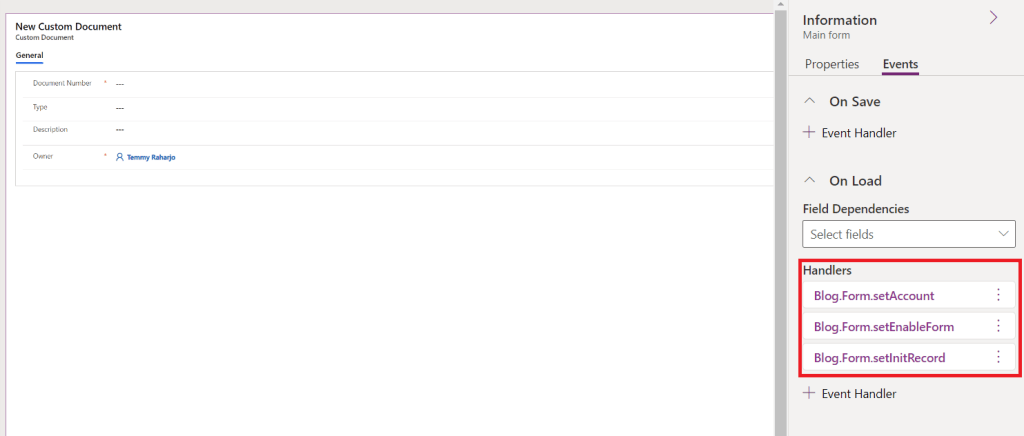
I recommend you to just register per event like this:
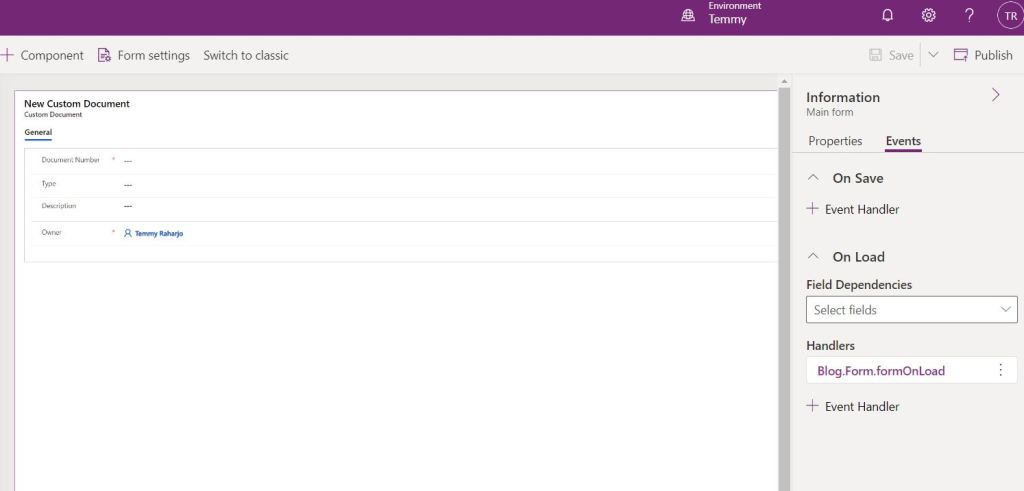
This is the code from the above event:
var Blog = Blog || {};
Blog.Form = Blog.Form || {};
(function () {
    // ...
    this.formOnLoad = function (context) {
        Blog.Form.setAccount(context);
        Blog.Form.setEnableForm(context);
        Blog.Form.setInitRecord(context);
    };
}).apply(Blog.Form);
The idea of registering event-function per event is to ease your refactoring process and you don't need to re-mapping the events if something in the future changes again. Like in the above sample, setAccount calls getAccount, **** and then in the new version, getAccount is the one that calls the setAccount.
So, do you agree with my opinion?
Leave a comment
Your comment is sent privately to the author and isn't published on the site.