Dynamics CRM Model Driven Apps: Make use of addOnLoad and removeOnLoad
In this post, we will learn about how to use formContext.data.addOnLoadand formContext.data.removeOnLoad. Generally, formContext.data.addOnLoad function is totally the same as below function (register manually from the form):
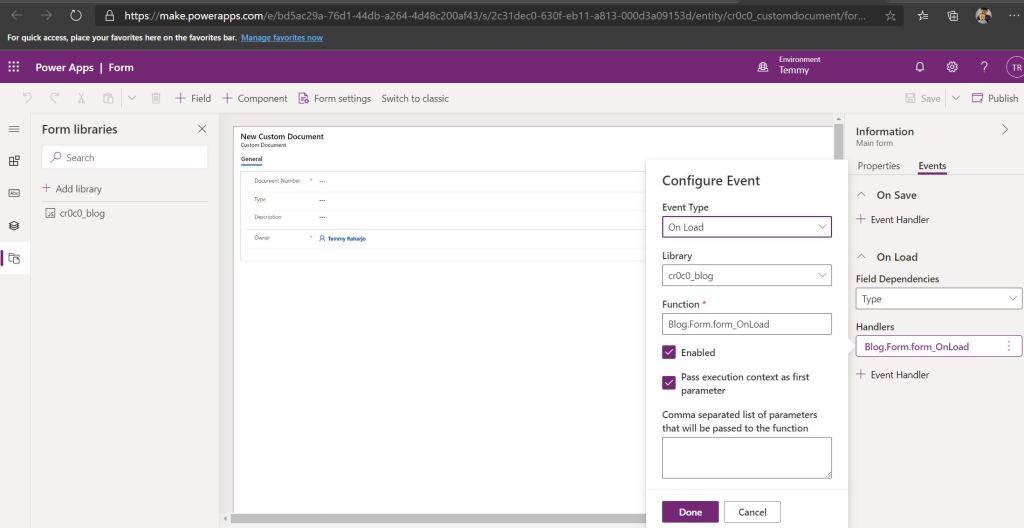
So the basic question that we will ask is why we need this API? For me, I will use this API if I have dynamic requirements. Last time, I had one friend that asked me about the complexity of the project he was doing. There are at least 3 instances of Dynamic CRM with different Solutions Installed on each layer.
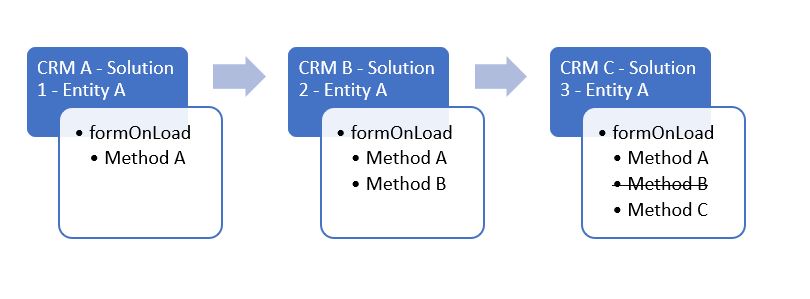
In the above Picture, CRM C has dependencies in Solution 1 and Solution 2 (Managed Solutions). The requirement for formOnLoad on Entity A in Solution 3 we need to call Method A and Method C only (removed Method B) which is not supported by the current Implementation of CRM (Solutions changes only for Added Components). So how are we going to solve this implementation?
First, you need to create 1 JavaScript like below (to simplify the process We just use 1 CRM environment but register 3 events to simulate the final result in CRM C):
var Blog = Blog || {};
Blog.Form = Blog.Form || {};
Blog.Form.Solution1 = Blog.Form.Solution1 || {};
(function() {
    this.formOnLoadFn = function(context){
        console.log('formOnLoad Solution 1');
    };
    this.form_OnLoad = function(context) {
       var formContext = context.getFormContext();
       formContext.data.addOnLoad(Blog.Form.Solution1.formOnLoadFn);
    };
}).apply(Blog.Form.Solution1);
Blog.Form.Solution2 = Blog.Form.Solution2 || {};
(function() {
    this.formOnLoadFn = function(context){
        console.log('formOnLoad Solution 2');
    };
    this.form_OnLoad = function(context) {
       var formContext = context.getFormContext();
       formContext.data.addOnLoad(Blog.Form.Solution2.formOnLoadFn);
    };
}).apply(Blog.Form.Solution2);
Blog.Form.Solution3 = Blog.Form.Solution3 || {};
(function() {
    this.formOnLoadFn = function(context){
        console.log('formOnLoad Solution 3');
    };
    this.form_OnLoad = function(context) {
       var formContext = context.getFormContext();
       formContext.data.addOnLoad(Blog.Form.Solution3.formOnLoadFn);
       formContext.data.removeOnLoad(Blog.Form.Solution2.formOnLoadFn);
    };
}).apply(Blog.Form.Solution3);
In the above coding, we just want to simulate that there are 3 JavaScript. Solutions 1, 2, and 3 have 3 events registered on formOnLoad. If you take a look closely at Blog.Form.Solution3.form_OnLoad, you will see that we remove Blog.Form.Solution2.formOnLoadFn to achieve the requirement given. Below is how I register for those events:
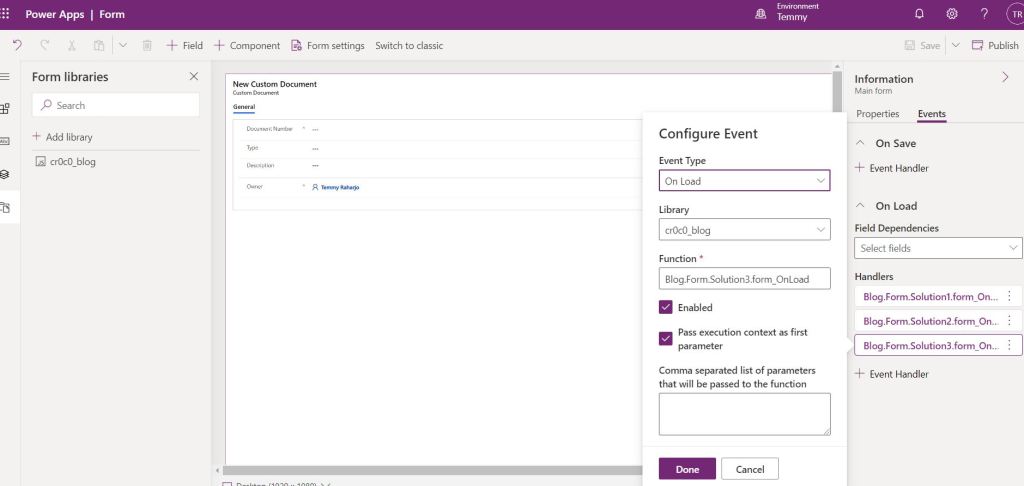
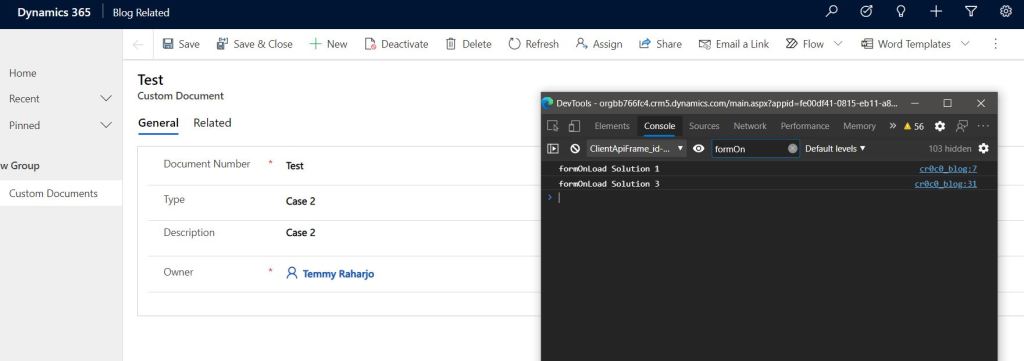
When You load the form, this is the result:
Leave a comment
Your comment is sent privately to the author and isn't published on the site.