(Dataverse) .NET API Implement Multiplexing Strategy
In some scenarios, we sometimes need to add a middleware (in this case .NET WebAPI) that connects Dataverse to other applications for integration. The reason can vary such as making the connection, request, and response to Dataverse simpler. If the integration loads are high and because we usually just use a single connection string, Microsoft will block the subsequent requests as part of Service Protection API limits to ensure availability in their service (and FYI, by default ServiceClient already has a built-in method to handle this error, but here, we adding more protection to avoid the Service Protection Limit error). Interestingly, Kingswaysoft in this blog post, gives me an idea to implement the same thing which I'll explain in detail in this blog post!
Create Multiple Application User
As you might know, the idea to bypass the error enforced by the Service Protection API Limit is to create multiple users to process the requests. The more users are used, the fewer the requests per user will be.
Create the WebApi
In this sample, I created a minimal WebAPI using .NET 8. Then you will need to install Microsoft.PowerPlatform.Dataverse.Client NuGet package into this project. Here is the csproj generated:
<Project Sdk="Microsoft.NET.Sdk.Web">

    <PropertyGroup>
        <TargetFramework>net8.0</TargetFramework>
        <Nullable>enable</Nullable>
        <ImplicitUsings>enable</ImplicitUsings>
    </PropertyGroup>

    <ItemGroup>
        <PackageReference Include="Microsoft.AspNetCore.OpenApi" Version="8.0.5"/>
        <PackageReference Include="Microsoft.PowerPlatform.Dataverse.Client" Version="1.1.22" />
        <PackageReference Include="Swashbuckle.AspNetCore" Version="6.4.0"/>
    </ItemGroup>

</Project>
Then, here are the appsettings.json:
{
  "Logging": {
    "LogLevel": {
      "Default": "Information",
      "Microsoft.AspNetCore": "Warning"
    }
  },
  "AllowedHosts": "*",
  "DataverseConnectionStrings": [
    "AuthType=ClientSecret;Url=https://yourcrmurl.crm.dynamics.com;ClientId=clientid1;ClientSecret=clientsecret1",
    "AuthType=ClientSecret;Url=https://yourcrmurl.crm.dynamics.com;ClientId=clientid2;ClientSecret=clientsecret2"
  ]
}
As you can see in the above appsettings.json, I added a **** new section "DataverseConnectionStrings". This new section will contain an array of connection strings to Dataverse.
Next, here is the Program.cs code:
using Microsoft.Crm.Sdk.Messages;
using Microsoft.PowerPlatform.Dataverse.Client;

var builder = WebApplication.CreateBuilder(args);

var connectionStrings =
    builder.Configuration
        .GetRequiredSection("DataverseConnectionStrings")
        .AsEnumerable()
        .Where(e=>!string.IsNullOrEmpty(e.Value))
        .Select(e => e.Value)
        .ToArray();

builder.Services.AddSingleton(new XrmConnection(connectionStrings));
builder.Services.AddTransient(sp =>
{
    var xrmConnection = sp.GetService<XrmConnection>();
    return new ServiceClient(xrmConnection.GetConnectionString());
});

// Add services to the container.
// Learn more about configuring Swagger/OpenAPI at https://aka.ms/aspnetcore/swashbuckle
builder.Services.AddEndpointsApiExplorer();
builder.Services.AddSwaggerGen();

var app = builder.Build();

// Configure the HTTP request pipeline.
if (app.Environment.IsDevelopment())
{
    app.UseSwagger();
    app.UseSwaggerUI();
}

app.UseHttpsRedirection();

app.MapGet("/whoami", () =>
    {
        var service = app.Services.GetService<ServiceClient>();
        var result = (WhoAmIResponse)service.Execute(new WhoAmIRequest());
        return result.UserId;
    })
    .WithName("WhoAmIResponse")
    .WithOpenApi();

app.Run();

public class XrmConnection
{
    public XrmConnection(string[] connectionString)
    {
        Connections = connectionString.Select(e => new KeyValuePair<string, int>(e, 0)).ToDictionary();
    }

    private static object _lockObject = new object();
    public Dictionary<string, int> Connections { get; set; }

    public string GetConnectionString()
    {
        lock (_lockObject)
        {
            var minValue = Connections.Min(e => e.Value);
            var key = Connections.First(e => e.Value == minValue).Key;

            Connections[key] = Connections[key] + 1;
            return key;
        }
    }
}
From the code above, you can see that I created a new class named XrmConnection. In this class, we expect the array of connection strings in the constructor and map those values to become a Dictionary with a string key and set the int value as 0. The dictionary will represent how many connections are created by the connection string (that's why, at the constructor, we set it as 0 for the initial value).
Then, the important method in this class is GetConnectionString which will take the least connection, and update the usage with current value + 1 (lines 62 - 65).
Once you understand the above, then we will go to lines 6-12 which are responsible for getting the DataverseConnectionStrings from appsettings.json and making it an array of strings.
Then, we will use Dependency Injection and register XrmConnection as singleton (line 14). Also, whenever we need the ServiceClient, we will use the Transient method and create ServiceClientwith the connection string that we got from the GetConnectionString method (lines 17 - 18).
To demonstrate the result, I created a function that will execute WhoAmIRequest (lines 37 - 44), and here is the demo:
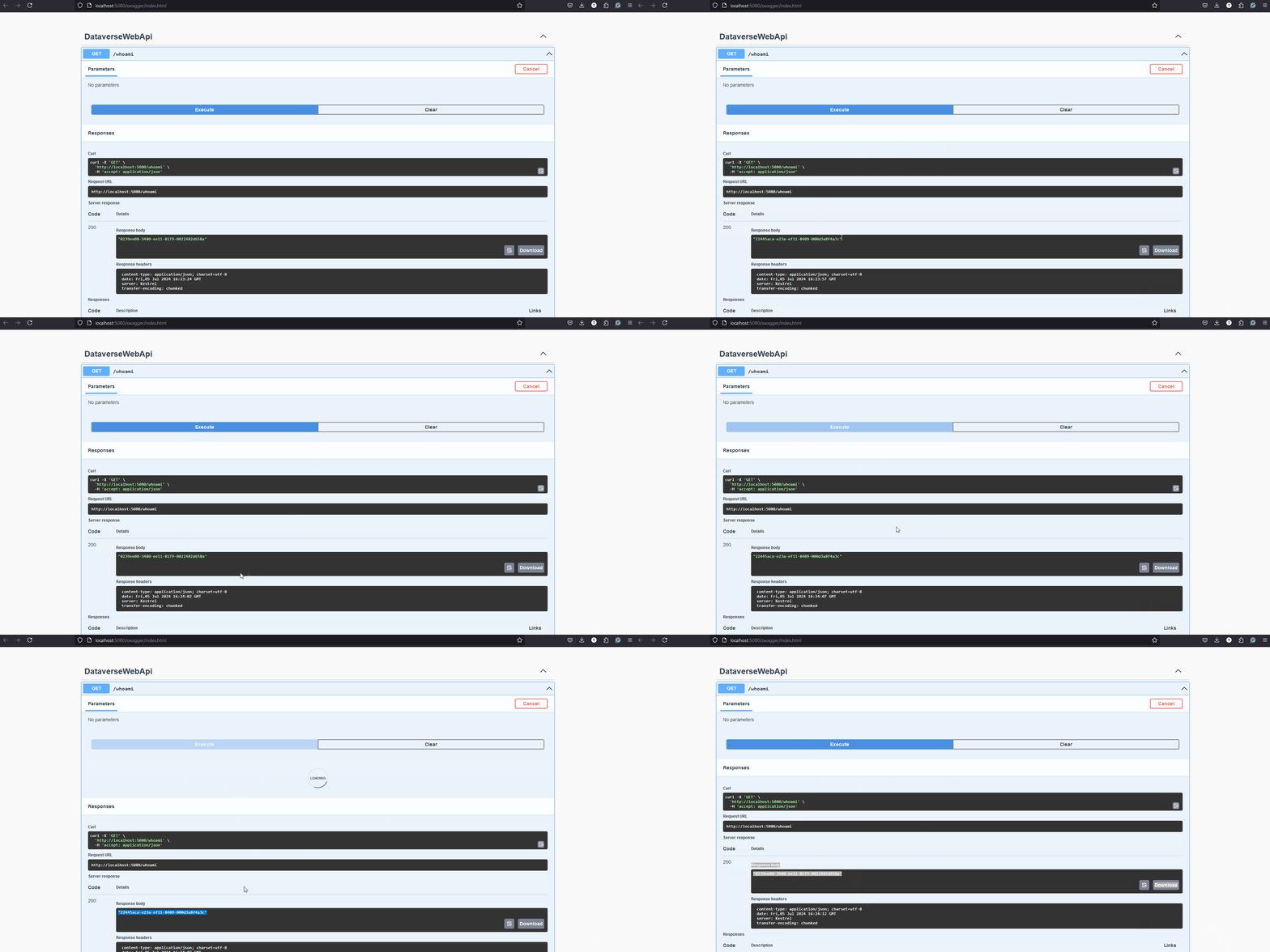
Demo
Happy CRM-ing!
Leave a comment
Your comment is sent privately to the author and isn't published on the site.