Dataverse: Create Custom Integration To Azure Cosmos DB for PostgreSQL
In a world where integration is common to do. Especially, because clouds is a common term, for sure, there are requests to integrate Dataverse with another DB (for reporting, or other system process purposes). Today, we will learn how to create Dataverse Plugins to do CUD (Create, Update, and Delete) to PostgreSQL Db. Let's go to the detailed implementation!
Prepare The DB
Go to your portal.azure.com > search "Azure Cosmos DB" > select "Azure Cosmos DB for PostgreSQL" and hit the "Create" button:
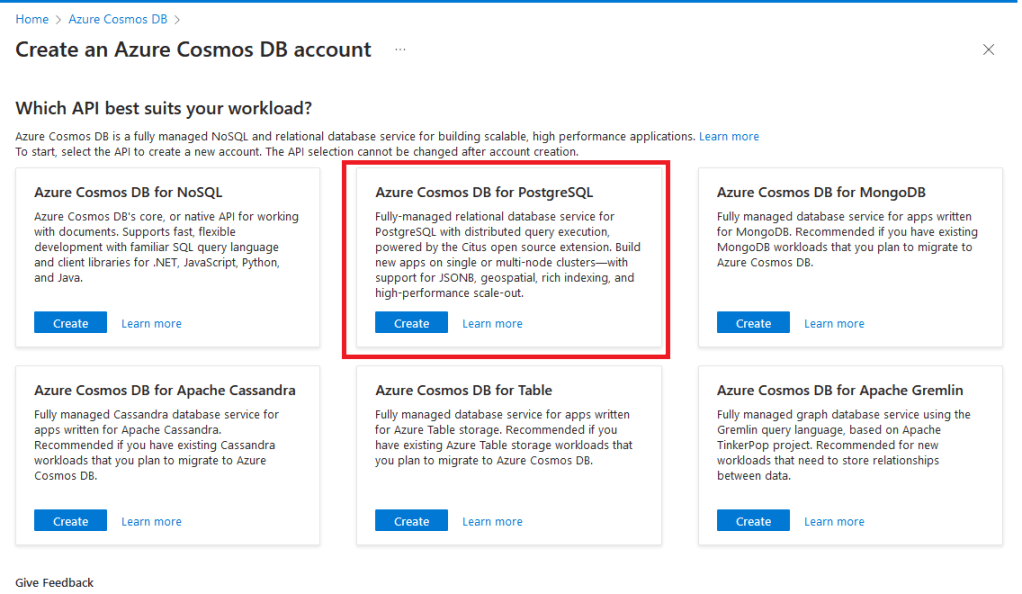
Create Azure Cosmos DB for PostgreSQL
On the Create Azure Cosmos DB for PostgreSQL cluster, you must select the specification for your DB. Because this is just for demo purposes, I set to the cheapest option:
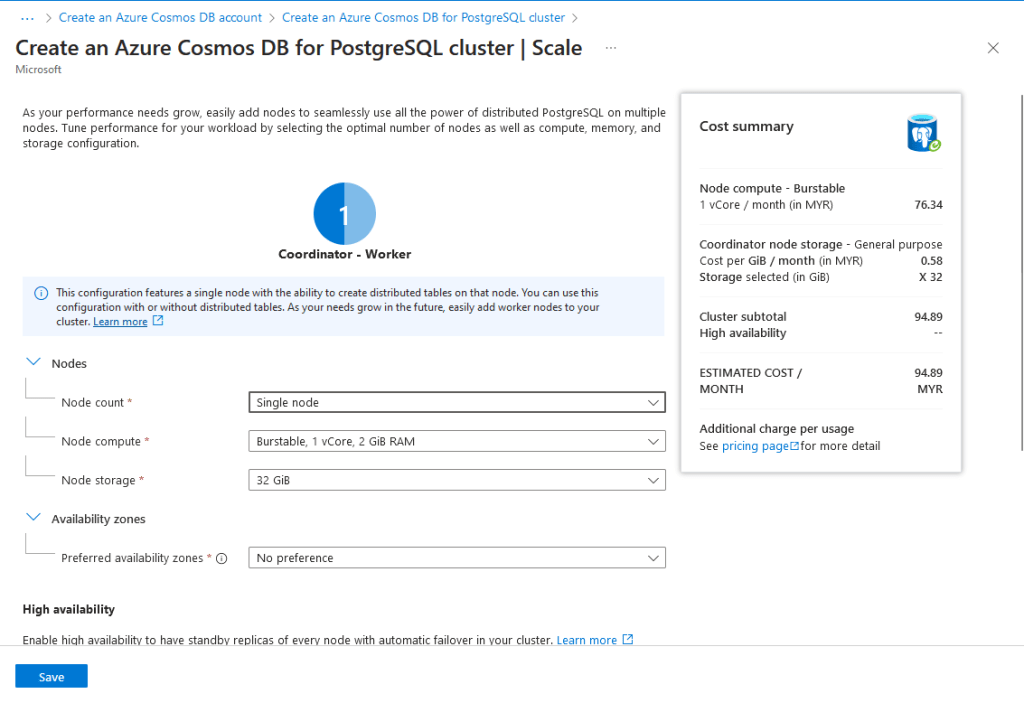
Create an Azure Cosmos DB for the PostgreSQL Cluster
Next, you need to fill in the Resource group, Cluster name, Location, and also the PostgreSQL version:
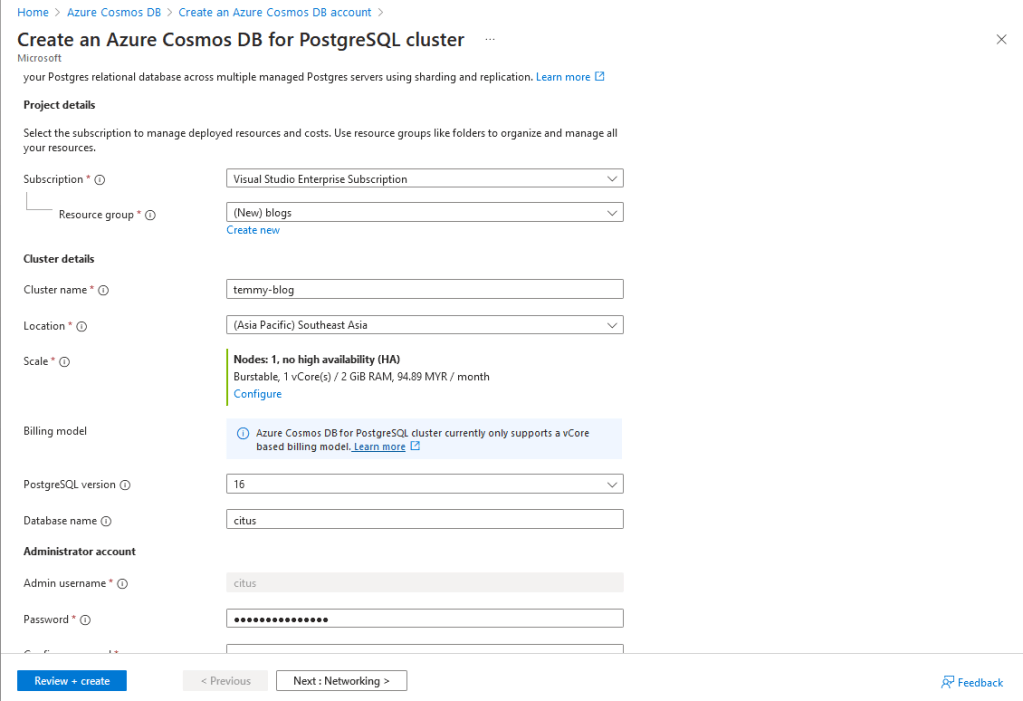
Create an Azure Cosmos DB for PostgreSQL Cluster (cont)
In the Networking tab (or you can set this once the Cluster is created), you can select to whitelist your IP Address (for creation of the DB) and tick the "Allow public access from Azure services and resources within Azure to this cluster" to enabling access from Dataverse:
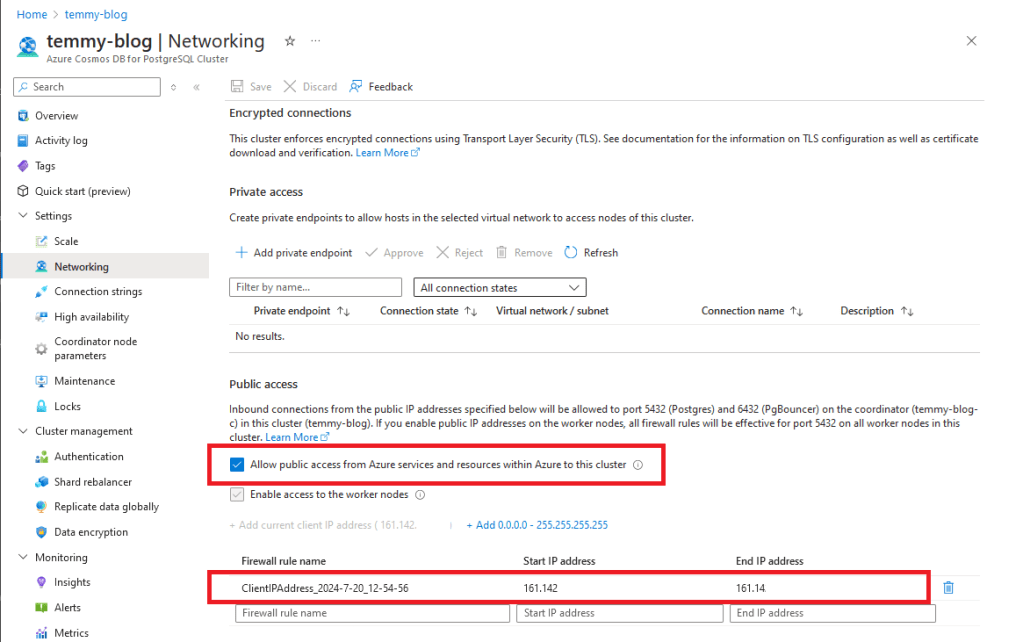
Whitelist rules
Once the PostgreSQL is created, open your VSCode > install extensions "PostgreSQL".
Then, you can create an SQL file and open it on your vscode > press CTRL + Shift + P and select the "PostgreSQL: Connect" command > fill in all the necessary information (Host, Username, Password, Port, and DB Name). You can get the connection string information from your PostgreSQL Cluster > Quick Start (preview) > Connect with pgAdmin.
After your vscode can connected to the PostgreSQL Db (you can see in the vscode on the bottom right if you successfully connected to your DB), you can create your table with the below command:
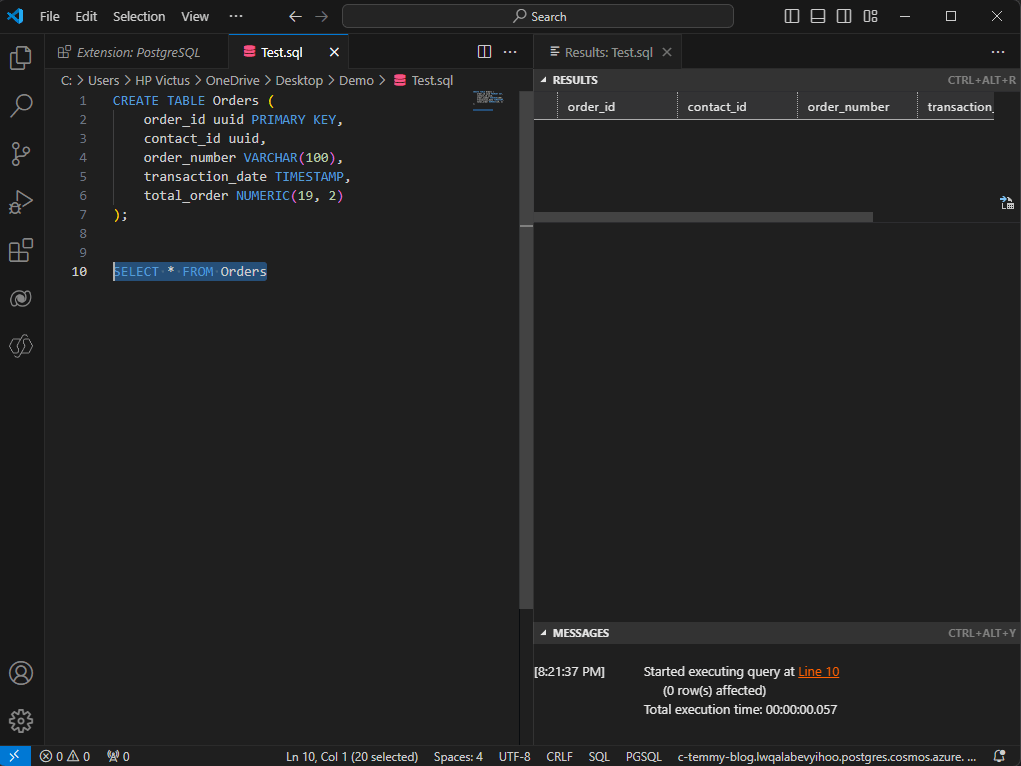
Create Order table
You can select the Create command and then press CTRL + Shift + P > PostgreSQL: Execute Query. Again, you can execute the second select command to check whether the table is created in the DB.
Create Dataverse Plugins
Next, we just need to create Dataverse Plugins. I'm using my existing Plugins Package (you can check this blog post to create the Plugin Project) > Install Npgsql Nuget package:
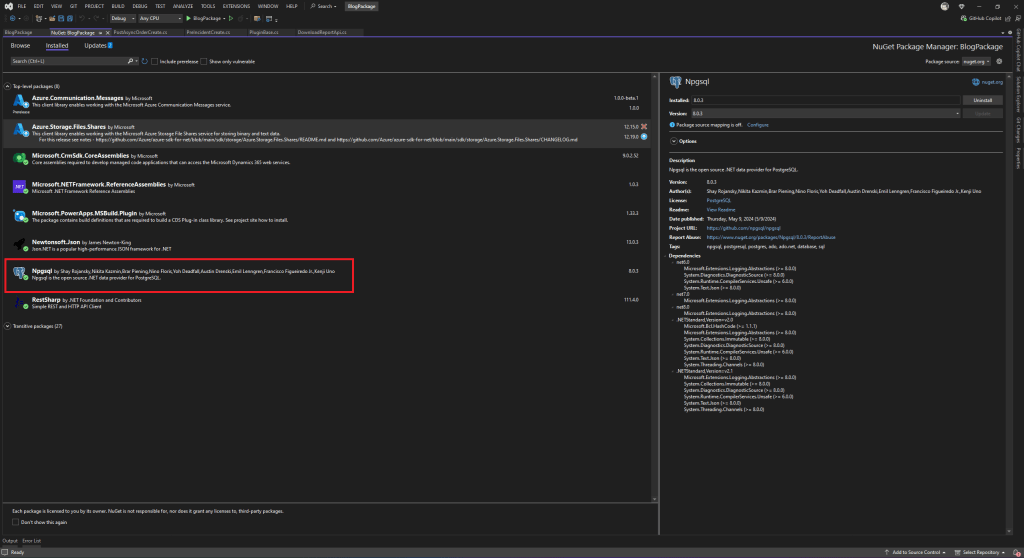
Install Npgsql Nuget Package
Below are the three Plugins CUD (Create, Update, and Delete) codes:
using Microsoft.Xrm.Sdk;
using Microsoft.Xrm.Sdk.Extensions;
using System;
using System.Collections.Generic;

namespace BlogPackage
{
    public static class OrderConst
    {
        public const string ConnectionString = "Server=yourserver.postgres.cosmos.azure.com;Database=dbname;Port=5432;User Id=userid;Password=yourpassword;Ssl Mode=Require;";
    }

    public class PostAsyncOrderCreate : PluginBase
    {
        public PostAsyncOrderCreate() : base(typeof(PostAsyncOrderCreate))
        {
        }

        protected override void ExecuteDataversePlugin(ILocalPluginContext localPluginContext)
        {
            var order = localPluginContext.PluginExecutionContext.InputParameterOrDefault<Entity>("Target");
            var orderId = order.Id;
            var customerId = order.GetAttributeValue<EntityReference>("customerid")?.Id ?? Guid.Empty;
            var orderNumber = order.GetAttributeValue<string>("ordernumber");
            var orderName = order.GetAttributeValue<string>("name");
            var requestedDeliveryDate = order.GetAttributeValue<DateTime?>("requestdeliveryby") ?? DateTime.MinValue;
            var totalOrder = order.GetAttributeValue<Money>("totalamount")?.Value ?? 0m;

            using (var connection = new Npgsql.NpgsqlConnection(OrderConst.ConnectionString))
            {
                connection.Open();

                using (var command = connection.CreateCommand())
                {
                    command.CommandText = "INSERT INTO orders (order_id, contact_id, order_number, order_name, transaction_date, total_order) VALUES (@order_id, @contact_id, @order_number, @order_name, @transaction_date, @total_order)";
                    command.Parameters.AddWithValue("order_id", orderId);
                    command.Parameters.AddWithValue("contact_id", customerId);
                    command.Parameters.AddWithValue("order_number", orderNumber);
                    command.Parameters.AddWithValue("order_name", orderName);
                    command.Parameters.AddWithValue("transaction_date", requestedDeliveryDate);
                    command.Parameters.AddWithValue("total_order", totalOrder);

                    command.ExecuteNonQuery();
                }
            }
        }
    }

    public class PostAsyncOrderUpdate : PluginBase
    {
        public PostAsyncOrderUpdate() : base(typeof(PostAsyncOrderUpdate))
        {
        }

        protected override void ExecuteDataversePlugin(ILocalPluginContext localPluginContext)
        {

            var order = localPluginContext.PluginExecutionContext.InputParameterOrDefault<Entity>("Target");
            var orderId = order.Id;

            using (var connection = new Npgsql.NpgsqlConnection(OrderConst.ConnectionString))
            {
                connection.Open();

                using (var command = connection.CreateCommand())
                {
                    var updateCommands = new List<string>();
                    if (order.Contains("customerid"))
                    {
                        var customerId = order.GetAttributeValue<EntityReference>("customerid")?.Id ?? Guid.Empty;
                        updateCommands.Add("contact_id = @contact_id");
                        command.Parameters.AddWithValue("contact_id", customerId);
                    }

                    if (order.Contains("ordernumber"))
                    {
                        var orderNumber = order.GetAttributeValue<string>("ordernumber");
                        updateCommands.Add("order_number = @order_number");
                        command.Parameters.AddWithValue("order_number", orderNumber);
                    }

                    if (order.Contains("name"))
                    {
                        var orderName = order.GetAttributeValue<string>("name");
                        updateCommands.Add("order_name = @order_name");
                        command.Parameters.AddWithValue("order_name", orderName);
                    }

                    if (order.Contains("requestdeliveryby"))
                    {
                        var requestedDeliveryDate = order.GetAttributeValue<DateTime?>("requestdeliveryby") ?? DateTime.MinValue;
                        updateCommands.Add("transaction_date = @transaction_date");
                        command.Parameters.AddWithValue("transaction_date", requestedDeliveryDate);
                    }

                    if (order.Contains("totalamount"))
                    {
                        var totalOrder = order.GetAttributeValue<Money>("totalamount")?.Value ?? 0m;
                        updateCommands.Add("total_order = @total_order");
                        command.Parameters.AddWithValue("total_order", totalOrder);
                    }

                    command.CommandText = $"UPDATE orders SET {string.Join(",", updateCommands)} WHERE order_id = @order_id";
                    command.Parameters.AddWithValue("order_id", orderId);

                    command.ExecuteNonQuery();
                }
            }
        }
    }

    public class PostAsyncOrderDelete : PluginBase
    {
        public PostAsyncOrderDelete() : base(typeof(PostAsyncOrderDelete))
        {
        }

        protected override void ExecuteDataversePlugin(ILocalPluginContext localPluginContext)
        {
            var order = localPluginContext.PluginExecutionContext.InputParameterOrDefault<EntityReference>("Target");
            var orderId = order.Id;

            using (var connection = new Npgsql.NpgsqlConnection(OrderConst.ConnectionString))
            {
                connection.Open();

                using (var command = connection.CreateCommand())
                {
                    command.CommandText = "DELETE FROM orders WHERE order_id = @order_id";
                    command.Parameters.AddWithValue("order_id", orderId);

                    command.ExecuteNonQuery();
                }
            }
        }
    }
}
As you can see in the above code, three plugins are mostly just for mapping and constructing the query to do Create - Update - Delete to PostgreSQL Orders table.
Once you are done > build and deploy the Plugin Package. Then, you need to register the plugin steps:
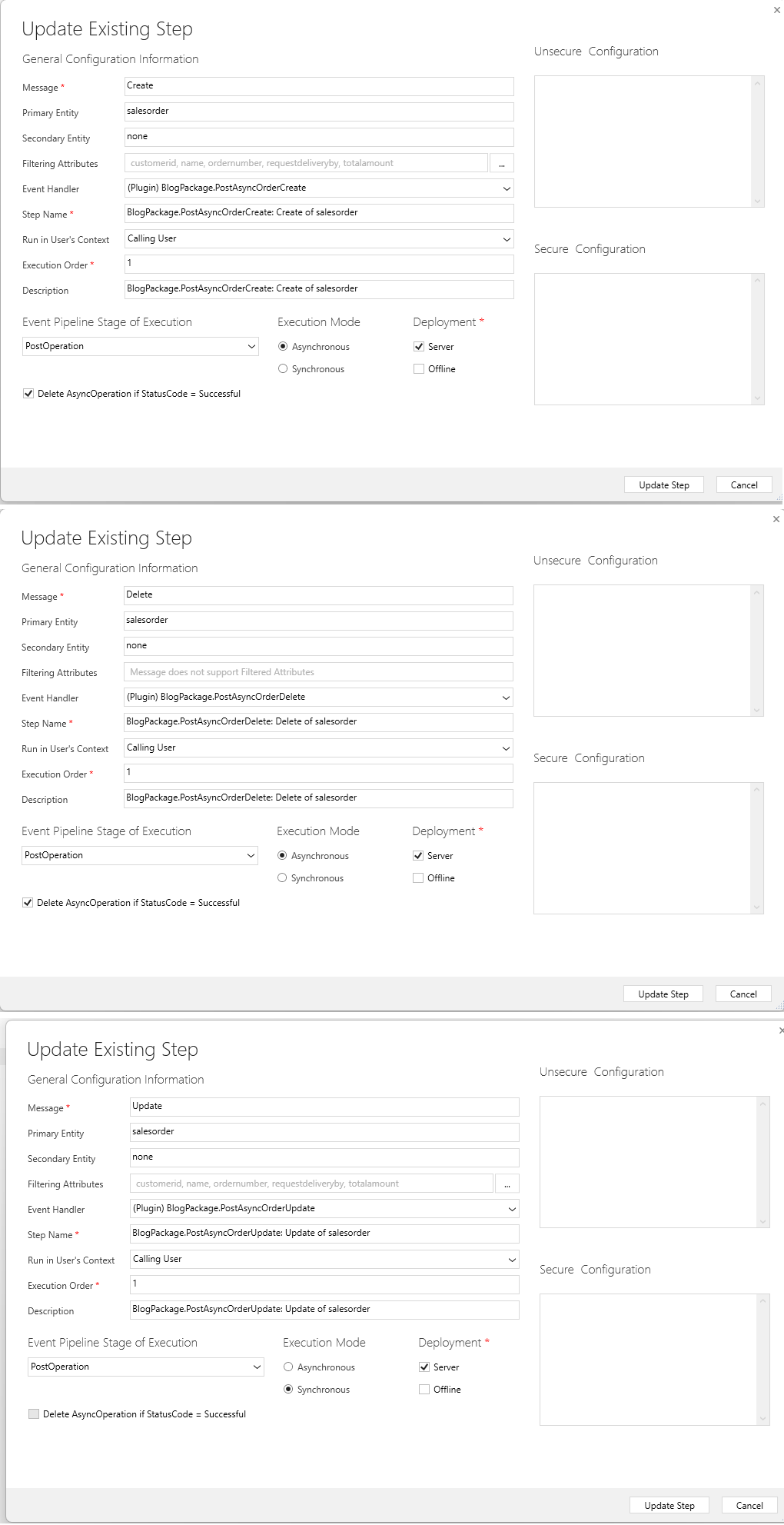
CUD Plugin Steps
Demo
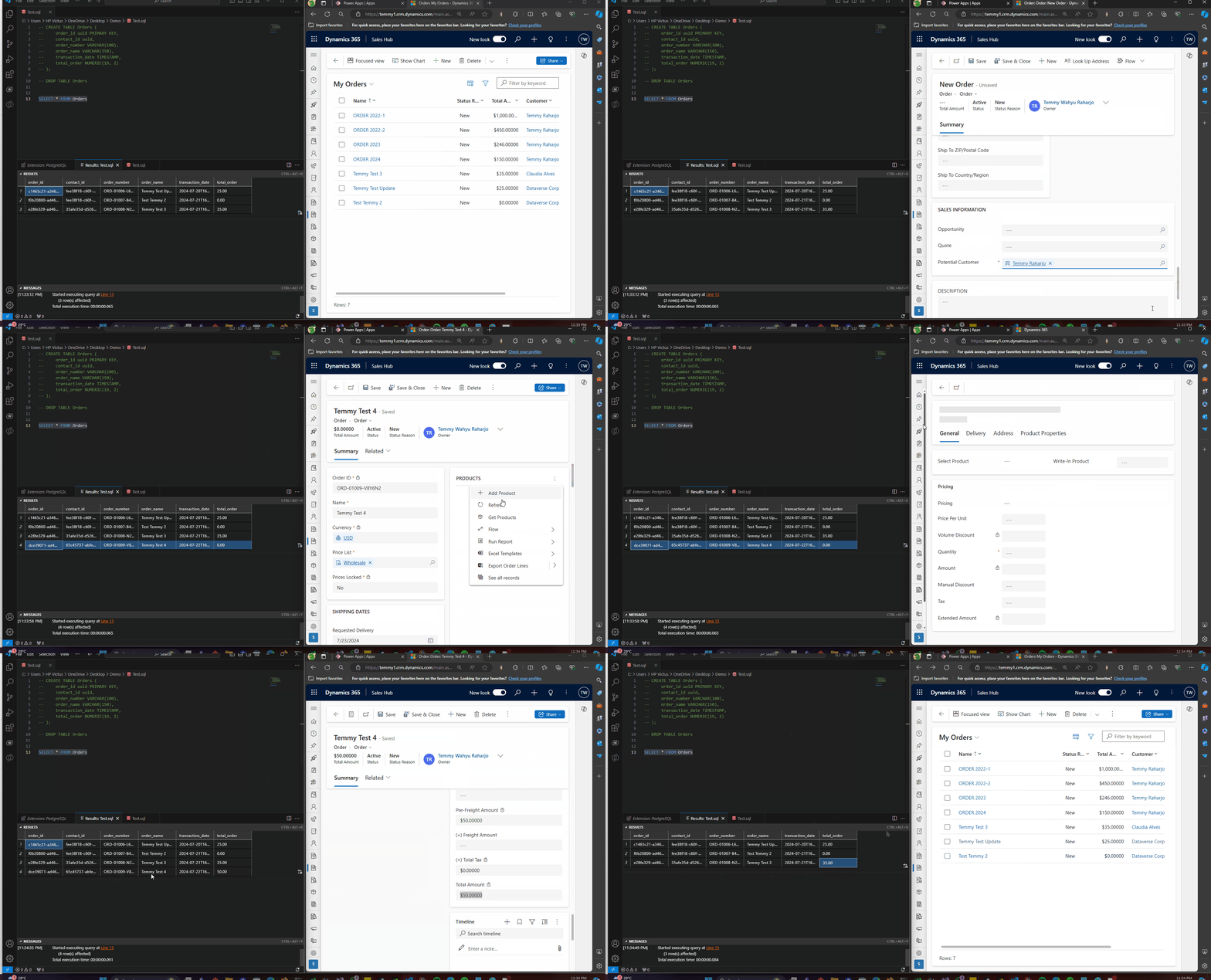
Demo PostgreSQL
Happy CRM-ing!
Leave a comment
Your comment is sent privately to the author and isn't published on the site.