MDA: Learn Xrm.WebApi.executeMultiple
Back again with a deep dive series where we will learn about Xrm.WebApi.executeMultiple. The purpose of the function is to make batch requests (the real-world scenario is to make a bunch of CUD - Create/Update/Deleteoperations). Because this is a batch scenario, the performance will be faster than the individual request. And, we also set the requests as a transaction based. This enables us to roll back the changes as long as they are in the same batch.
Error Scenario
Because we need to test the error scenario, I created the below plugin and created the Plugin Step in the Contact - Create:
using Microsoft.Xrm.Sdk;
using Microsoft.Xrm.Sdk.Extensions;
using System;

namespace BlogPackage
{
    public class PreValidateContact : PluginBase
    {
        public PreValidateContact(string unsecureConfiguration, string secureConfiguration)
            : base(typeof(PreValidateContact))
        {
        }

        protected override void ExecuteDataversePlugin(ILocalPluginContext localPluginContext)
        {
            if (localPluginContext == null)
            {
                throw new ArgumentNullException(nameof(localPluginContext));
            }

            var context = localPluginContext.PluginExecutionContext;

            var target = context.InputParameterOrDefault<Entity>("Target");

            if (target.GetAttributeValue<string>("lastname").Contains("Error")) throw new InvalidPluginExecutionException("Error name!");
        }
    }
}
ExecuteMultiple
Next, here is the JS that I ran to test the functionality:
var Sdk = window.Sdk || {};
Sdk.CreateRequest = function (entityTypeName, payload) {
    this.etn = entityTypeName;
    this.payload = payload;
    this.getMetadata = function () {
        return {
            boundParameter: null,
            parameterTypes: {},
            operationType: 2,
            operationName: "Create",
        };
    };
};

var requests = [
    new Sdk.CreateRequest("contact", { "firstname": "Temmy 1", "lastname": "Pass" }),
    new Sdk.CreateRequest("contact", { "firstname": "Temmy 2", "lastname": "Error" }),
    new Sdk.CreateRequest("contact", { "firstname": "Temmy 3", "lastname": "Pass" })
];

Xrm.WebApi.executeMultiple(requests).then(
    function success(response) {
        debugger;
        if (response.ok) {
            console.log("Record created");
        }
    }
).catch(function (error) {
    debugger;
    console.log(error.message);
});
As you can see, we will create 3 Contacts in the above code. On the 2nd data, we will trigger the error scenario. If you run it, it will result in the below:
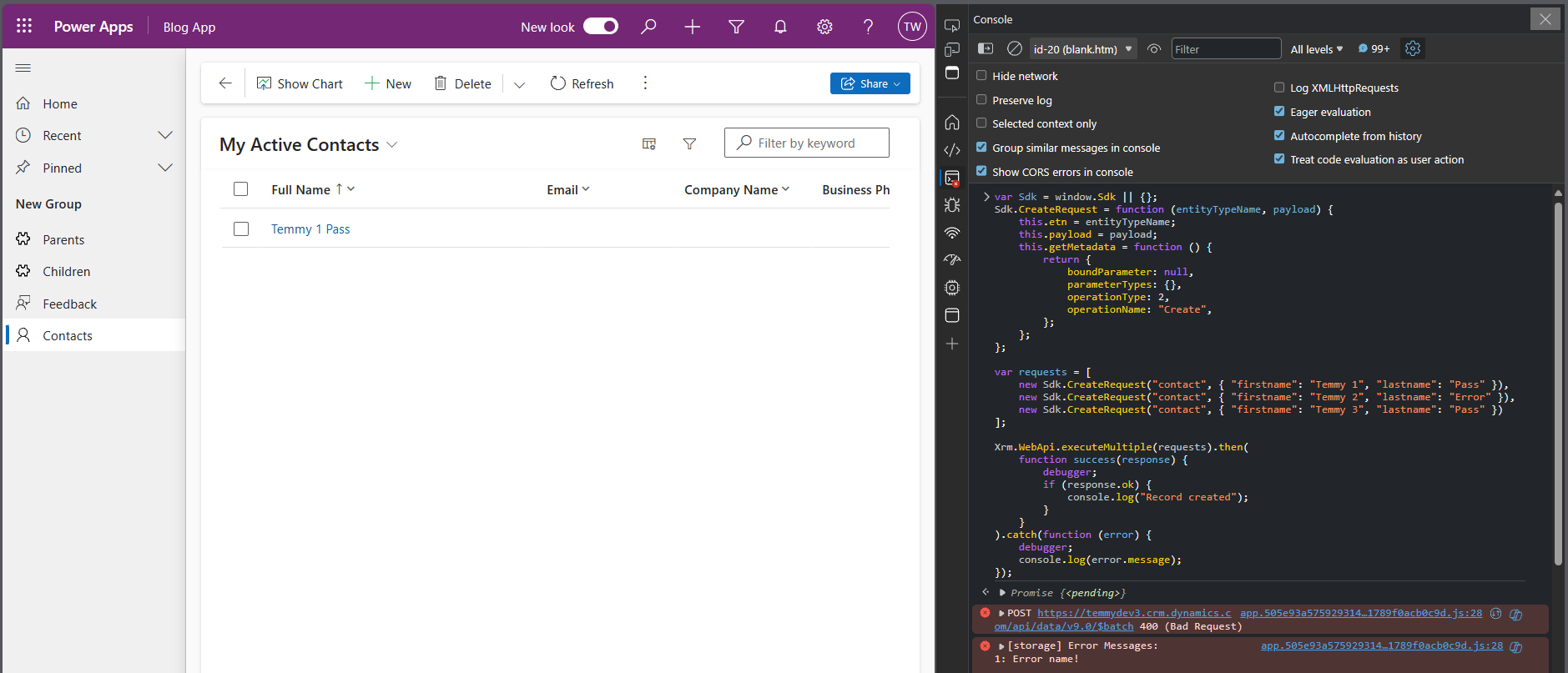
First scenario: first record created
As you can see, if we set the 2nd record error, the system will still successfully create the 1st record and the 3rd record will be skipped as there is an error in #2.
Next, if we set the like the below:
var requests = [
    new Sdk.CreateRequest("contact", { "firstname": "Temmy 1", "lastname": "Pass" }),
    new Sdk.CreateRequest("contact", { "firstname": "Temmy 2", "lastname": "Error" }),
    new Sdk.CreateRequest("contact", { "firstname": "Temmy 3", "lastname": "Pass" })
];

var changeset = [requests];

Xrm.WebApi.executeMultiple(changeset).then(
    function success(response) {
        debugger;
        if (response.ok) {
            console.log("Record created");
        }
    }
).catch(function (error) {
    debugger;
    console.log(error.message);
});
Here is the result:
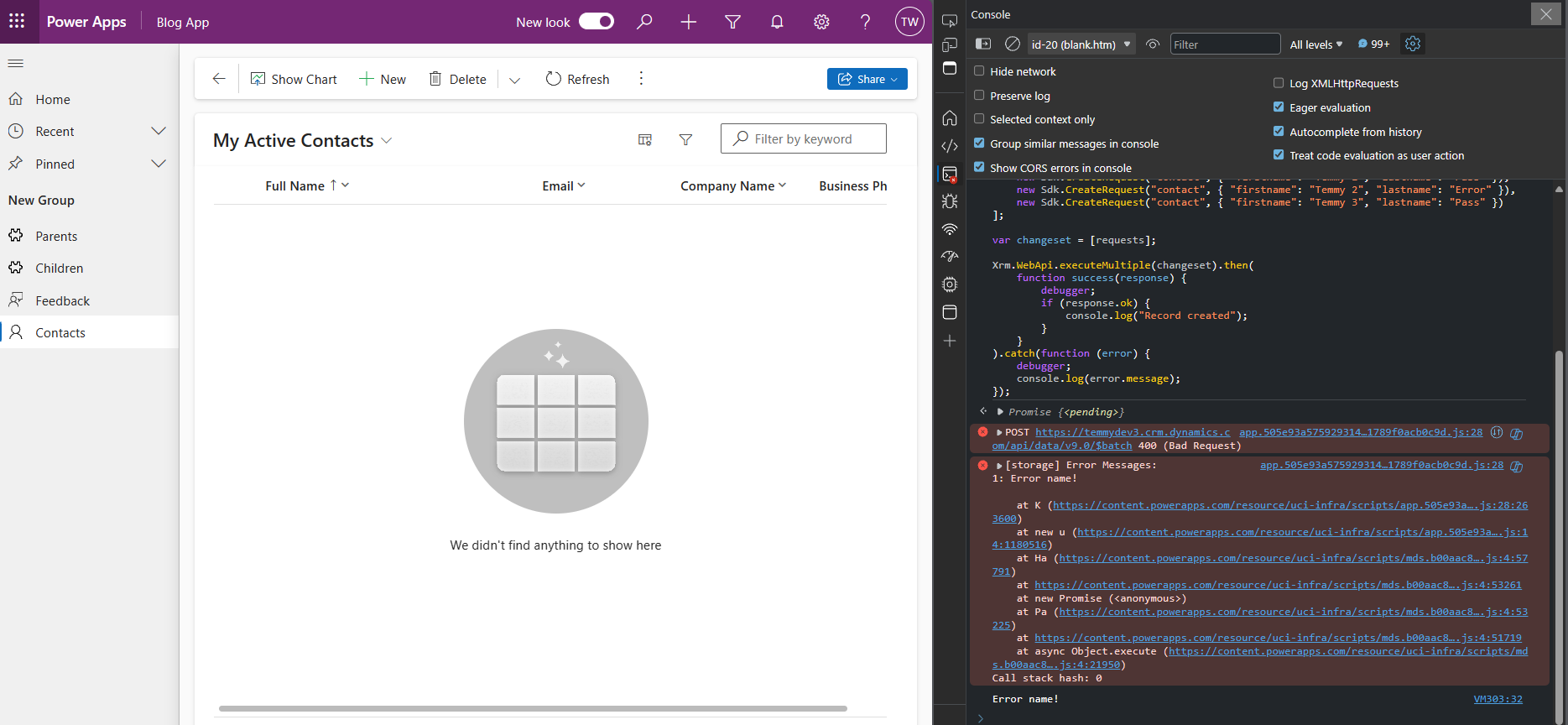
2nd Scenario: Put it as a changeset (array of requests array). When there is an error, all changes rollback
From here you will understand if you want to make all the changes rollback if there is an error, you need to set it as a changeset!
Last, scenario which is the combination of 1st and 2nd:
var changeset = [
    new Sdk.CreateRequest("contact", { "firstname": "Temmy 1", "lastname": "Pass" }),
    new Sdk.CreateRequest("contact", { "firstname": "Temmy 2", "lastname": "Error" }),
    new Sdk.CreateRequest("contact", { "firstname": "Temmy 3", "lastname": "Pass" })
];

Xrm.WebApi.executeMultiple([
        new Sdk.CreateRequest("contact", { "firstname": "Temmy 4", "lastname": "Pass" }),
        new Sdk.CreateRequest("contact", { "firstname": "Temmy 5", "lastname": "Pass" }),
        changeset
    ])
    .then(
        function success(response) {
            debugger;
            if (response.ok) {
                console.log("Record created");
            }
        }
    ).catch(function (error) {
        debugger;
        console.log(error.message);
    });
Here is the result:
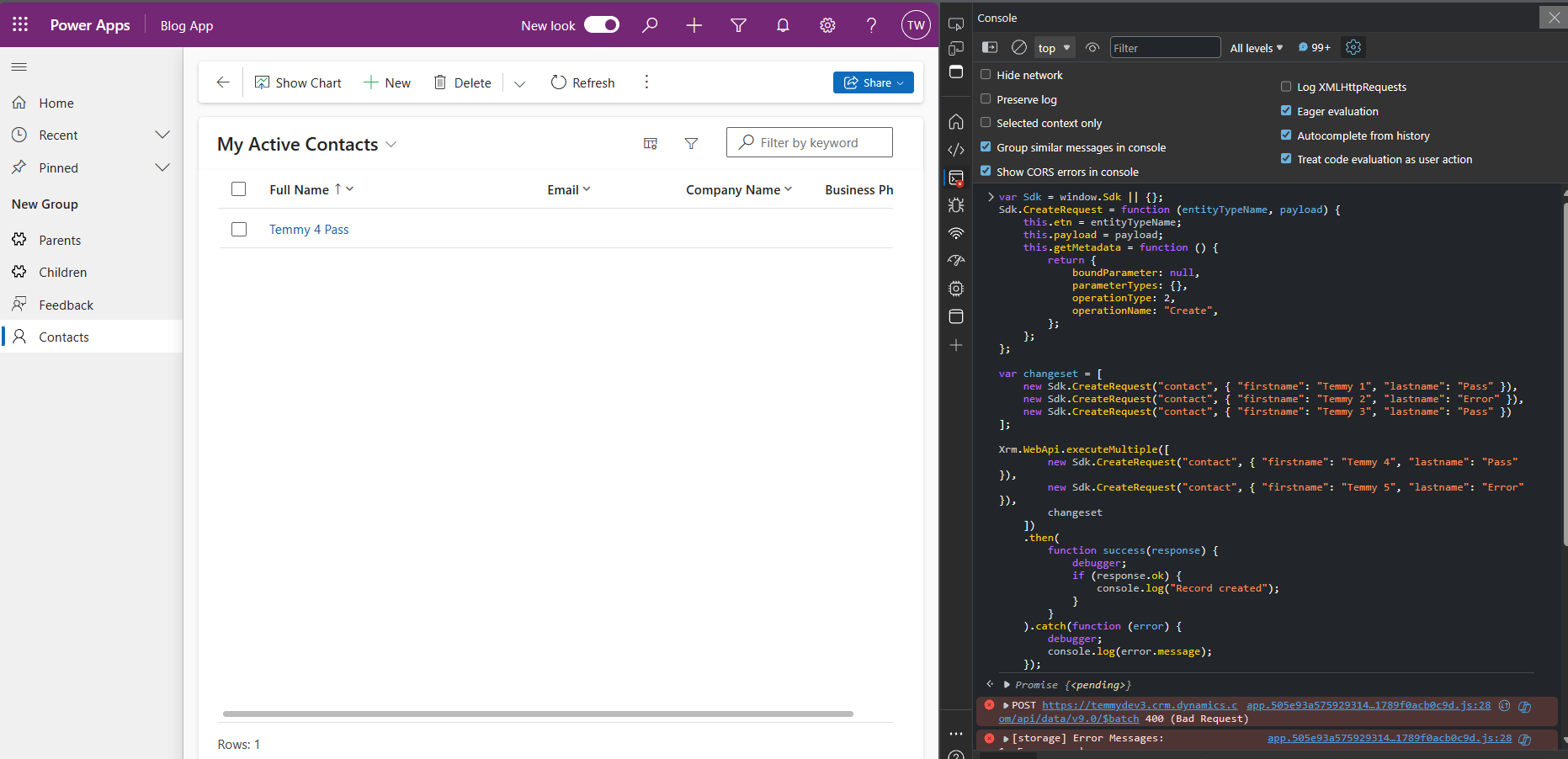
3rd scenario: Temmy 4 created!
As you can see in the above, because we set Temmy 4 and 5 not in the changeset, so the 4th is still created. And because Temmy 1 - 3 is in one batch, if there's one error, all the creation will be rolled back!
Summary
This is a good feature that we can implement from the front end where we can call batch CUD (Create/Update/Delete). The important thing for me is to always remember about the "changeset" (array of requests array) if we want to enable transaction-based operations. Hope you learn something and happy CRM-ing!
Leave a comment
Your comment is sent privately to the author and isn't published on the site.