Dynamics CRM Tips: Get Latest Target Entity Value in Plugin Side
 Please Register for this event to learn more!
If you are a Dynamics CRM Developer, you will agree with me. When creating Dynamics CRM Plugin, you will be thinking there is so much repetitive code that you need to apply when you want to do customization. Automatically what you do is open the existing plugin code, and then you do copy-paste to get all the objects that you need in the IServiceProviderobject. Those objects such as IPluginExecutionContext, IOrganizationServiceProvider, etc.
Then the most workflow that you will do, is getting the InputParameter["Target"] to get all the attributes that are changed in the UI. Then combine with that workflow, sure you have a scenario whereby you need to check the combination ofInputParameters["Target"]+ Previous data to get the latest value of the object to do something. The flow will be like the below image:
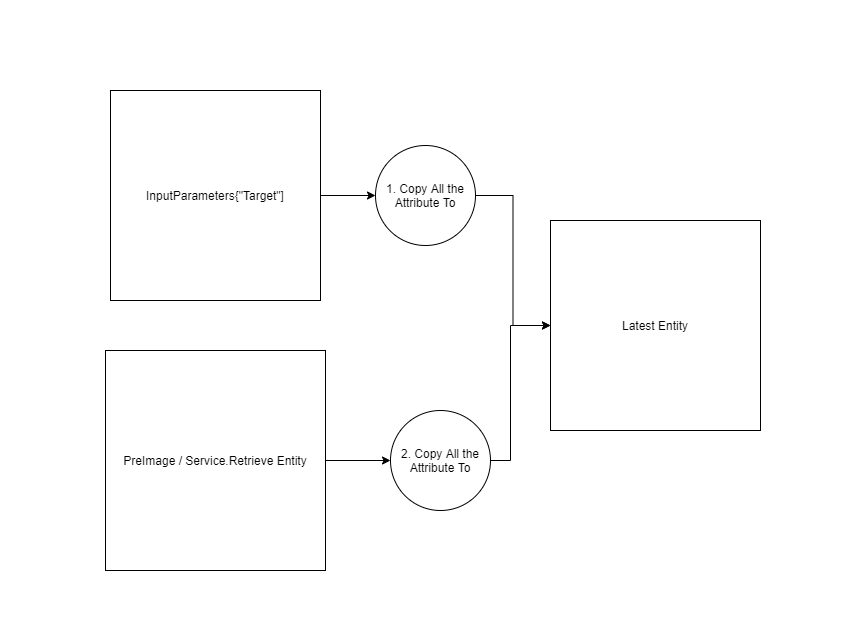 Diagram how the latest state.
To get the above result. Here is an idea to achieve that scenario:
using Microsoft.Xrm.Sdk;
using System;
using System.Text;
namespace Demo.Plugins
{
    public class StateManager
    {
        private readonly IServiceProvider _serviceProvider;
        public StateManager(IServiceProvider serviceProvider)
        {
            _serviceProvider = serviceProvider;
        }
        private IPluginExecutionContext PluginExecutionContext =>
            (IPluginExecutionContext)_serviceProvider.GetService(typeof(IPluginExecutionContext));
        public Entity Target => PluginExecutionContext.InputParameters["Target"] as Entity;
        public Entity Initial => PluginExecutionContext.PreEntityImages["EntityImage"];
        public Entity Latest
        {
            get
            {
                var temp = Initial;
                foreach (var targetAttribute in Target.Attributes)
                {
                    temp[targetAttribute.Key] = targetAttribute.Value;
                }
                return temp;
            }
        }
    }
    public class PreUpdateOperation : IPlugin
    {
        public void Execute(IServiceProvider serviceProvider)
        {
            var stateManager = new StateManager(serviceProvider);
            stateManager.Target["new_orderdetail"] = "CHANGE FROM PLUGIN";
            stateManager.Target["new_qty"] = 9999;
            var sb = new StringBuilder();
            sb.AppendLine($"Init: \n{GetFormatValue(stateManager.Initial)}");
            sb.AppendLine($"Target \n{GetFormatValue(stateManager.Target)}");
            sb.AppendLine($"Latest \n{GetFormatValue(stateManager.Latest)}");
            throw new InvalidPluginExecutionException(sb.ToString());
        }
        private string GetFormatValue(Entity obj)
        {
            var orderDetail = obj.GetAttributeValue<string>("new_orderdetail");
            var customOrderRef = obj.GetAttributeValue<EntityReference>("new_orderid");
            var productRef = obj.GetAttributeValue<EntityReference>("new_productid");
            var qty = obj.GetAttributeValue<int>("new_qty");
            var pricePerUnit = obj.GetAttributeValue<Money>("new_price");
            return
                $"Name: {orderDetail}. Order: {customOrderRef?.Name}. Product: {productRef?.Name}. " +
                $"Qty: {qty}. Price: {pricePerUnit?.Value}";
        }
    }
}
In the above code, you will see that we need to rely on 1 object for reading purposes instead of needing to do checking like the below code:
var qty = (input["new_qty"] ?? reference["new_qty"]) as int?;
But that code above, will not cover if we want to do updating in Plugin Message below Main Operation (PreValidate and PreOperation). We must manually set the ***stateManager.Input["attribute"]***to set the value.
Demonstration
Here is the result of the above plugin step:
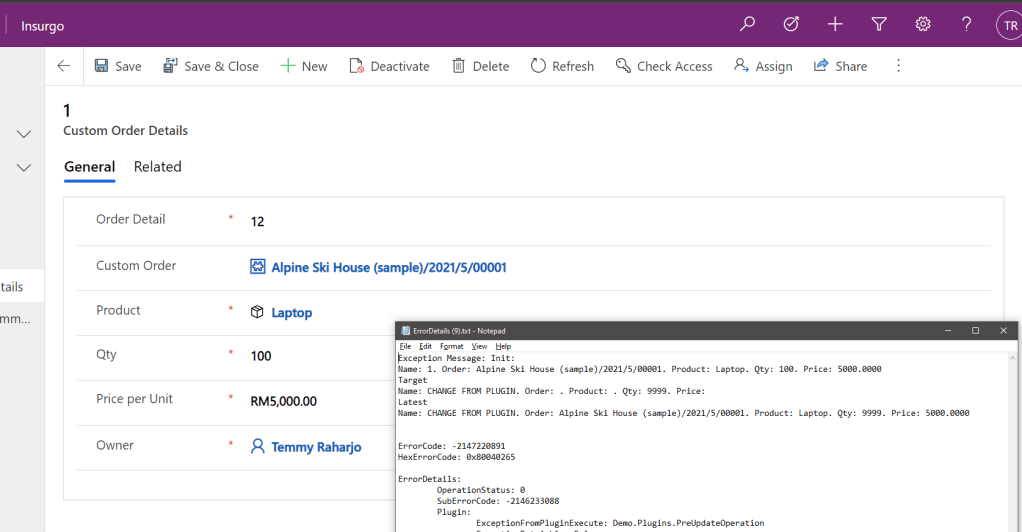 The latest value retrieved successfully
Summary
Niam.Xrm.Framework is a Dynamics CRM Plugin framework that I have been using for almost 6 years. This framework has lots of functionality to help us focus on the Business Logic + increase our productivity instead of doing lots of repetitive work. This 29th May 2021 at 3 PM (Malaysia Time), I will speak on Power Community - Power Apps Bootcamp about this framework. You can join to learn more about this framework.
For more info about the event, you can go here: https://events.powercommunity.com/powerapps-developer-bootcamp-2021/.
Leave a comment
Your comment is sent privately to the author and isn't published on the site.