Dynamics CRM Plugin Development: Exploring File and Image DataType
Last week, we learned about File DataTypeand created Custom API to get the FileName and the Base64StringContent. Which I thought is already good enough based on the last knowledge that I knew. But then I saw a post from Daryl Labar about his XrmToolbox EarlyBound Generator improvement around four months ago that said it will generate File attribute type:
 Daryl's said his Generator also generates File DataType
Once I generated the entities generated, I inspected the result and saw that CRM created <file_type_attribute_name>+"_name" attribute (retrievable when we query the main entity). So we can improve something on the last blog post to avoid the error throw if the entity doesn't have a file attachment if the user requested. We also can get the FileAttachmentId when we access <file_type_attribute_name>.
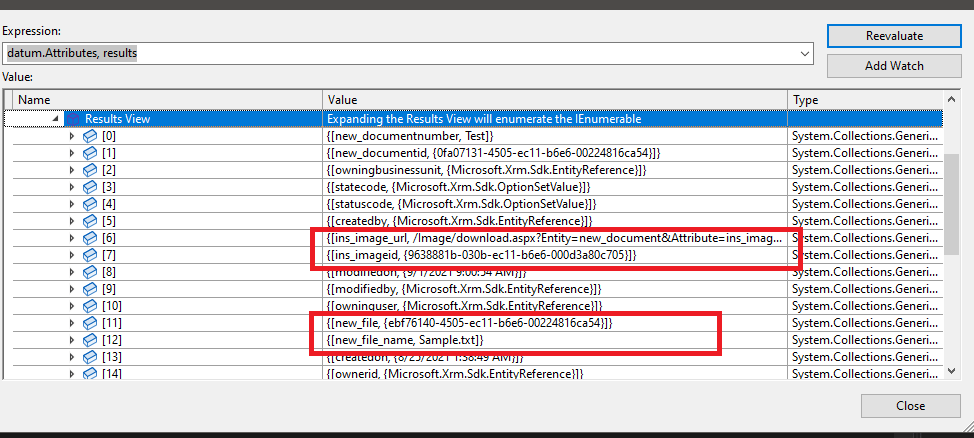 Debug result for Image + File DataType
We can query the FileAttachmententity and filter by the objectid but we only can get just for File Type only.
        private static FileAttachment[] GetFile(CrmServiceClient client, Guid objectId)
        {
            var query = new QueryExpression(FileAttachment.EntityLogicalName)
            {
                ColumnSet = new ColumnSet(true)
            };
            query.Criteria.AddCondition("objectid", ConditionOperator.Equal, objectId);

            var result = client.RetrieveMultiple(query);

            return result.Entities?.Select(e => e.ToEntity<FileAttachment>()).ToArray();
        }
You only can use the RetrieveMultiplemethod to query this entity (FileAttachment). If you use the Retrievefunction, there will be an error throw: The 'Retrieve' method does not support entities of type 'fileattachment'.
The same pattern also can be seen on Image DataType. But the difference is for Image information, the FileAttachmentIdattribute can be accessed with the format:<image_type_attribute_name>+"id", while there is also an attribute with format ***<image_type_attribute_name>+"_url"***that will show you the image location. But both of DataTypegot similar action to download (via InitializeFileBlocksDownloadrequestand DownloadBlockRequest).
So with this new knowledge, we can add some logic to make our last Custom API nicer (slower, but it's better to avoid errors on the plugin because it will lead to random errors afterward):
using Microsoft.Crm.Sdk.Messages;
using Microsoft.Xrm.Sdk;
using Microsoft.Xrm.Sdk.Query;
using Niam.XRM.Framework.Interfaces.Plugin;
using Niam.XRM.Framework.Plugin;
using System;
using System.Collections.Generic;
using System.Linq;

namespace Insurgo.Custom.Api.Business
{
    public class GetFileInAttribute : OperationBase<Entity>
    {
        public const string InputEntityLogicalName = "EntityLogicalName";
        public const string InputEntityGuid = "EntityGuid";
        public const string InputFileAttributeName = "FileAttributeName";

        public const string OutputFileName = "FileName";
        public const string OutputFileContent = "FileContent";

        public GetFileInAttribute(ITransactionContext<Entity> context) : base(context)
        {
        }

        protected override void HandleExecute()
        {
            var fileInformation = GetFileContinuationToken();
            if (string.IsNullOrEmpty(fileInformation.FileContinuationToken)) return;

            var req = new DownloadBlockRequest { FileContinuationToken = fileInformation.FileContinuationToken, BlockLength = fileInformation.FileSizeInBytes };
            var result = (DownloadBlockResponse)Service.Execute(req);

            Context.PluginExecutionContext.OutputParameters[OutputFileName] = fileInformation.FileName;
            Context.PluginExecutionContext.OutputParameters[OutputFileContent] = Convert.ToBase64String(result.Data);
        }

        private InitializeFileBlocksDownloadResponse GetFileContinuationToken()
        {
            var entityLogicalName = Context.PluginExecutionContext.InputParameters[InputEntityLogicalName].ToString();
            var entityId = new Guid(Context.PluginExecutionContext.InputParameters[InputEntityGuid].ToString());
            var attributeName = Context.PluginExecutionContext.InputParameters[InputFileAttributeName].ToString();

            var fileAttributes = GetFileAttributes(attributeName).ToArray();

            var data = Service.Retrieve(entityLogicalName, entityId, new ColumnSet(true));

            if (!fileAttributes.Any(expectedAttribute => data.Contains(expectedAttribute)))
            {
                return new InitializeFileBlocksDownloadResponse();
            }

            var initializeFile = new InitializeFileBlocksDownloadRequest
            {
                FileAttributeName = attributeName,
                Target = new EntityReference(entityLogicalName, entityId)
            };

            return (InitializeFileBlocksDownloadResponse)Service.Execute(initializeFile);
        }

        private IEnumerable<string> GetFileAttributes(string attributeName)
        {
            yield return attributeName; // For File
            yield return $"{attributeName}id"; // For Image
        }
    }
}
Some people will argue that we are supposed not to retrieve all columns. But for now, I think this strategy will be nicer compared to the last one. From the knowledge that we get so far if the DataType is File, then we can search directly using attribute_name. But if we want to allow our Custom API to download Image DataType, then we need to add attribute_name+"id". Or to avoid this retrieve all, meaning that you can split the Custom API to make it strict (but I'm not doing it like that for now).
Below picture is the result when we want to get Image DataType from Flow:
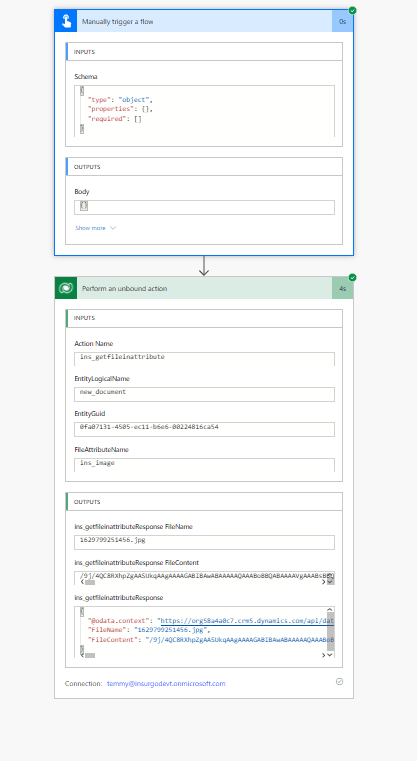 Flow to get Image DataType
Summary
- All the File and Image datatype information will be stored on fileattachment entity.
- You can retrieve File DataType if you filter based on objectid from fileattachment entity.
- If you want to download Image DataType, you must use the same method as File DataType (through InitializeFileBlocksDownloadrequestand DownloadBlockRequest) which makes me combine both of these actions into a single custom API.
- Check the Entity Generator by Daryl! The most complete generator I know.
The solution and the code can be checked in this GitHub repo.
Leave a comment
Your comment is sent privately to the author and isn't published on the site.