Dynamics CRM Model-Driven Apps: Setup Testing Environment with chai, Mocha, xrm-mock, and SinonJS
As developers, we are supposed to adapt ourselves to a better working framework or mindset. Following a Test-Driven Development (TDD) mindset, for example, enables us to work more effectively in the long run, compared to not using it. Hence making unit tests has become a crucial part (at least for me), and this post will explain how to set up our project to enable unit testing in our Model-Driven-Apps front-end development. This post is a continuation of this blog post. If you have not yet checked that, you need to go there to get the context (also the zip file).
After you open the project, you can run this command to install some packages:
npm install chai mocha ts-node @types/chai @types/mocha sinon @types/sinon xrm-mock --save-dev
This are the information on the npm packages that we are installing:
| Npm Packages | Description |
|---|---|
| chai | Chai is a BDD / TDD assertion library for node and the browser that can be delightfully paired with any javascript testing framework. |
| mocha | Mocha is a feature-rich JavaScript test framework running on Node.js and in the browser, making asynchronous testing simple and fun. Mocha tests run serially, allowing for flexible and accurate reporting, while mapping uncaught exceptions to the correct test cases. Hosted on GitHub. |
| SinonJS | Standalone test spies, stubs and mocks for JavaScript.<br>Works with any unit testing framework. |
| xrm-mock | xrm-mock is a fake implementation of the Dynamics 365 Client API and Xrm object model. Written in TypeScript against @types/xrm definitions. |
NPM Packages
First, we need to configure our package.json file to enable the test command:
{
  "name": "basic-crm-typescript",
  "version": "1.0.0",
  "description": "Sample of how to implement TypeScript for Dynamics CRM",
  "main": "index.js",
  "scripts": {
    "build": "webpack",
    "test": "mocha -r ts-node/register '**/*.spec.ts'"
  },
  "keywords": [
    "powerapps",
    "dynamics-crm",
    "model-driven-apps",
    "microsoft",
    "typescript"
  ],
  "author": "Temmy",
  "license": "ISC",
  "devDependencies": {
    "@types/chai": "^4.2.14",
    "@types/mocha": "^8.2.0",
    "@types/sinon": "^9.0.9",
    "@types/xrm": "^9.0.31",
    "chai": "^4.2.0",
    "mocha": "^8.2.1",
    "sinon": "^9.2.2",
    "terser-webpack-plugin": "^5.0.3",
    "ts-loader": "^8.0.11",
    "ts-node": "^9.1.1",
    "typescript": "^4.1.2",
    "webpack": "^5.10.0",
    "webpack-cli": "^4.2.0",
    "xrm-mock": "^3.4.21"
  }
}
The highlight syntax in the top (mocha -r ts-node/register '**/*.spec.ts') means we will only register all files as long as the file format is *.spec.ts.
Because from the last post we already have implementation code, now we will create the test file for it (src/new_customdocument/form.spec.ts):
import { expect } from 'chai';
import { XrmMockGenerator } from 'xrm-mock';
import { initFormCreate } from './form';
import * as sinon from 'sinon';

describe('new_customdocument form tests', () => {
    beforeEach(() => {
        XrmMockGenerator.initialise();
        XrmMockGenerator.Attribute.createString('new_name');
        XrmMockGenerator.Attribute.createDate('new_documentdate');
    });

    describe('on form update', () => {
        beforeEach(() => {
            sinon.stub(XrmMockGenerator.getFormContext().ui, 'getFormType').
                returns(XrmEnum.FormType.Update);
        });

        it('initFormCreate skip set', () => {
            initFormCreate(XrmMockGenerator.getEventContext());

            var formContext = XrmMockGenerator.getFormContext();

            expect(formContext.getAttribute('new_name').getValue()).to.empty;
            expect(formContext.getAttribute('new_documentdate').getValue()).to.undefined;
        });
    });

    describe('on form create', () => {
        beforeEach(() => {
            sinon.stub(XrmMockGenerator.getFormContext().ui, 'getFormType').
                returns(XrmEnum.FormType.Create);
        });

        it('initFormCreate set name and document date', () => {
            initFormCreate(XrmMockGenerator.getEventContext());

            var formContext = XrmMockGenerator.getFormContext();

            expect(formContext.getAttribute('new_name').getValue()).to.equal('Form TypeScript UI');
            expect(formContext.getAttribute('new_documentdate').getValue()).to.not.null;
        });
    });
});
As you can see, we use sinon to return mock the value return when we call formContext.ui.getFormType().
To run the test, we can run it using this command:
npm run test
This is the result:
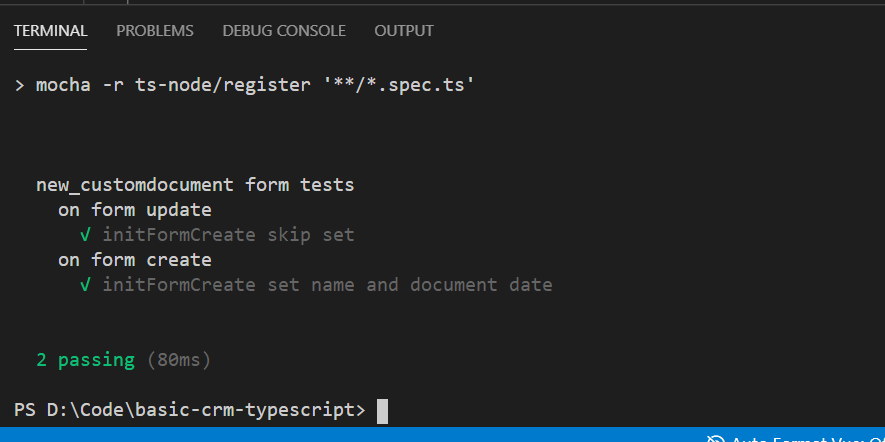 Result testing in command prompt
Summary
Until this step, you already have a better environment than before. You can reduce typing errors (using TypeScript) and you already can apply your unit testing using xrm-mock as its Xrm object replacement. And all of this is production-ready!
You can download the source code here.
Leave a comment
Your comment is sent privately to the author and isn't published on the site.