Dynamics CRM Model-Driven-Apps: formContext.data.entity.addOnPostSave vs modified_OnChanged
What is the way that you used Dynamics CRM to call the javascript method after saving the entity? For example, after the record is saved, you want to re-run the form_onLoad function again so you can see the latest state of your controls (set required/hide). Or probably you want to open WebResource or add Form Notification to the user. Here, I will be explaining about 2 methods that we can use to achieve this requirement.
Here is the code that we will learn today:
var Blog = Blog || {};
// This variable being used for make sure the event register only once per lifetime
var load;
(function () {
    var setNotification = function (context, message, id) {
        var formContext = context.getFormContext();
        formContext.ui.setFormNotification(message, "INFO", id);
        window.setTimeout(function () {
            formContext.ui.clearFormNotification(id)
        }, 10000);
    };
    var addOnPostSave = function (context) {
        if (load) return;
        var formContext = context.getFormContext();
        formContext.data.entity.addOnPostSave(function () {
            setNotification(context, "FROM: addOnPostSave", "_adddOnPostSave");
        });
        load = true;
    };

    this.form_onLoad = function (context) {
        addOnPostSave(context);
    };
    this.modified_onChanged = function (context) {
        setNotification(context, "FROM: modified_onChanged", "_modified_onChanged");
    };
}).apply(Blog);
And when I saved the form, here is the result:
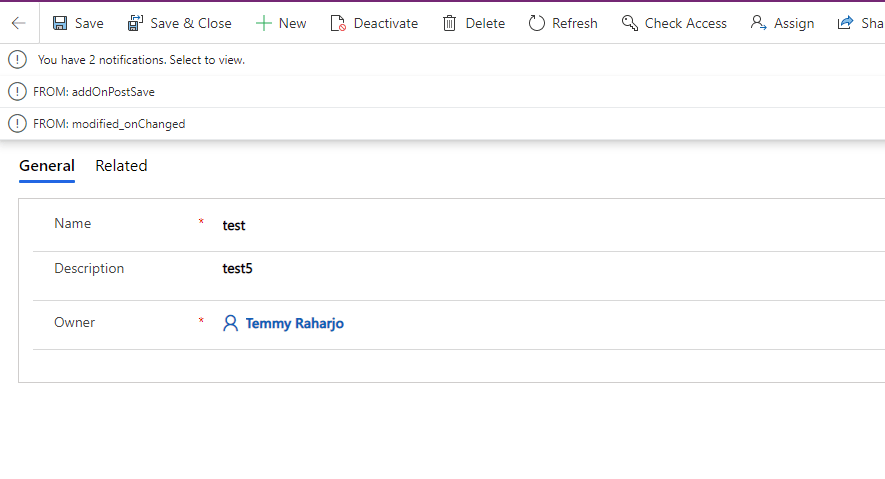 After the data is saved, the function triggering the Form Notification
The addOnPostSave method
The first method is formContext.data.entity.addOnPostSave***.***The formContext.data.entity.addOnPostSaveis a method that lets the developer register a custom function to be executed after the data is saved (success/fail). So in the addOnPostSavemethod, you can see that we registered the custom function of setNotification. The important point here, you need to make sure the function only be registered once. That is why the variable loadis being used.
Modified On Changed Method
The second method steps:
- Add Modified Onattribute into the form (You can set Visibleto false).
- Add new Event> register your modified_onChangedjavascript function to this attribute (Modified On).
The below picture is how I register the function:
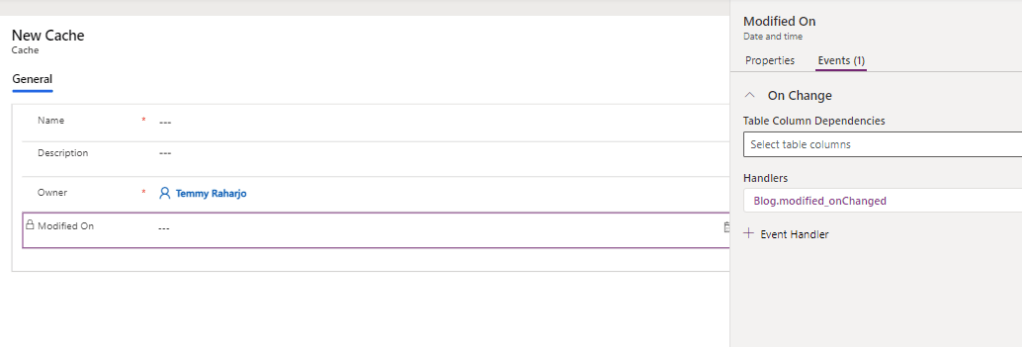 Registering javascript function in Modified On Change
If you wondering why is it working. The answer is CRM will be comparing the value of each attribute from the backend, and compare it with the current front-end attribute's value. If got changes to it, then the value will be replaced (the Modified Onattribute will always be updated, that is why we use this attribute to verify the changes). Hence the onChangedevent will be triggered. This behavior is a long time not being changed and this is my way to go before I knew formContext.data.entity.addOnPostSaveAPI*.*
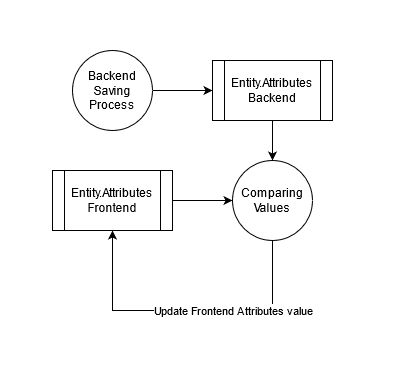 The system will replace all old attribute values, hence the event will be triggered
Summary
- The formContext.data.entity.addOnPostSave **** provides a very easy-to-understand method to register custom functions after the saving process is successfully called.
- You need to make sure you only call this formContext.data.entity.addOnPostSave once so the method is not registered so many times.
- The second method even though it is working, the method is more tedious because we need to add the Modified Onattribute in the form + register on the change event.
Leave a comment
Your comment is sent privately to the author and isn't published on the site.