Dynamics CRM: Implement Retry Policy using Polly
Lately, I'm still actively thinking about designing a system that also considers error-proofing as part of the feature. For example, we want to ensure the transaction that we will execute is successful in 3 times execution. Meaning, we need to implement a retry policy that Polly can handle! I know Polly when I read "How to maximize throughput" in Microsoft Documentation which makes me curious about this NuGet package. So without further ado, let's make a simple demonstration!
Table
For this demonstration purpose, I have a Table named new_test and have a column (datatype text) new_name:
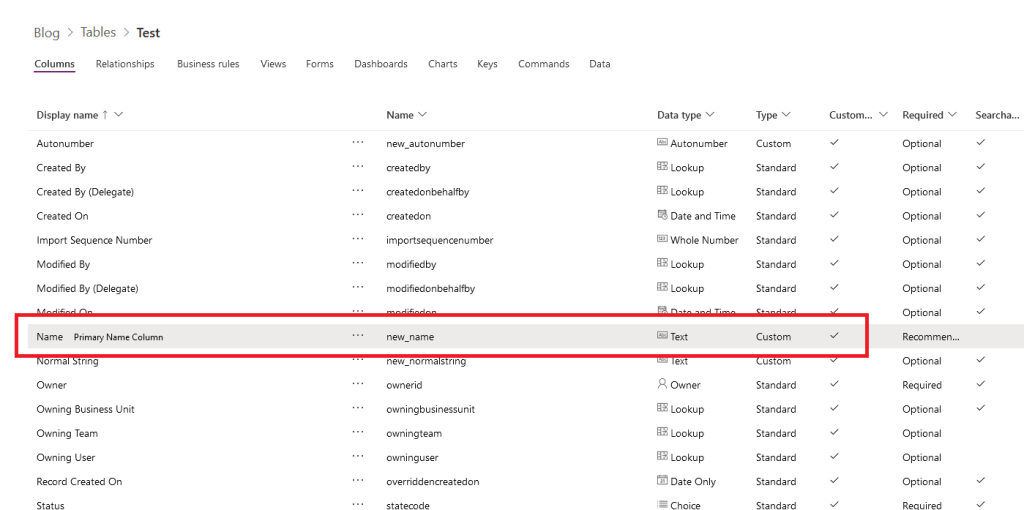 Table Definition
* Please don't follow this naming when creating a Table/Column for your production!🤣
Plugin
In the next step, I will make a simple plugin with the below logic:
using Microsoft.Xrm.Sdk;
using System;
using System.Threading;

namespace DemoPlugin
{
    public class Plugin1 : IPlugin
    {
        public void Execute(IServiceProvider serviceProvider)
        {
            var context = (IPluginExecutionContext)
                serviceProvider.GetService(typeof(IPluginExecutionContext));
            var target = context.InputParameters["Target"] as Entity;
            if (target == null) return;

            var name = target.GetAttributeValue<string>("new_name");
            if (name != "4") throw new InvalidPluginExecutionException("Error From Plugin!");
        }
    }
}
We will make sure that if the new_nameis not equal to "4", we will throw an error from the plugin. With this, we can test our retry policy.
* You can register this plugin in the Update Message + Pre-Operation mode.
Exe
The last part is to make the Exe part (Console Application with .NET Framework 4.7.2). Because we need to use CRM and Poly, we must install the below NuGet packages:
Install-Package Microsoft.CrmSdk.CoreAssemblies -Version 9.0.2.42
Install-Package Polly -Version 7.2.3
Here is the code that I created for this demo purpose:
using System;
using System.Web.Configuration;
using Microsoft.Xrm.Sdk;
using Microsoft.Xrm.Tooling.Connector;
using Polly;

namespace CrmCheck
{
    class Program
    {
        static int _name = 0;
        static void Main(string[] args)
        {
            var maxRetry = 5;
            var pauseBetweenFailures = TimeSpan.FromSeconds(10);
            var retryPolicy = Policy.Handle<System.ServiceModel.FaultException>(
                ex =>
                {
                    return ex.Message == "Error From Plugin!";
                }).WaitAndRetry(maxRetry, i => pauseBetweenFailures);

            retryPolicy.Execute(() => Update());

            Console.ReadKey();
        }

        static void Update()
        {
            try
            {
                Console.WriteLine($"Begin Update {_name} at {DateTime.Now}..");
                var connectionString = WebConfigurationManager.AppSettings["connectionString"];
                var client = new CrmServiceClient(connectionString);

                var update = new Entity("new_test") { Id = new Guid("6b941994-6c86-ec11-93b0-002248296e0d") };
                update["new_name"] = _name.ToString();

                client.Update(update);

                Console.WriteLine("Success Updating record!");
            }
            catch (Exception ex)
            {
                Console.WriteLine("ERROR: " + ex.Message);
                throw;
            }
            finally
            {
                _name++;
            }
        }
    }
}
From the code above, you can see that even in the Plugin we throw InvalidPluginExecutionException, when calling CrmServiceClient.Update, we still have an error under System.ServiceModel.FaultException. That is why for the retry policy, we make a condition using ex.Message == "Error From Plugin!". Then the key takeaway is we do retry the transaction 5 times with a wait time of 10 seconds for each failed execution!
Here is the result:
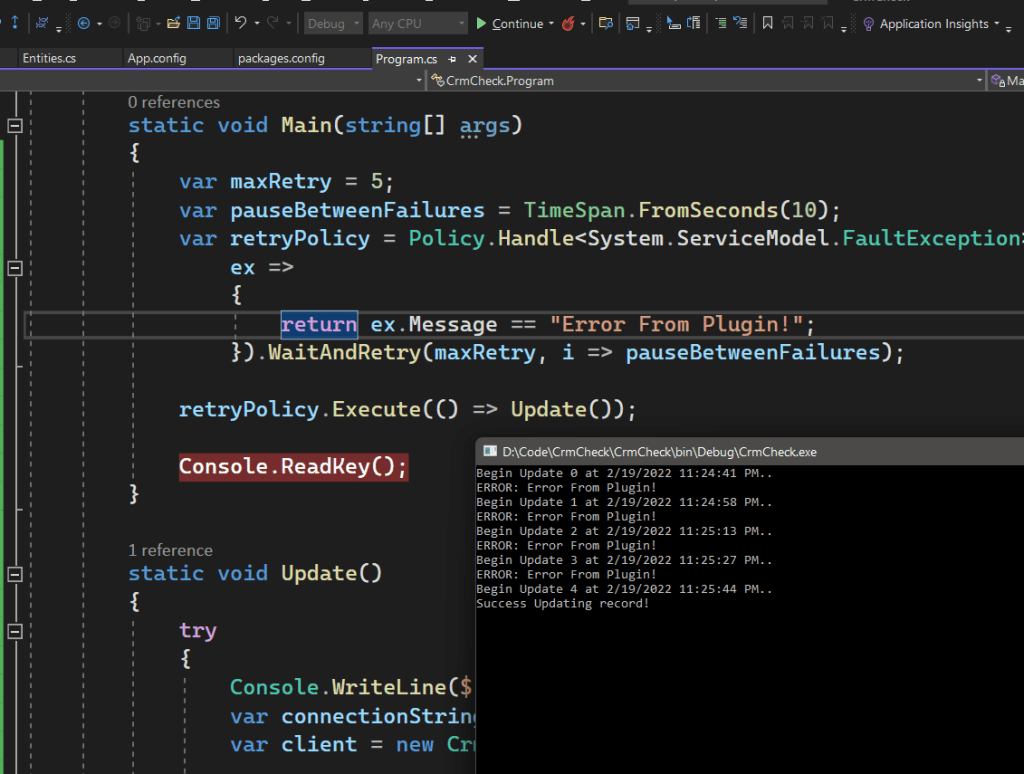 The Result
Happy CRM-ing!
Leave a comment
Your comment is sent privately to the author and isn't published on the site.