Dynamics CRM 365: WebResource Dependencies
The common routine that we will do in custom RibbonButton is adding the library that we want to use. Let's say we have a function onCallButton on JavaScript A. But inside the function onCallButton, we have called another JavaScript B. Hence we need to register JavaScript B to be loaded when we click that button.
This is how we load the JavaScript library:
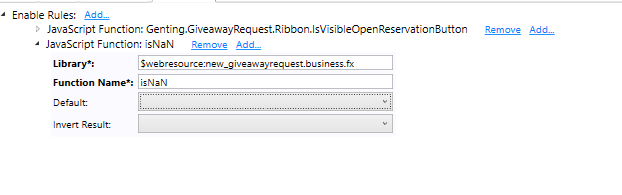
We use Enable Rules in Ribbon Editor and we put information about the file we want to load and use isNaN function to force the Ribbon to load our JavaScript.
Now in CRM 365, we can put our dependencies in the JavaScript itself.
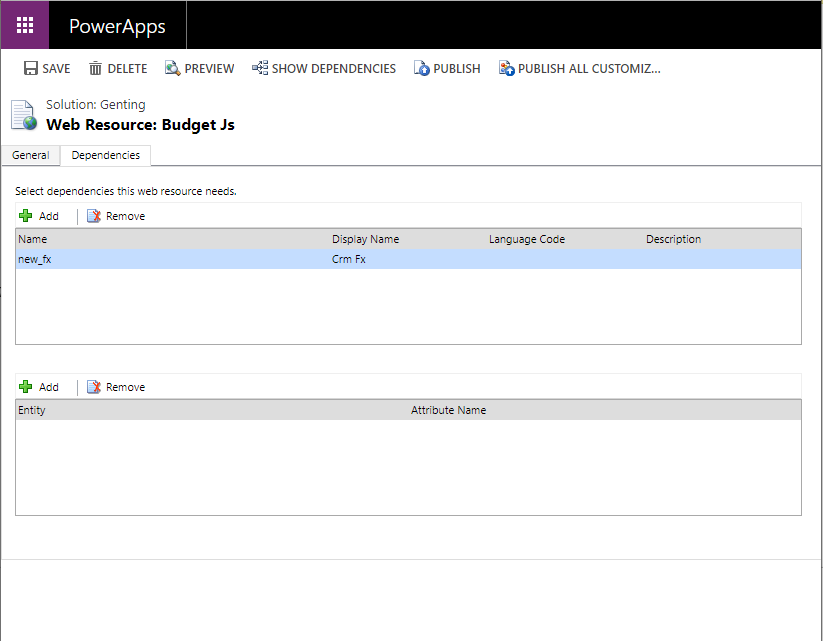
With this feature, CRM will load automatically our dependencies which is more convenient to use compared to the old way.
Source:
https://docs.microsoft.com/en-us/dynamics365/customer-engagement/developer/web-resource-dependencies
Leave a comment
Your comment is sent privately to the author and isn't published on the site.