Dataverse: Improve Performance using Partition Key
Do you know we can pass the partitionID parameter when doing CRUD to improve performance? The information I got from this documentation link. Today we will prove how what is the difference between using the partitionID and not using it.
To collect the data, I'll run below code:
using System;
using System.Web.Configuration;
using Entities;
using Microsoft.Crm.Sdk.Messages;
using Microsoft.Xrm.Sdk;
using Microsoft.Xrm.Sdk.Messages;
using Microsoft.Xrm.Sdk.Query;
using Microsoft.Xrm.Tooling.Connector;

namespace CrmCheck
{
    class Program
    {
        static void Main(string[] args)
        {
            CrmServiceClient.MaxConnectionTimeout = TimeSpan.FromHours(3);
            var connectionString = WebConfigurationManager.AppSettings["connectionString"];
            var client = new CrmServiceClient(connectionString);
            var request = new ExecuteMultipleRequest
            {
                Requests = new OrganizationRequestCollection(),
                Settings = new ExecuteMultipleSettings
                {
                    ContinueOnError = true,
                    ReturnResponses = false
                }
            };

            var websiteUrl = "temmyraharjo.wordpress.com";
            var partitionId = "20220320";
            for (int i = 0; i < 250; i++)
            {
                var account = new Entity("account");
                account["name"] = Guid.NewGuid().ToString();
                account["websiteurl"] = websiteUrl;

                var createReq = new CreateRequest { Target = account };
                if (!string.IsNullOrEmpty(partitionId))
                {
                    createReq["partitionId"] = partitionId;
                }
                request.Requests.Add(createReq);
            }

            Log(() =>
            {
                client.Execute(request);
                return true;
            }, "Create");
            Console.WriteLine("Created sample data!");

            var retreiveMultipleRequest =
                new RetrieveMultipleRequest();
            var query = new QueryExpression("account")
            {
                ColumnSet = new ColumnSet("name", "websiteurl")
            };
            query.Criteria.AddCondition("websiteurl", ConditionOperator.Equal, websiteUrl);
            retreiveMultipleRequest.Query = query;
            if (!string.IsNullOrEmpty(partitionId))
            {
                retreiveMultipleRequest["partitionId"] = partitionId;
            }

            var data = Log(() =>
            {
                var result = (RetrieveMultipleResponse)
                    client.Execute(retreiveMultipleRequest);
                Console.WriteLine($"Total records {result.EntityCollection.Entities.Count}.");
                return result.EntityCollection;
            }, "Query");

            request.Requests.Clear();

            foreach (var item in data.Entities)
            {
                var updateReq = new UpdateRequest
                {
                    Target = new Entity("account", item.Id)
                    {
                        ["name"] = Guid.NewGuid().ToString()
                    },
                };

                if (!string.IsNullOrEmpty(partitionId))
                {
                    updateReq["partitionId"] = partitionId;
                }

                request.Requests.Add(updateReq);
            }

            Log(() =>
            {
                client.Execute(request);
                return true;
            }, "Update");

            request.Requests.Clear();
            foreach (var item in data.Entities)
            {
                var deleteRequest = new DeleteRequest
                {
                    Target = new Entity("account", item.Id).ToEntityReference()
                };

                if (!string.IsNullOrEmpty(partitionId))
                {
                    deleteRequest["partitionId"] = partitionId;
                }

                request.Requests.Add(deleteRequest);
            }

            Log(() =>
            {
                client.Execute(request);
                return true;
            }, "Delete");
            Console.ReadKey();
        }

        private static T Log<T>(Func<T> runSomething, string info)
        {
            var start = DateTime.Now;
            var result = runSomething();
            var end = DateTime.Now;

            Console.WriteLine($"Running {info}. Start at {start}. End at {end}. Total Seconds: {(end - start).TotalSeconds}.");
            return result;
        }
    }
}
For a normal scenario (without partition), I'll just set the partitionId variable as an empty string (var partitionId = ""). For the scenario with partition, I'll set it like the above code.
For Normal Scenario:
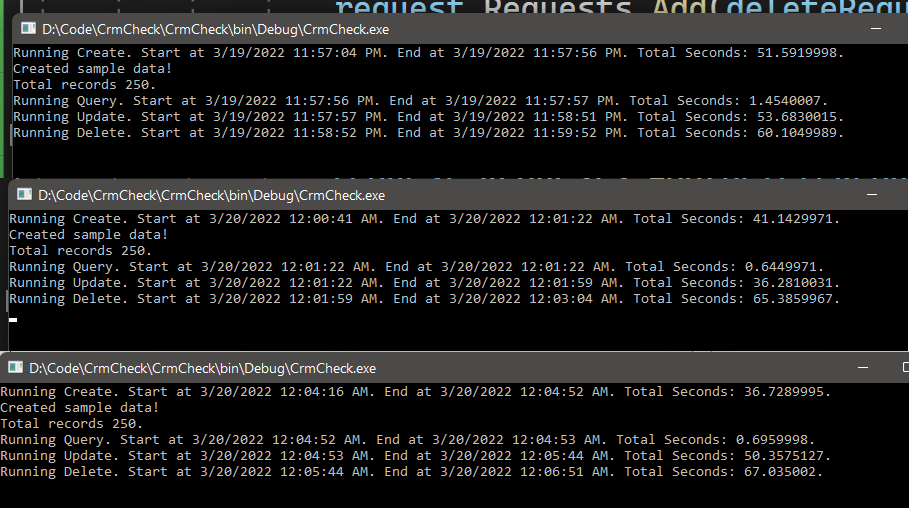 Normal Scenario
With Partition:
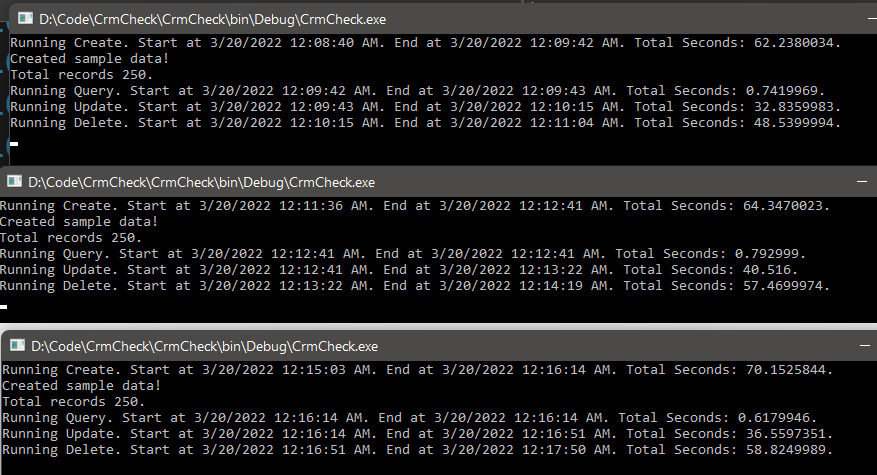 Partition Scenario
If you submitted the wrong partitionID, it will not block you but most likely you will not get the performance improvement.
Summary
You will see from 250 record data, that you will get slight improvement (on Update and Delete got lots of improvement, but for Create became worse) there (the result will vary, that is why you need to test it by yourself). But from this result, I can see that we can apply this to a system that is sensitive to the key. For example, if your system requires you to do CRUD periodically (based on day/week/month/year), then you can try to implement this to improve the performance of your system!
Happy CRM-ing!
Leave a comment
Your comment is sent privately to the author and isn't published on the site.