Dataverse Filtering Attributes benchmark
I heard lots of dos and don'ts about performance enhancement specifically when creating plugins in Dataverse. One of the pieces of advice is about setting the "Filtering attributes" when registering the plugin step so the system will not run unnecessarily process. So, today we will check the benchmark between setting the Filtering attributes vs Filtering attributes = "All". Let's go into it!
Metadata
First, I created two identical tables with the below columns:
| Column Name | Data Type | Description |
|---|---|---|
| Qty | Int | For calculating Total via Plugin |
| Price | Money | For calculating Total via Plugin |
| Total | Money | Qty * Price |
| Qty 2 | Int | For calculating Total 2 via Plugin |
| Price 2 | Money | For calculating Total 2 via Plugin |
| Total 2 | Money | Qty 2 * Price 2 |
| Description | Text | Description |
Columns of the Table
Below is Table 1:
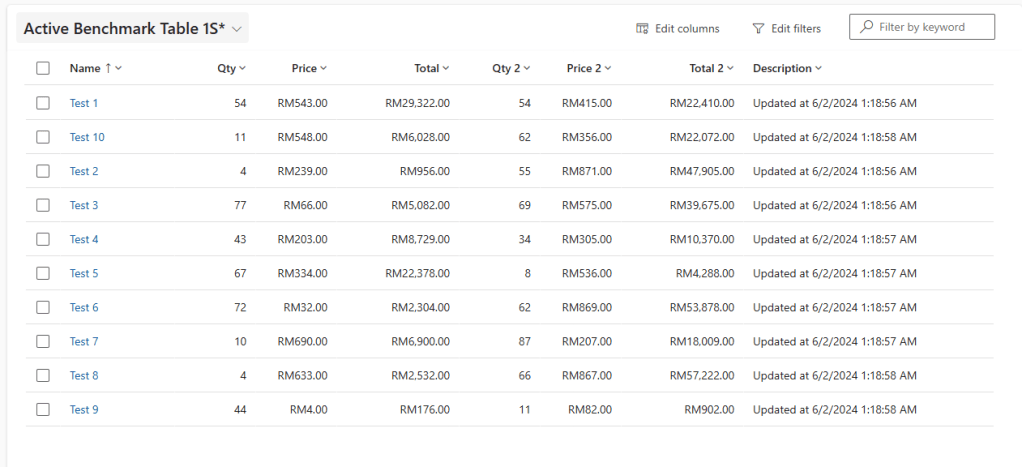
Benchmark Table 1
And also Table 2:
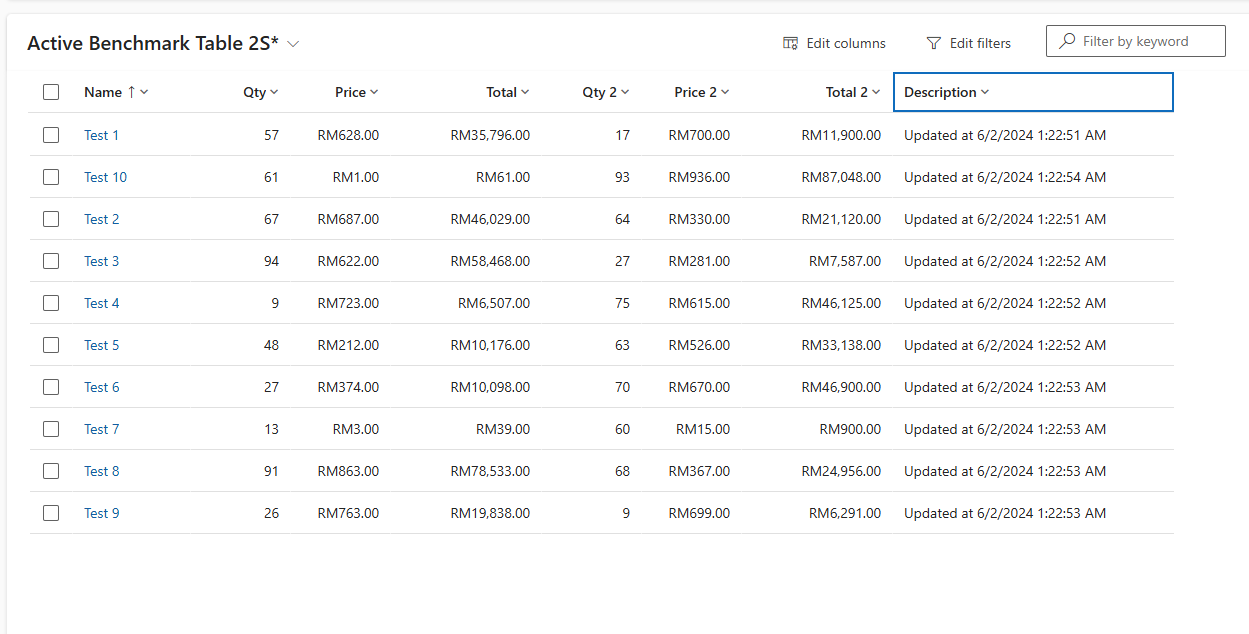
Benchmark Table 2
Plugins
Next, I prepared the below code:
using Microsoft.Xrm.Sdk;
using System;
using BlogPlugins.Business.BenchmarkTable;

namespace BlogPlugins.Business.BenchmarkTable
{
    public class CalculateTotal
    {
        private readonly ILocalPluginContext _context;

        public CalculateTotal(ILocalPluginContext context)
        {
            _context = context;
        }

        public void Execute()
        {
            var target = (Entity)_context.PluginExecutionContext.InputParameters["Target"];
            var initial = _context.PluginExecutionContext.PreEntityImages["PreImage"];

            var qty = target.GetAttributeValue<int?>("tmy_qty") ?? initial.GetAttributeValue<int?>("tmy_qty");
            var price =  target.GetAttributeValue<Money>("tmy_price") ?? initial.GetAttributeValue<Money>("tmy_price");
            var valid = qty.HasValue && price != null;
            if (!valid) return;

            var total = qty.GetValueOrDefault() * price.Value;
            target["tmy_total"] = new Money(total);
        }
    }

    public class CalculateTotal2
    {
        private readonly ILocalPluginContext _context;

        public CalculateTotal2(ILocalPluginContext context)
        {
            _context = context;
        }

        public void Execute()
        {
            var target = (Entity)_context.PluginExecutionContext.InputParameters["Target"];
            var initial = _context.PluginExecutionContext.PreEntityImages["PreImage"];

            var qty = target.GetAttributeValue<int?>("tmy_qty2") ?? initial.GetAttributeValue<int?>("tmy_qty2");
            var price =  target.GetAttributeValue<Money>("tmy_price2") ?? initial.GetAttributeValue<Money>("tmy_price2");
            var valid = qty.HasValue && price != null;
            if (!valid) return;

            var total = qty.GetValueOrDefault() * price.Value;
            target["tmy_total2"] = new Money(total);
        }
    }
}

namespace BlogPlugins
{
    public class PreBenchmarkTable1Update : PluginBase
    {
        public PreBenchmarkTable1Update()
            : base(typeof(PreBenchmarkTable1Update))
        {
        }

        protected override void ExecuteDataversePlugin(ILocalPluginContext localPluginContext)
        {
            if (localPluginContext == null)
            {
                throw new ArgumentNullException(nameof(localPluginContext));
            }

            var context = localPluginContext.PluginExecutionContext;
            var target = (Entity)context.InputParameters["Target"];

            if (target.Attributes.Contains("tmy_qty") || target.Attributes.Contains("tmy_price"))
            {
                new CalculateTotal(localPluginContext).Execute();
            }

            if (target.Attributes.Contains("tmy_qty2") || target.Attributes.Contains("tmy_price2"))
            {
                new CalculateTotal2(localPluginContext).Execute();
            }
        }
    }

    public class PreBenchmarkTable2CalculateTotal : PluginBase
    {
        public PreBenchmarkTable2CalculateTotal() : base(typeof(PreBenchmarkTable2CalculateTotal))
        {
        }

        protected override void ExecuteDataversePlugin(ILocalPluginContext localPluginContext)
        {
            if (localPluginContext == null)
            {
                throw new ArgumentNullException(nameof(localPluginContext));
            }

            var context = localPluginContext.PluginExecutionContext;
            var target = (Entity)context.InputParameters["Target"];

            if (target.Attributes.Contains("tmy_qty") || target.Attributes.Contains("tmy_price"))
            {
                new CalculateTotal(localPluginContext).Execute();
            }

            if (target.Attributes.Contains("tmy_qty2") || target.Attributes.Contains("tmy_price2"))
            {
                new CalculateTotal2(localPluginContext).Execute();
            }
        }
    }
}
Business classes CalculateTotal and CalculateTotal2 have similar logic whereby we will retrieve the tmy_qty/tmy_qty2 columns or tmy_price/tmy_price2 and then multiply those values to get the tmy_total/tmy_total2.
Again, for the PreBenchmarkTable1Update and PreBenchmarkTable2CalculateTotal even though we have the same logic. The differences will be when we register the plugin step in Plugin Registration Tools. For both, we are controlling which Business class needs to be called (if Qty and Price, we need to run the CalculateTotal. If Qty2 and Price2, we need to run the CalculateTotal2).
Here is the side-by-side of the two plugin steps:
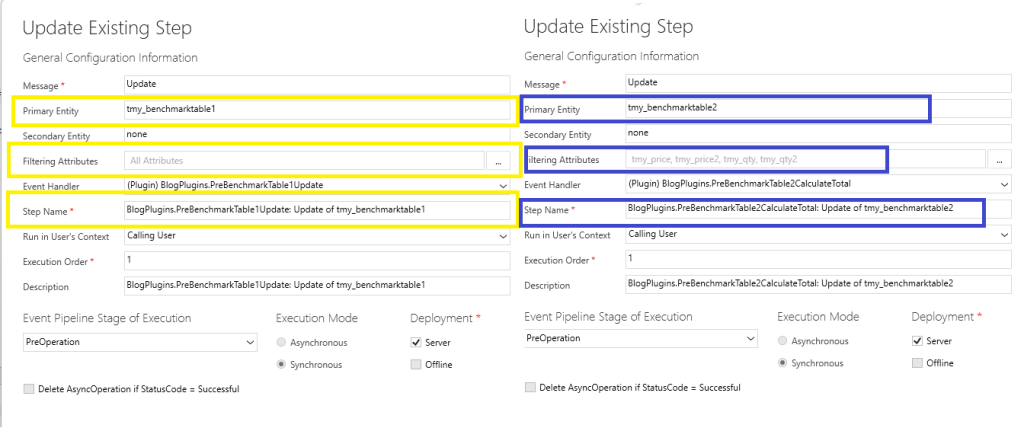
Plugin steps between PreBenchmarkTable1Update and PreBenchmarkTable2CalculateTotal
Once I created the plugin steps above, I also created the necessary Pre Image for both.
Benchmark
Last, I created the below code for benchmarking the above plugins:
using BenchmarkDotNet.Attributes;
using Microsoft.Extensions.DependencyInjection;
using Microsoft.PowerPlatform.Dataverse.Client;
using Microsoft.Xrm.Sdk;
using Microsoft.Xrm.Sdk.Query;

namespace DataverseBenchmarkProject;

[MemoryDiagnoser]
[Orderer(BenchmarkDotNet.Order.SummaryOrderPolicy.FastestToSlowest)]
[SimpleJob(launchCount: 1, warmupCount: 0)]
public class PluginStepsBenchmark
{
    private readonly ServiceClient _serviceClient = Startup.GetApplicationHost().Services.GetService<ServiceClient>()!;
    private readonly Random _random = new();

    [Benchmark]
    public void BenchmarkTable1_CalculateTotal()
    {
        var entities = GetData("tmy_benchmarktable1");
        for (int i = 0; i < entities.Length; i++)
        {
            var entity = entities[i];

            var update = new Entity(entity.LogicalName) { Id = entity.Id };

            if (i % 2 == 0)
            {
                update["tmy_qty"] = _random.Next(1, 99);
            }
            else
            {
                update["tmy_price"] = new Money( _random.Next(1, 999));
            }

            _serviceClient.Update(update);
        }
    }

    [Benchmark]
    public void BenchmarkTable1_CalculateTotal2()
    {
        var entities = GetData("tmy_benchmarktable1");
        for (int i = 0; i < entities.Length; i++)
        {
            var entity = entities[i];

            var update = new Entity(entity.LogicalName) { Id = entity.Id };

            if (i % 2 == 0)
            {
                update["tmy_qty2"] = _random.Next(1, 99);
            }
            else
            {
                update["tmy_price2"] = new Money( _random.Next(1, 999));
            }

            _serviceClient.Update(update);
        }
    }

    [Benchmark]
    public void BenchmarkTable1_UpdateDescription()
    {
        var entities = GetData("tmy_benchmarktable1");
        foreach (var entity in entities)
        {
            var update = new Entity(entity.LogicalName) { Id = entity.Id };
            update["tmy_description"] = $"Updated at {DateTime.Now}";
            _serviceClient.Update(update);
        }

    }

    [Benchmark]
    public void BenchmarkTable2_CalculateTotal()
    {
        var entities = GetData("tmy_benchmarktable2");
        for (int i = 0; i < entities.Length; i++)
        {
            var entity = entities[i];

            var update = new Entity(entity.LogicalName) { Id = entity.Id };

            if (i % 2 == 0)
            {
                update["tmy_qty"] = _random.Next(1, 99);
            }
            else
            {
                update["tmy_price"] = new Money( _random.Next(1, 999));
            }

            _serviceClient.Update(update);
        }
    }

    [Benchmark]
    public void BenchmarkTable2_CalculateTotal2()
    {
        var entities = GetData("tmy_benchmarktable2");
        for (int i = 0; i < entities.Length; i++)
        {
            var entity = entities[i];

            var update = new Entity(entity.LogicalName) { Id = entity.Id };

            if (i % 2 == 0)
            {
                update["tmy_qty2"] = _random.Next(1, 99);
            }
            else
            {
                update["tmy_price2"] = new Money( _random.Next(1, 999));
            }

            _serviceClient.Update(update);
        }
    }

    [Benchmark]
    public void BenchmarkTable2_UpdateDescription()
    {
        var entities = GetData("tmy_benchmarktable2");
        foreach (var entity in entities)
        {
            var update = new Entity(entity.LogicalName) { Id = entity.Id };
            update["tmy_description"] = $"Updated at {DateTime.Now}";
            _serviceClient.Update(update);
        }

    }

    private Entity[] GetData(string logicalName)
    {
        var query = new QueryExpression(logicalName)
        {
            ColumnSet = new ColumnSet(false),
            NoLock = true,
            TopCount = 10
        };

        query.Criteria.AddCondition("statecode", ConditionOperator.Equal, 0);

        var result = _serviceClient.RetrieveMultiple(query);

        return result.Entities.ToArray();
    }
}
In the above scenario, I separate 3 logics for each of the tables for benchmark purposes:
- Calculate Total
- Calculate Total 2
- Update Description
Here is the result of the benchmark:
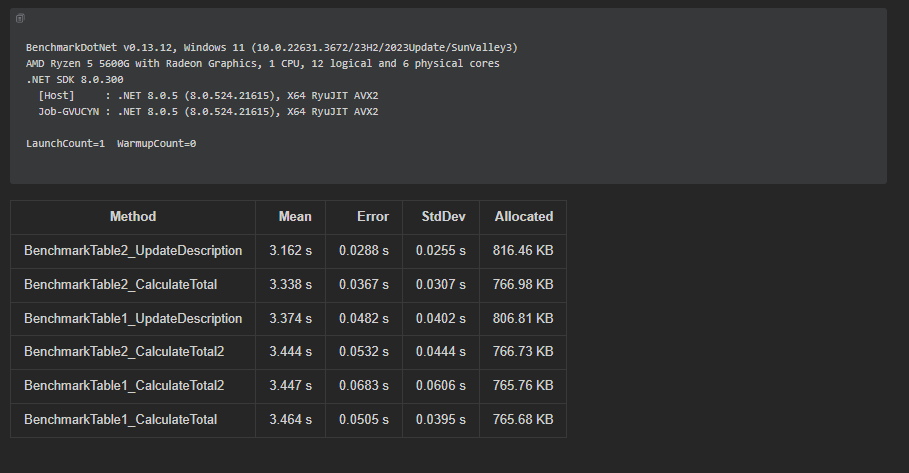
Benchmark result 1
As you can see, Benchmark Table 2 wins as we set the filtering attributes to the attributes that will trigger the plugin. But, the difference isn’t very significant (BenchmarkTable2_UpdateDescription vs BenchmarkTable1_UpdateDescription just 0.212 seconds).
Summary
Actually, I also tried to run another benchmark between multiple plugin steps vs single plugin steps which resulted in the below result:
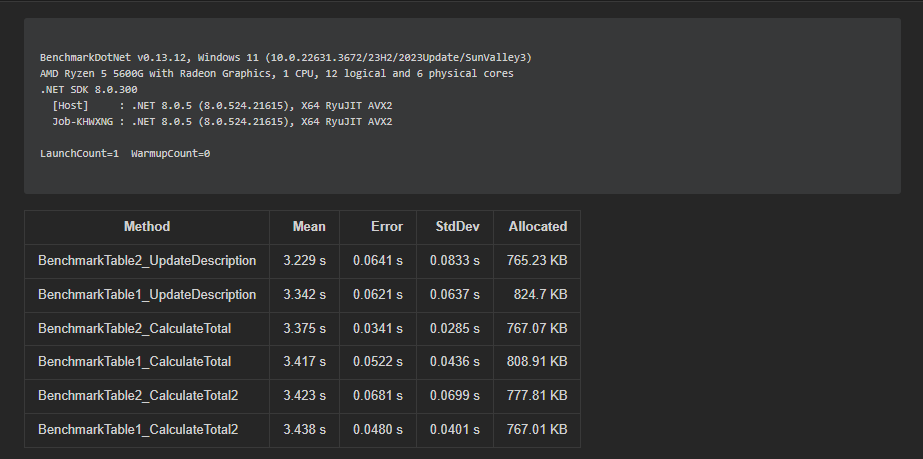
Benchmark Table 2 (multiple plugin steps with filtering attributes) vs Benchmark Table 1 (Single plugin steps without filtering attributes)
As you can see, BenchmarkTable2 still wins against BenchmarkTable1, and yet, the result isn't substantial in my opinion. However, this changes when we introduce Post Async Update. If you read the documentation regarding Filtering Attributes, it states that the purpose of this feature is to limit the call of the plugin step which is substantial for Post Async Update. When using Async, it generates system jobs. If we don’t set up Filtering Attributes,all changes will trigger the plugin step. However, this isn’t the correct approach and will slow down the system.
Hope you learn something and happy CRM-ing!
Leave a comment
Your comment is sent privately to the author and isn't published on the site.