Dataverse: Create reusable C# Code/Custom API to bypass specific plugin steps
As a (lazy) Developer, I always find a way to implement something as simply as possible. The more experience that we are gaining over the years will eventually show us certain language features/components that can support it. For example, in today's blog post, we want to create a feature where we want to bypass certain plugin steps that will be called from C# code (plugin, workflow, etc) and also Power Automate. So here is the implementation!
C# Components
To achieve this demonstration, I will use a C# Shared Project to group all the extensions/classes that need to be shared across different projects:
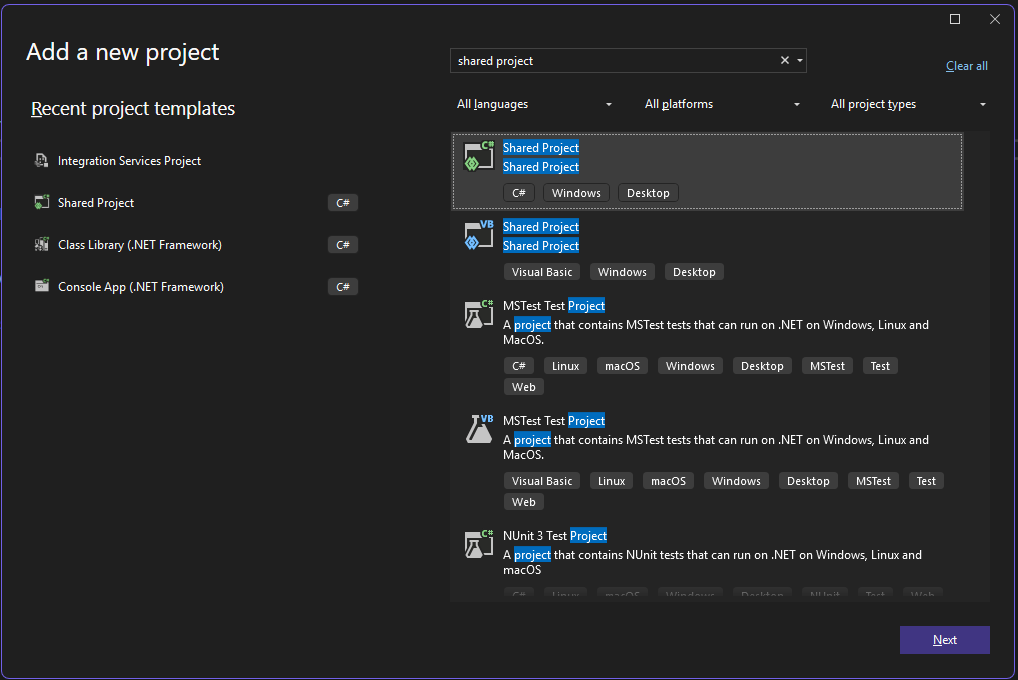
C# Shared Project (.shproj)
Once created, in the Plugin project where you want to call the function, you can add a reference to the newly created Shared Project:
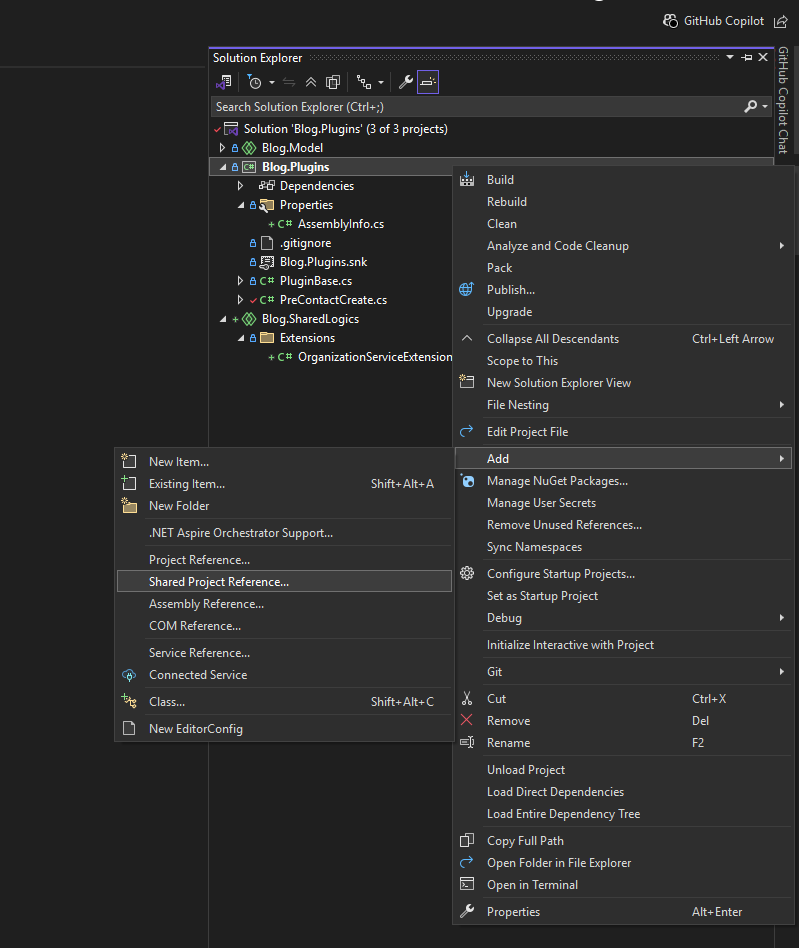
Add reference to the Shared Project
Next, I'll create an extension class inside this Shared Project, which will be the main code for this demo:
using System;
using System.Linq;
using Microsoft.Xrm.Sdk;
using Microsoft.Xrm.Sdk.Messages;
using Microsoft.Xrm.Sdk.Query;

namespace Blog.SharedLogics.Extensions
{
    public static class OrganizationServiceExtensions
    {
        public static Guid CreateAndByPassBasedOnEnvironmentVariable(this IOrganizationService service, Entity entity, string environmentVariable)
        {
            var pluginStepIds = service.GetEnvironmentVariable(environmentVariable);

            var request = new CreateRequest
            {
                Target = entity
            };

            if (!string.IsNullOrEmpty(pluginStepIds))
            {
                request.Parameters.Add("BypassBusinessLogicExecutionStepIds", pluginStepIds);
            }

            var result = (CreateResponse)service.Execute(request);

            return result.id;
        }

        private static string GetEnvironmentVariable(this IOrganizationService service, string environmentVariable)
        {
            var query = new QueryExpression("environmentvariabledefinition")
            {
                ColumnSet = new ColumnSet("defaultvalue", "schemaname")
            };
            query.Criteria.AddCondition("schemaname", ConditionOperator.Equal, environmentVariable);

            var childLink =
                query.AddLink("environmentvariablevalue", "environmentvariabledefinitionid", "environmentvariabledefinitionid", JoinOperator.LeftOuter);
            childLink.EntityAlias = "ev";
            childLink.Columns = new ColumnSet("schemaname", "value");

            var result = service.RetrieveMultiple(query);

            var data = result.Entities.FirstOrDefault() ?? new Entity();
            var value = data.GetAttributeValue<AliasedValue>("ev.value")?.Value as string ?? data.GetAttributeValue<string>("defaultvalue");

            return value;
        }
    }
}
The logic is pretty simple. First, we need to retrieve the EnviromentVariableDefinition left join EnvironmentVariableValueand filter it by EnviromentVariableDefinition.SchemaName. Then we can get the EnvironmentVariableValue.Value. Alternatively, we can retrieve the EnvironmentVariableDefinition.DefaultValue for it (function GetEnvironmentVariable - lines 30 to 49).
Next, we just need to execute the CreateRequest, and if the value of the plugin steps that need to be bypassed is found, then we can set "BypassBusinessLogicExecutionStepIds" with that value. FYI, if the plugin steps are invalid, the Dataverse will not validate and continue to create the record.
Plugin Testing
For the demonstration via the plugin, I created below logic:
using Microsoft.Xrm.Sdk;
using Microsoft.Xrm.Sdk.Extensions;
using System;
using Blog.SharedLogics.Extensions;

namespace Blog.Plugins
{
    public class PreContactCreate1 : PluginBase
    {
        public PreContactCreate1()
            : base(typeof(PreContactCreate1))
        {
        }
        // Entry point for custom business logic execution
        protected override void ExecuteDataversePlugin(ILocalPluginContext localPluginContext)
        {
            if (localPluginContext == null)
            {
                throw new ArgumentNullException(nameof(localPluginContext));
            }

            throw new InvalidPluginExecutionException("Error from PreContactCreate1");
        }
    }

    public class PreContactCreate2 : PluginBase
    {
        public PreContactCreate2()
            : base(typeof(PreContactCreate2))
        {
        }
        // Entry point for custom business logic execution
        protected override void ExecuteDataversePlugin(ILocalPluginContext localPluginContext)
        {
            if (localPluginContext == null)
            {
                throw new ArgumentNullException(nameof(localPluginContext));
            }

            throw new InvalidPluginExecutionException("Error from PreContactCreate2");
        }
    }

    public class PreContactCreate3 : PluginBase
    {
        public PreContactCreate3()
            : base(typeof(PreContactCreate3))
        {
        }
        // Entry point for custom business logic execution
        protected override void ExecuteDataversePlugin(ILocalPluginContext localPluginContext)
        {
            if (localPluginContext == null)
            {
                throw new ArgumentNullException(nameof(localPluginContext));
            }

            var target = localPluginContext.PluginExecutionContext.InputParameterOrDefault<Entity>("Target");
            target["lastname"] = "FROM PreContactCreate3";
        }
    }

    public class PostBenchmark1Create : PluginBase
    {
        public PostBenchmark1Create()
           : base(typeof(PostBenchmark1Create))
        {
        }
        // Entry point for custom business logic execution
        protected override void ExecuteDataversePlugin(ILocalPluginContext localPluginContext)
        {
            if (localPluginContext == null)
            {
                throw new ArgumentNullException(nameof(localPluginContext));
            }

            var target = localPluginContext.PluginExecutionContext.InputParameterOrDefault<Entity>("Target");
            var contact = new Entity("contact")
            {
                ["firstname"] = target.GetAttributeValue<string>("tmy_name")
            };

            localPluginContext.InitiatingUserService.CreateAndByPassBasedOnEnvironmentVariable(contact, "tmy_bypasscontactcreatesteps");
        }
    }
}
The explanations will be:
- PreContactCreate1 will always throw an error. We will get the StepId to be passed in the Environment Variable later.
- PreContactCreate2 will always throw an error. We will get the StepId to be passed in the Environment Variable later.
- PreContactCreate3 will set the lastname of the contact to "FROM PreContactCreate3".
- PostBenchmark1Create will be the entry point to call the CreateAndByPassBasedOnEnvironmentVariable extensions!
After I registered the necessary plugin steps, I created the Environment Variable and set the below:
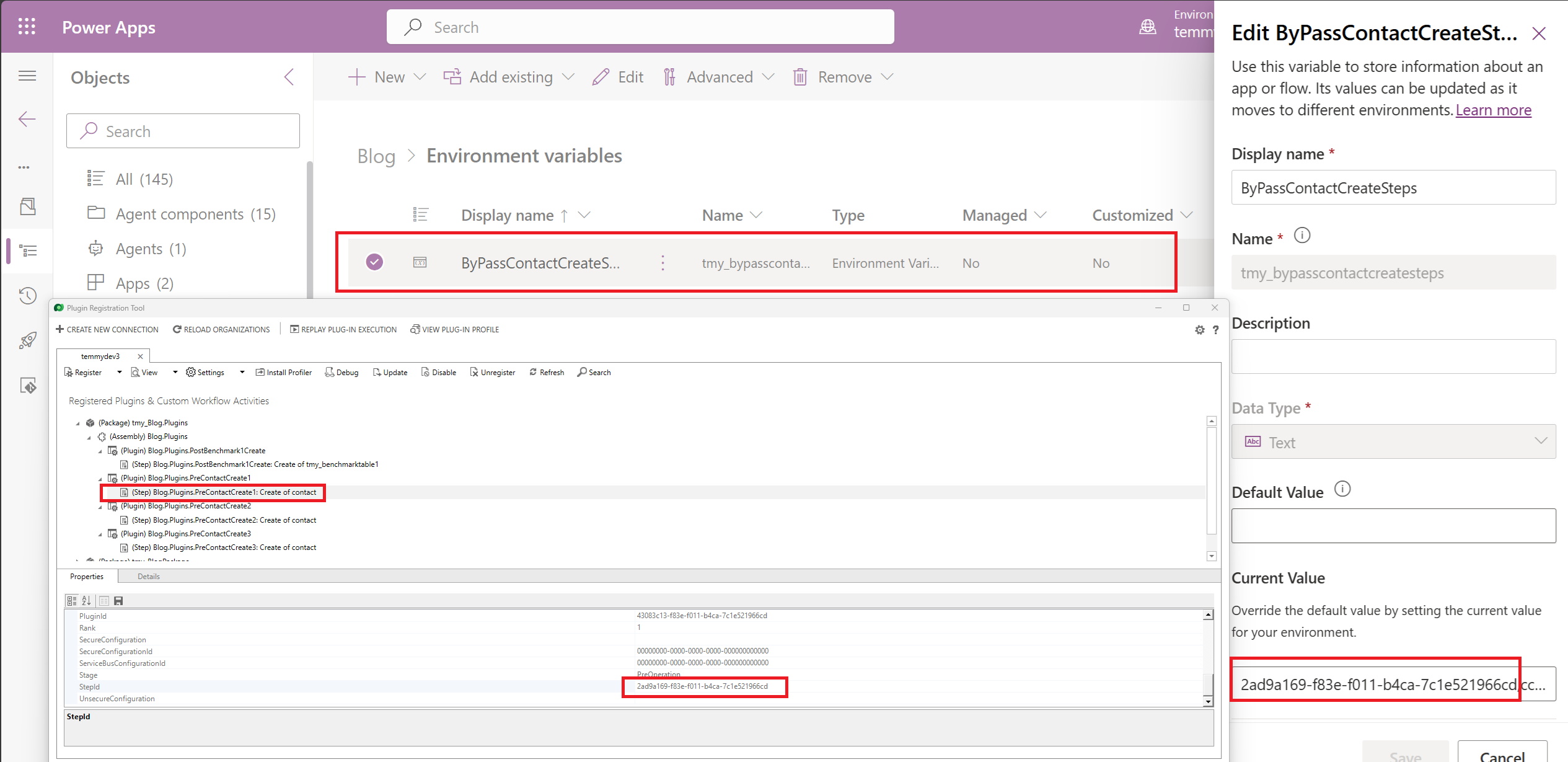
Register plugin steps and set the Environment Variable
For the plugin step, I just need to create a Benchmark record, and here is the result that the Contact created:
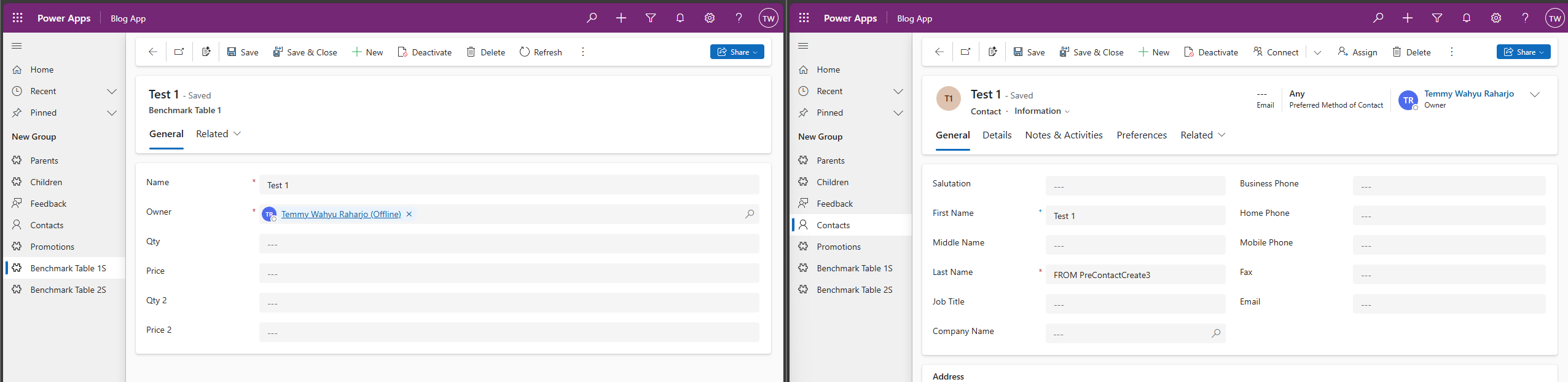
Demo from the plugin (success)
And here is the failed demo:
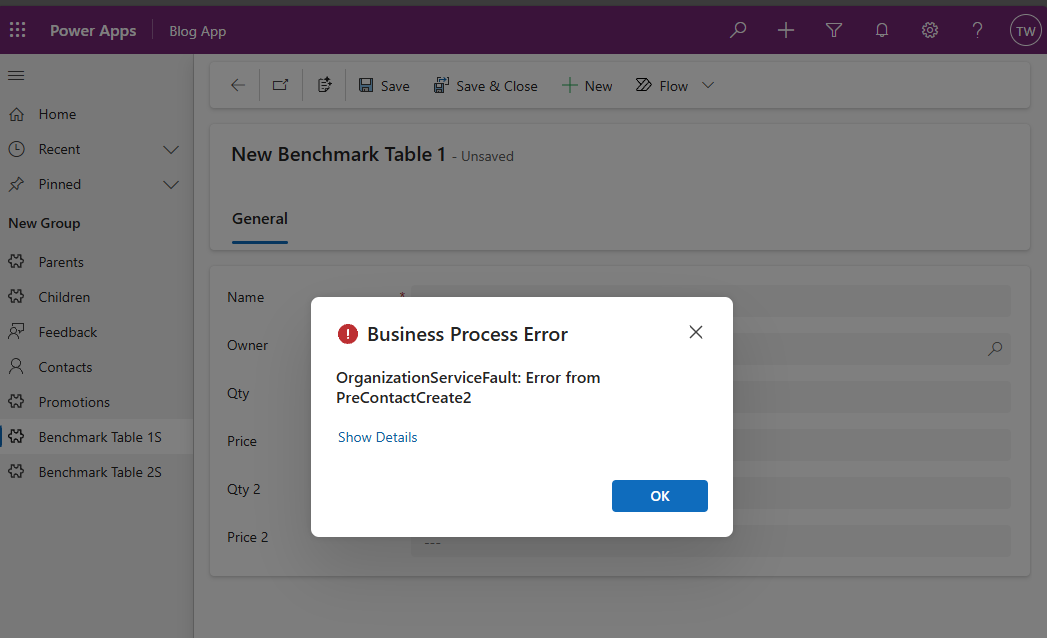
Demo error plugin
Power Automate Testing
Because we want to call the same logic (but make it as dynamic) in the Power Automate, we need to create a Custom API, and here is the code for it:
using Blog.SharedLogics.Extensions;
using Microsoft.Xrm.Sdk.Extensions;
using Microsoft.Xrm.Sdk;
using System;

namespace Blog.Plugins.API
{
    public class CreateAndByPassBasedOnEnvironmentVariableApi : PluginBase
    {

        public const string EntityParameter = "Entity";
        public const string EntityLogicalNameParameter = "EntityLogicalName";
        public const string EnvironmentVariableParameter = "EnvironmentVariable";
        public const string EntityIdParameter = "EntityId";

        public CreateAndByPassBasedOnEnvironmentVariableApi()
           : base(typeof(CreateAndByPassBasedOnEnvironmentVariableApi))
        {
        }
        // Entry point for custom business logic execution
        protected override void ExecuteDataversePlugin(ILocalPluginContext localPluginContext)
        {
            if (localPluginContext == null)
            {
                throw new ArgumentNullException(nameof(localPluginContext));
            }

            var entity = localPluginContext.PluginExecutionContext.InputParameterOrDefault<Entity>(EntityParameter);
            entity.LogicalName = localPluginContext.PluginExecutionContext.InputParameterOrDefault<string>(EntityLogicalNameParameter);
            var environmentVariable = localPluginContext.PluginExecutionContext.InputParameterOrDefault<string>(EnvironmentVariableParameter);

            var result = localPluginContext.InitiatingUserService.CreateAndByPassBasedOnEnvironmentVariable(entity, environmentVariable);
            localPluginContext.PluginExecutionContext.OutputParameters[EntityIdParameter] = result;
        }
    }
}
As you can see in the above, we are actually reusing the same component in the Dataverse Custom API (kinda making a wrapper only)!
Before we can use it in Power Automate, we need to register the Custom API:
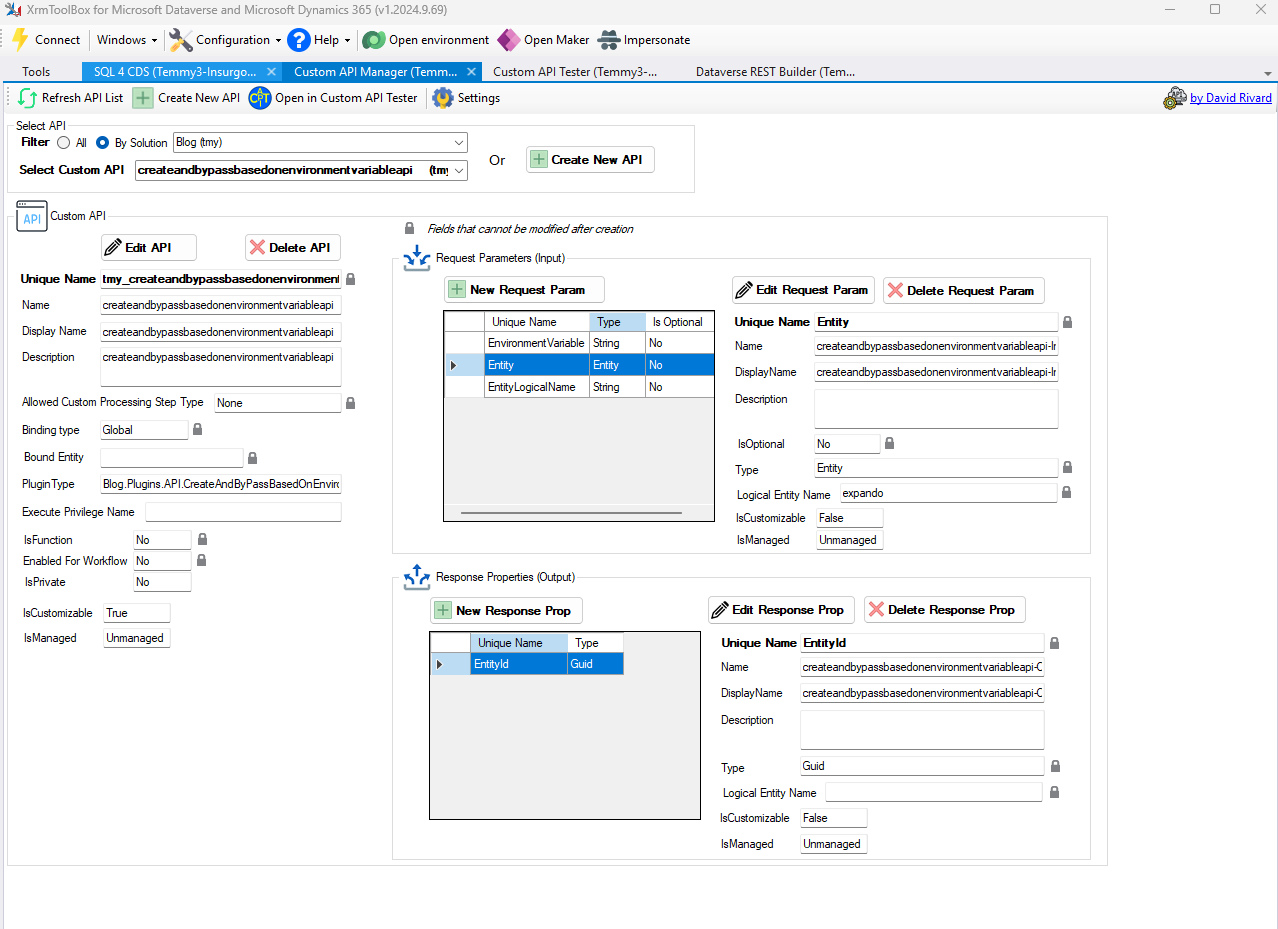
Create Dataverse Custom API
Last, we need to create a new Power Automate flow with these simple steps:
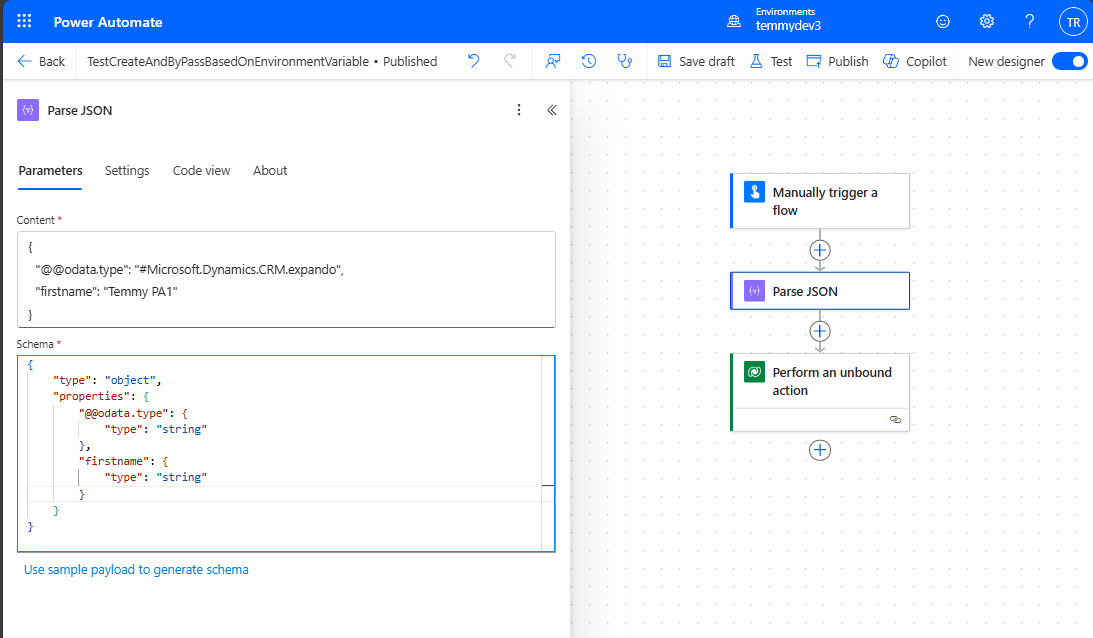
Parse JSON
Because we need to pass the "expando" object, here is the sample JSON that I set:
{
  "@@odata.type": "#Microsoft.Dynamics.CRM.expando",
  "firstname": "Temmy PA1"
}
When you set the "Use sample payload to generate schema" and paste the value, it will generate as "@@@odata.type". You need to modify it manually to set it as "@@odata.type":
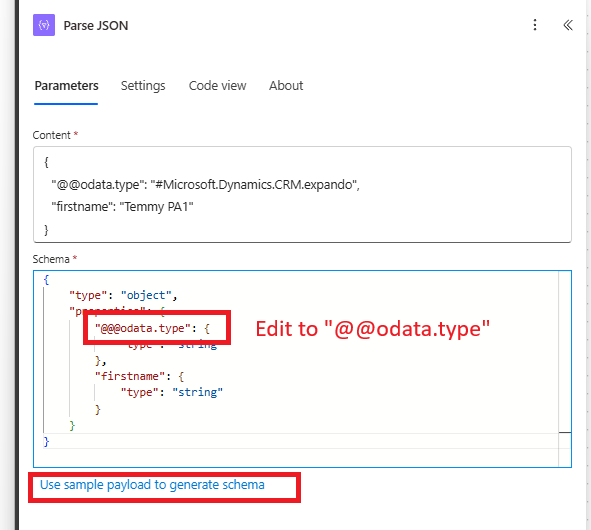
Correcting the schema
Once done, the next step is to execute the Custom API, and we need to pass the following values:
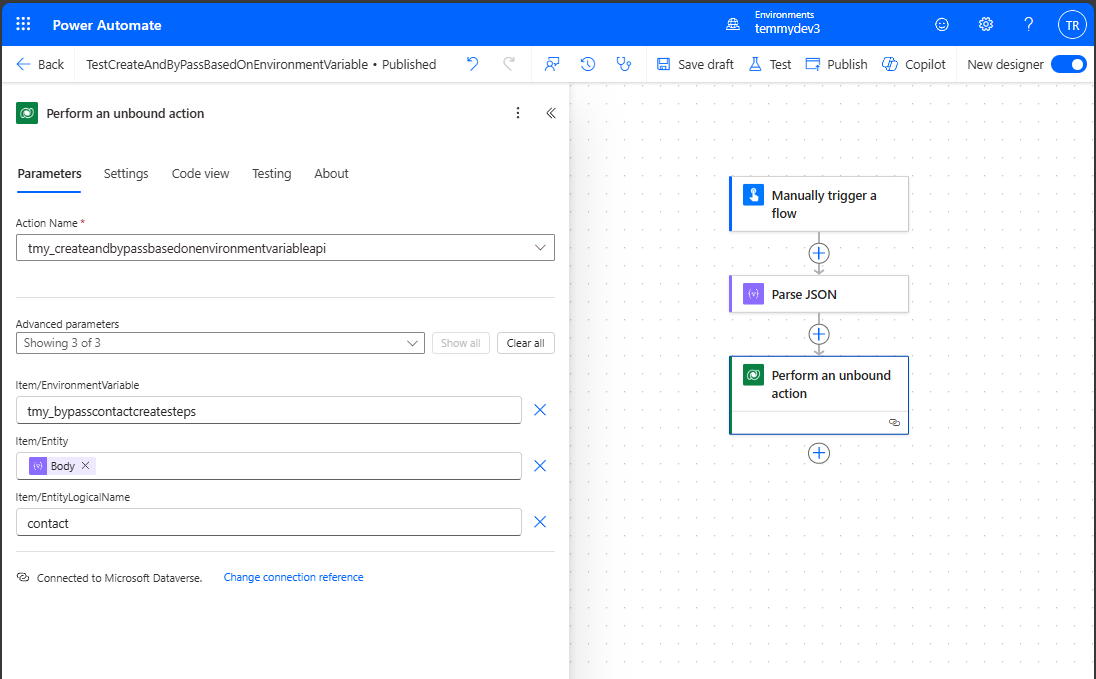
Perform the Custom API
Here is the positive demo result:
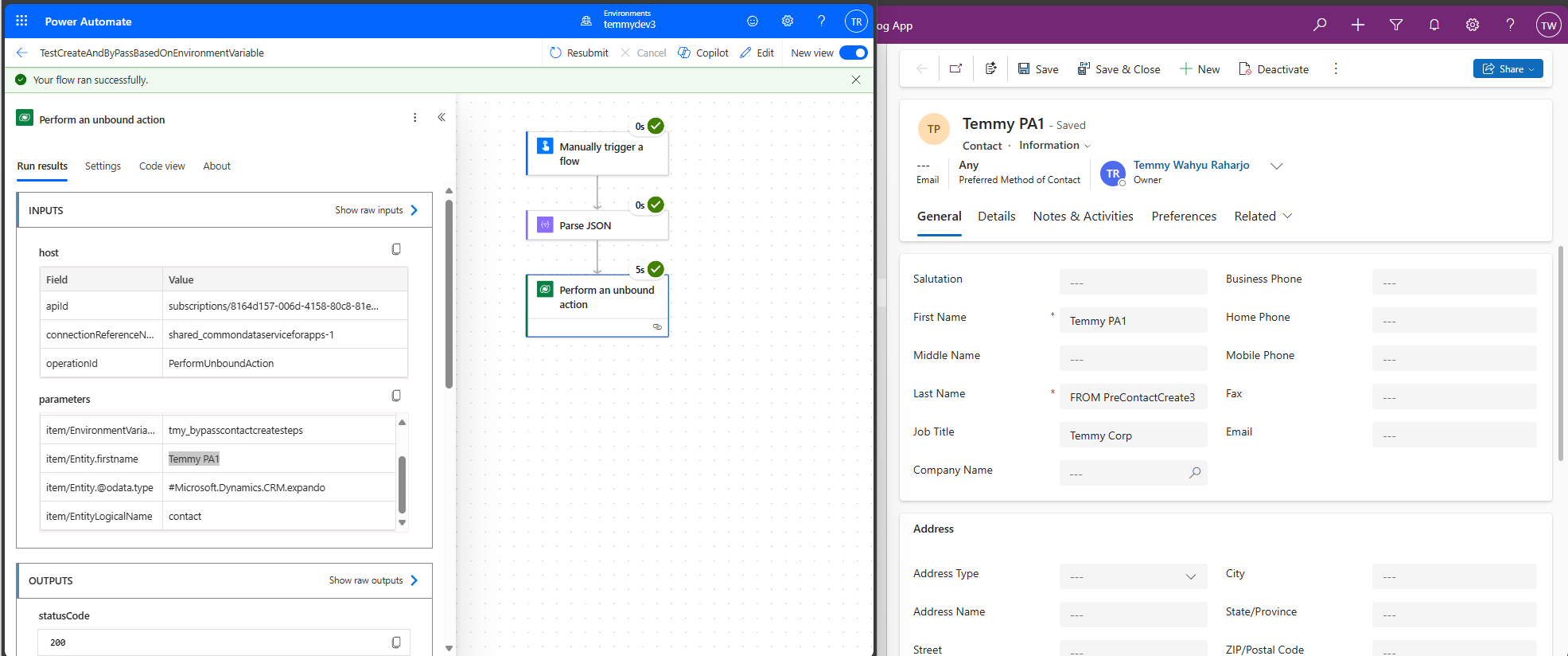
Demo Power Automate record created result
And if I removed one of the Plugin Steps, here is the result:
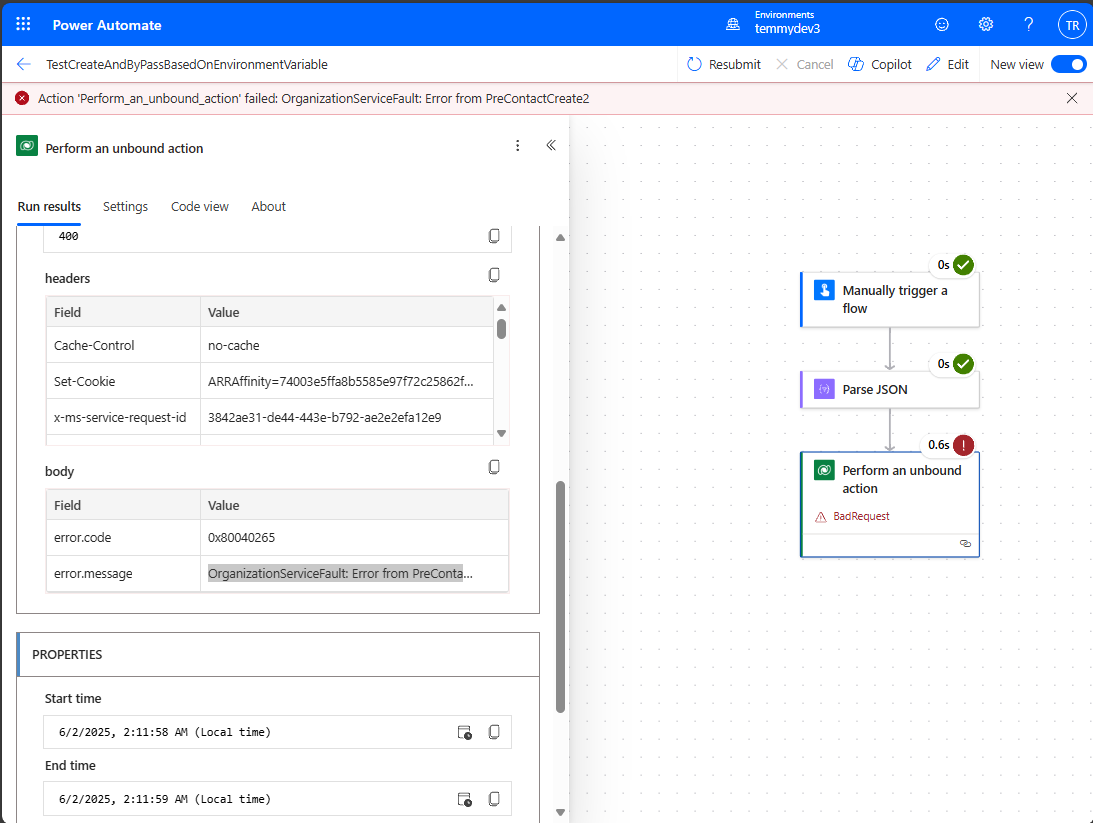
Demo Power Automate record failed
Happy CRM-ing 🚀!
Leave a comment
Your comment is sent privately to the author and isn't published on the site.