Dataverse Benchmark: Calculated Column vs Formula Column
In Dataverse, we have lots of Data Types that we can use. But, there are two Data Types that seem similar (in terms of functionality -I skip the rollup columns as this type has a period of time/manual to be refreshed). We know the great Calculated Columns that have already been so long with us. With the new preview feature called Formula Columns. We have another alternative how to create calculated value. But, the one that intrigues me so far is about the performance between Calculated and Formula Columns. And here is the story of it 😎.
The Metadata
I created one table with two important attributes: Qty (Number) and Price (Money).
Then, here is the Calculated Column that I created for this demo:
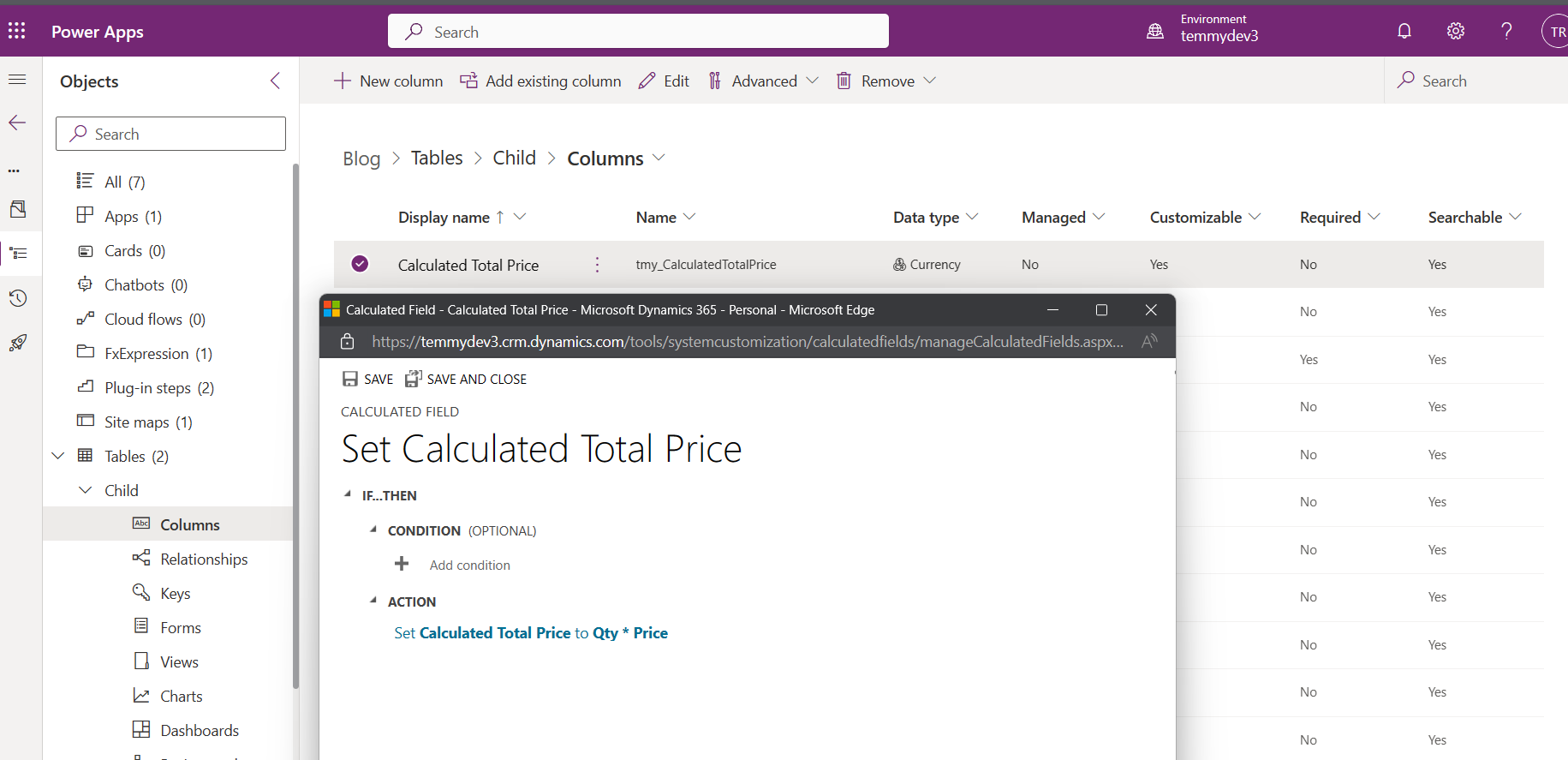
Here is the Formula Column:
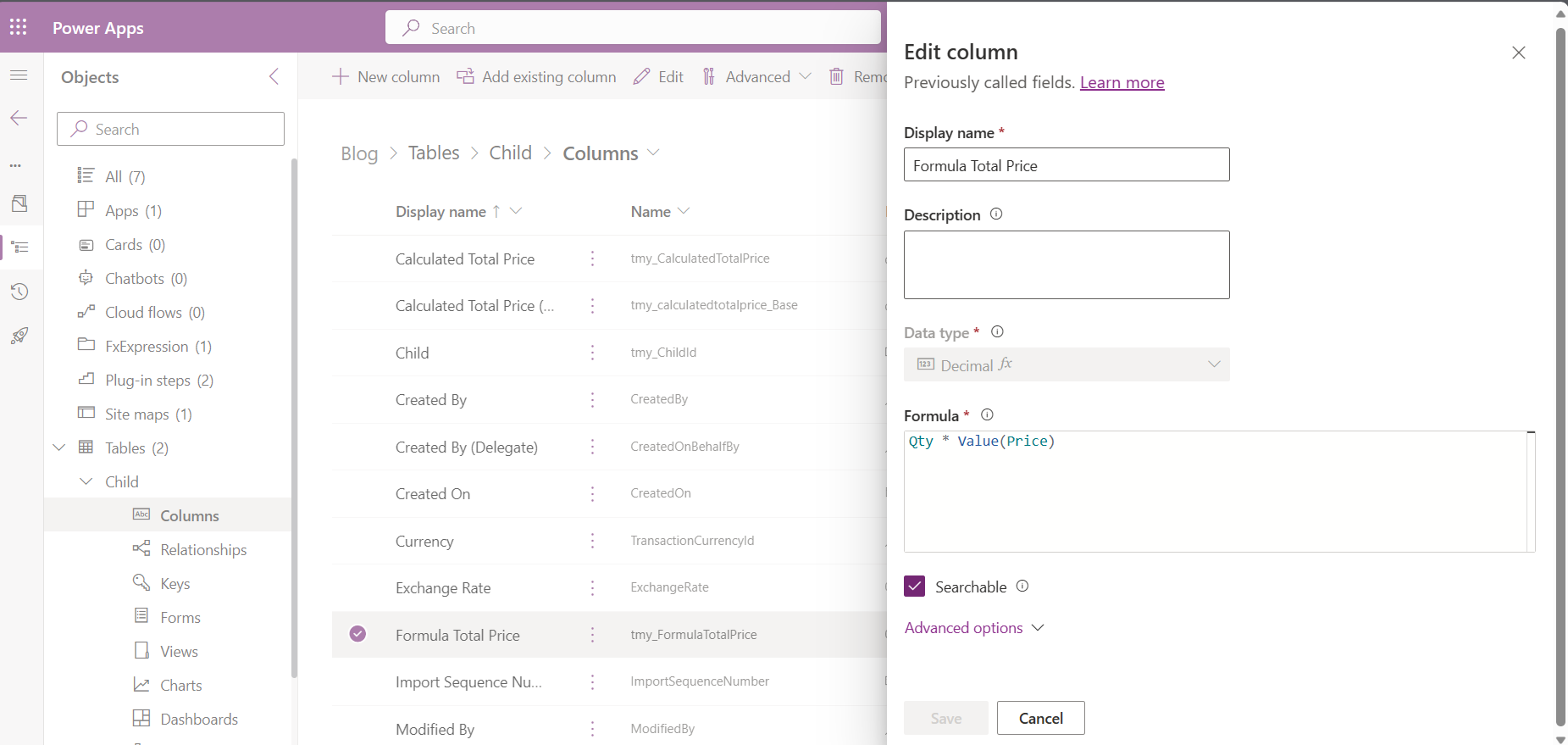
Note: there are slight differences in the Data Type between those attributes (Calculated Column is Money, while the Formula Column is Decimal).
UPDATED
As requested by Joe Gill, I added several additional properties to make it similar. First, I added Price 2 (decimal). Then, here is the Calculated Column 2:
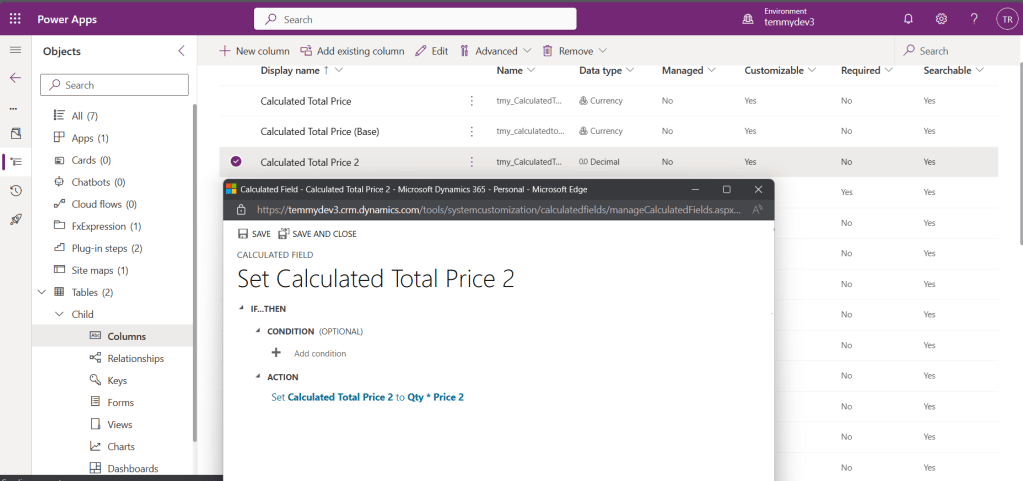
And also Formula Column 2:
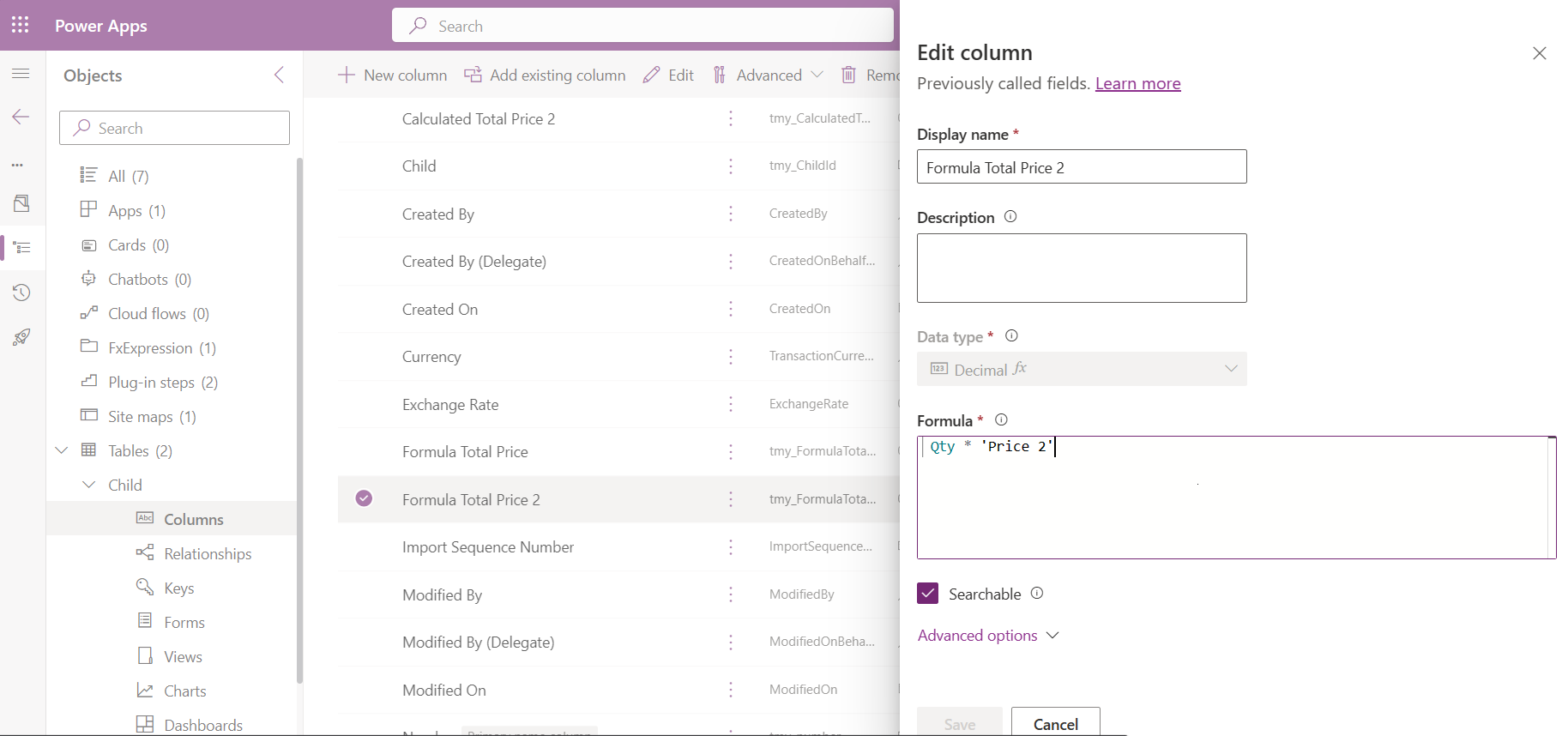
Once the Metadata was defined, I created 10 records for benchmarking purposes:
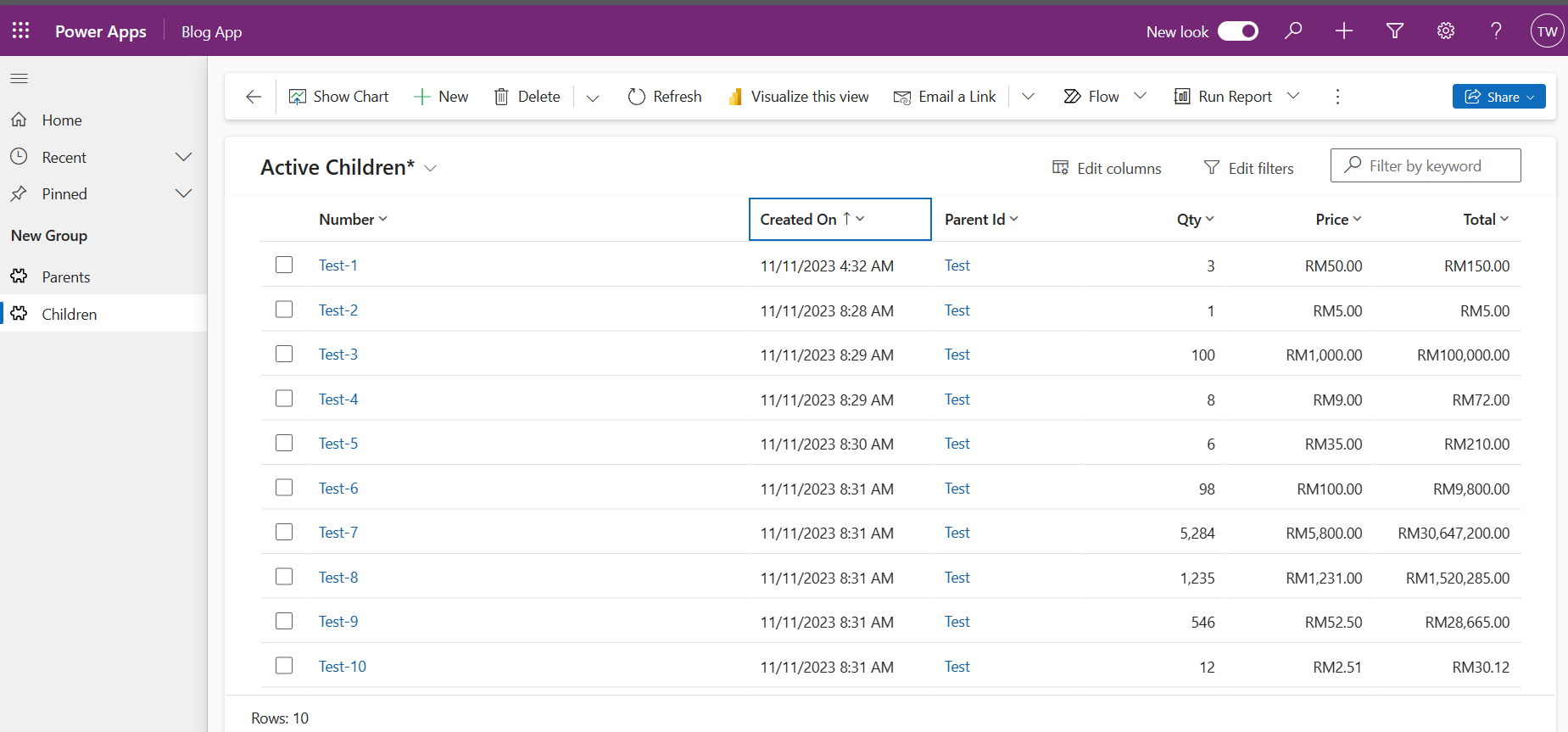
Benchmarking
For the benchmarking method, I created the .NET 6 Console app that is primarily dependent on below Nuget Packages:
<PackageReference Include="Microsoft.PowerPlatform.Dataverse.Client" Version="1.1.14" />
<PackageReference Include="BenchmarkDotNet" Version="0.13.10" />
For benchmarking purposes, I'm using BenchmarkDotNet, and here is the code for doing it:
using BenchmarkDotNet.Attributes;
using BenchmarkDotNet.Running;
using Blog;
using DataverseClient;
using Microsoft.Crm.Sdk.Messages;
using Microsoft.Extensions.DependencyInjection;
using Microsoft.PowerPlatform.Dataverse.Client;
using Microsoft.Xrm.Sdk;
using Microsoft.Xrm.Sdk.Query;
using Newtonsoft.Json;
using System.Net;
BenchmarkRunner.Run<TestClass>();
Console.ReadKey();
[MemoryDiagnoser]
[SimpleJob(launchCount:3, warmupCount:0)]
public class TestClass
{
    public IOrganizationService GetService()
    {
        var builder = Helper.CreateHostBuilder().Build();
        var serviceProvider = builder.Services;
        return serviceProvider.GetRequiredService<ServiceClient>();
    }
    [Benchmark]
    public void RetrieveBoth()
    {
        var service = GetService();
        var query = new QueryExpression("tmy_child")
        {
            ColumnSet = new ColumnSet("tmy_number", "tmy_qty", "tmy_price", "tmy_calculatedtotalprice", "tmy_formulatotalprice")
        };
        query.Criteria.AddCondition("statecode", ConditionOperator.Equal, 0);
        var result = service.RetrieveMultiple(query);
        foreach (var row in result.Entities)
        {
            Console.WriteLine($"Number: {row.GetAttributeValue<string>("tmy_number")}. Qty: {row.GetAttributeValue<int>("tmy_qty")}. " +
                $"Price: {row.GetAttributeValue<Money>("tmy_price")?.Value:N2}. Total Calculated Price: {row.GetAttributeValue<Money>("tmy_calculatedtotalprice")?.Value:N2}. " +
                $"Total Formula Price: {row.GetAttributeValue<decimal>("tmy_formulatotalprice"):N2}");
        }
    }
    [Benchmark]
    public void RetrieveCalculated()
    {
        var service = GetService();
        var query = new QueryExpression("tmy_child")
        {
            ColumnSet = new ColumnSet("tmy_number", "tmy_qty", "tmy_price", "tmy_calculatedtotalprice")
        };
        query.Criteria.AddCondition("statecode", ConditionOperator.Equal, 0);
        var result = service.RetrieveMultiple(query);
        foreach (var row in result.Entities)
        {
            Console.WriteLine($"Number: {row.GetAttributeValue<string>("tmy_number")}. Qty: {row.GetAttributeValue<int>("tmy_qty")}. " +
                $"Price: {row.GetAttributeValue<Money>("tmy_price")?.Value:N2}. Total Calculated Price: {row.GetAttributeValue<Money>("tmy_calculatedtotalprice")?.Value:N2}. ");
        }
    }
    [Benchmark]
    public void RetriveUsingFormula()
    {
        var service = GetService();
        var query = new QueryExpression("tmy_child")
        {
            ColumnSet = new ColumnSet("tmy_number", "tmy_qty", "tmy_price", "tmy_formulatotalprice")
        };
        query.Criteria.AddCondition("statecode", ConditionOperator.Equal, 0);
        var result = service.RetrieveMultiple(query);
        foreach (var row in result.Entities)
        {
            Console.WriteLine($"Number: {row.GetAttributeValue<string>("tmy_number")}. Qty: {row.GetAttributeValue<int>("tmy_qty")}. " +
                $"Price: {row.GetAttributeValue<Money>("tmy_price")?.Value:N2}. " +
                $"Total Formula Price: {row.GetAttributeValue<decimal>("tmy_formulatotalprice"):N2}");
        }
    }
    [Benchmark]
    public void RetrieveBoth2()
    {
        var service = GetService();
        var query = new QueryExpression("tmy_child")
        {
            ColumnSet = new ColumnSet("tmy_number", "tmy_qty", "tmy_price2", "tmy_calculatedtotalprice2", "tmy_formulatotalprice2")
        };
        query.Criteria.AddCondition("statecode", ConditionOperator.Equal, 0);
        var result = service.RetrieveMultiple(query);
        foreach (var row in result.Entities)
        {
            Console.WriteLine($"Number: {row.GetAttributeValue<string>("tmy_number")}. Qty: {row.GetAttributeValue<int>("tmy_qty")}. " +
                $"Price: {row.GetAttributeValue<decimal>("tmy_price2"):N2}. Total Calculated Price: {row.GetAttributeValue<decimal>("tmy_calculatedtotalprice2"):N2}. " +
                $"Total Formula Price: {row.GetAttributeValue<decimal>("tmy_formulatotalprice2"):N2}");
        }
    }
    [Benchmark]
    public void RetrieveCalculated2()
    {
        var service = GetService();
        var query = new QueryExpression("tmy_child")
        {
            ColumnSet = new ColumnSet("tmy_number", "tmy_qty", "tmy_price2", "tmy_calculatedtotalprice2")
        };
        query.Criteria.AddCondition("statecode", ConditionOperator.Equal, 0);
        var result = service.RetrieveMultiple(query);
        foreach (var row in result.Entities)
        {
            Console.WriteLine($"Number: {row.GetAttributeValue<string>("tmy_number")}. Qty: {row.GetAttributeValue<int>("tmy_qty")}. " +
                $"Price: {row.GetAttributeValue<decimal>("tmy_price2"):N2}. Total Calculated Price: {row.GetAttributeValue<decimal>("tmy_calculatedtotalprice2"):N2}. ");
        }
    }
    [Benchmark]
    public void RetriveUsingFormula2()
    {
        var service = GetService();
        var query = new QueryExpression("tmy_child")
        {
            ColumnSet = new ColumnSet("tmy_number", "tmy_qty", "tmy_price2", "tmy_formulatotalprice2")
        };
        query.Criteria.AddCondition("statecode", ConditionOperator.Equal, 0);
        var result = service.RetrieveMultiple(query);
        foreach (var row in result.Entities)
        {
            Console.WriteLine($"Number: {row.GetAttributeValue<string>("tmy_number")}. Qty: {row.GetAttributeValue<int>("tmy_qty")}. " +
                $"Price: {row.GetAttributeValue<decimal>("tmy_price2"):N2}. " +
                $"Total Formula Price: {row.GetAttributeValue<decimal>("tmy_formulatotalprice2"):N2}");
        }
    }
}
As you can see in the above code, I have six methods to retrieve data from my Environment:
- RetrieveBoth, RetrieveCalculated, and RetrieveFormula (Combination between number and also Money data type).
- RetrieveBoth2, RetrieveCalculated2, and RetrieveFormula2 (Combination between money and decimal data type).
As far as I know, when we retrieve the same query. Dataverse by default has a mechanism for caching. That is why, in the above benchmarking code, in every method I create a new instance of IOrganizationServiceand disabled warm-up.
Once you are done with the code, we can run the benchmarking using the below command (in the terminal):
dotnet run -c Release
Last, here is the result of the benchmarking:
| Method | Mean | Error | StdDev | Median | Allocated |
|---|---|---|---|---|---|
| RetrieveBoth | 1.393 s | 0.0173 s | 0.0583 s | 1.399 s | 734.95 KB |
| RetrieveCalculated | 1.377 s | 0.0229 s | 0.0622 s | 1.379 s | 728.19 KB |
| RetriveUsingFormula | 1.423 s | 0.0152 s | 0.0334 s | 1.418 s | 725.67 KB |
| RetrieveBoth2 | 1.434 s | 0.0154 s | 0.0425 s | 1.426 s | 724.57 KB |
| RetrieveCalculated2 | 1.359 s | 0.0153 s | 0.0527 s | 1.375 s | 716.63 KB |
| RetriveUsingFormula2 | 1.393 s | 0.0196 s | 0.0579 s | 1.398 s | 711.26 KB |
Result
Below is the legend from BenchmarkDotNet:
Mean: Arithmetic mean of all measurementsWarmupCount=0 -> 6 outliers were removed, 12 outliers were detected (1.27 s..1.28 s, 1.61 Error: Half of 99.9% confidence intervalCount=0 -> 6 outliers were removed, 15 outliers were detected (1.16 s..1.29 s, 1.50 StdDev: Standard deviation of all measurements Median: Value separating the higher half of all measurements (50th percentile) Allocated: Allocated memory per single operation (managed only, inclusive, 1KB = 1024B) 1 s: 1 Second (1 sec)
After the update scenario, the result a bit changed. Calculated win in both scenarios. But I think the Formula column is more dynamic (that enables us to have more complex scenarios) compared to the Calculated column.
Happy CRM-ing!
Leave a comment
Your comment is sent privately to the author and isn't published on the site.